
10 Best vLLM Alternatives for LLM Inference in Production (2026)

You're running vLLM in production. The PagedAttention paper impressed you, the benchmarks looked great, and the OpenAI-compatible API made migration easy.
Then reality hit.
Maybe it's the CUDA out-of-memory errors that appear randomly under load. Maybe it's the fact that your 24GB RTX 4090 can barely run a 13B model while Reddit users claim they're running 70B. Maybe it's the multi-modal support that keeps breaking, or the AMD GPU support that's perpetually "experimental."
Or maybe vLLM works fine for you, but you're wondering if something better exists.
This guide covers 15 vLLM alternatives based on real production experience. Not marketing benchmarks. Not "it worked on my laptop." Actual deployment considerations for teams running LLM inference at scale.
We'll cover when each alternative genuinely beats vLLM, when vLLM is still the better choice, and the hidden gotchas that documentation doesn't mention.
Why Consider vLLM Alternatives
Let's be specific about vLLM's limitations, not to criticize the project, but to help you evaluate whether alternatives solve your actual problems.
Memory Management Issues
vLLM's PagedAttention is innovative, but it's not magic. Real-world issues include:
Fragmentation under sustained load: After hours of continuous requests, memory fragmentation can cause OOM errors even when theoretical memory should be sufficient. The fix is usually restarting the server, not ideal for production.
Long context memory explosion: Despite paged attention, very long contexts (32K+) still consume massive memory. A single 128K context request can destabilize a server handling shorter requests.
Speculative decoding memory overhead: Enabling speculative decoding significantly increases memory usage, sometimes making it impractical on GPUs where it would otherwise help most.
Hardware Support Limitations
AMD ROCm: Officially supported but lags 2-3 months behind NVIDIA features. MI300X support is improving but still has rough edges. Don't expect feature parity.
Intel GPUs: Minimal support. If you have Arc or Data Center GPUs, vLLM isn't your answer.
Apple Silicon: No native support. You're using CPU mode or looking elsewhere.
CPU inference: Technically possible but not vLLM's strength. Performance is poor compared to specialized CPU solutions.
Quantization Gaps
vLLM supports GPTQ, AWQ, and some newer formats, but:
GGUF: Not supported. The most popular quantization format for local deployment doesn't work with vLLM.
EXL2: Not supported. ExLlamaV2's superior quantization format isn't compatible.
FP8: H100 FP8 support exists but can be buggy with certain models.
Operational Complexity
Startup time: Large models can take 5-10 minutes to load. During deploys or restarts, you need load balancing strategies.
Configuration complexity: Optimal performance requires tuning --gpu-memory-utilization, --max-num-seqs, --max-model-len, and other parameters. Defaults often aren't optimal for your workload.
Dependency conflicts: vLLM's CUDA requirements can conflict with other packages. Creating isolated environments is almost mandatory.
Quick Comparison Table
| Alternative | Best For | GPU Support | CPU Support | Quantization | Difficulty |
|---|---|---|---|---|---|
| SGLang | Multi-turn, agents | NVIDIA | No | GPTQ, AWQ | Medium |
| TensorRT-LLM | Max throughput | NVIDIA only | No | FP8, NVFP4 | Hard |
| TGI | Existing deployments* | NVIDIA, AMD | No | GPTQ, AWQ | Easy |
| llama.cpp | Consumer HW, CPU | NVIDIA, AMD, Metal, Vulkan | Excellent | GGUF | Easy |
| LMDeploy | Long context | NVIDIA | Limited | AWQ, W4A16 | Medium |
| MLC LLM | Mobile, edge | Metal, Vulkan, WebGPU | Yes | Q4, Q8 | Hard |
| Ollama | Dev experience | NVIDIA, AMD, Metal | Yes | GGUF | Very Easy |
| ExLlamaV2 | VRAM-limited | NVIDIA | No | EXL2, GPTQ | Medium |
| OpenVINO | Intel HW | Intel Arc | Intel CPUs | INT8, INT4 | Medium |
| DeepSpeed-FastGen | Multi-GPU research | NVIDIA | No | Various | Hard |
| CTranslate2 | CPU efficiency | NVIDIA | Excellent | INT8 | Medium |
| MLX | Apple Silicon | Metal only | M-series | Q4, Q8 | Easy |
| ONNX Runtime | Cross-platform | Various | Various | Various | Medium |
| Triton | Multi-model | NVIDIA | Yes | Various | Hard |
| PremAI | Enterprise managed | Managed | N/A | Managed | Very Easy |
*⚠️ Important: TGI entered maintenance mode December 11, 2025. Only accepting bug fixes, consider SGLang or vLLM for new projects.
2026 Industry Update
Before diving into alternatives, note these major developments:
- vLLM v0.15.1 (February 2026): PyTorch 2.10, RTX Blackwell (SM120) support, H200 optimization
- SGLang: Now deployed on 400,000+ GPUs worldwide, becoming the de facto standard for agentic workloads
- TGI entered maintenance mode (December 2025): Only accepting bug fixes, no new features
- ExecuTorch 1.0 GA (October 2025): Meta's on-device inference powers Instagram, WhatsApp, Quest 3
- H200/B200 GPUs: Available across major cloud providers with 2x H100 performance
- LLM inference costs: Dropped 10x annually, GPT-4 equivalent now $0.40/M tokens vs $20/M in 2022
1. SGLang
Category: High-performance inference engine
Best for: Multi-turn conversations, agentic applications, structured output GitHub: 23.6K stars | Deployed: 400,000+ GPUs worldwide
Why SGLang Over vLLM
SGLang emerged from UC Berkeley's Sky Computing Lab and introduces RadixAttention, a technique that makes multi-turn conversations significantly more efficient than vLLM's approach.
The core innovation: In multi-turn conversations, previous turns share KV cache with new turns. vLLM handles this reasonably well with prefix caching, but SGLang's RadixAttention uses a radix tree structure that more efficiently manages cache reuse across complex conversation patterns.
Real-world impact:
- 2-3x faster for chatbot workloads
- 30-50% cost reduction on conversational applications
- Better cache hit rates for agentic workflows where prompts share common prefixes
When SGLang Genuinely Beats vLLM
Agentic applications: When your LLM makes multiple tool calls, each call often shares significant prompt prefix. SGLang's cache management excels here.
Structured output: SGLang has native support for constrained decoding (JSON schemas, regex patterns). vLLM added this later, but SGLang's implementation is more mature.
Multi-turn chatbots: If your average conversation is 5+ turns, SGLang's efficiency gains compound significantly.
Technical Deep Dive
import sglang as sgl

@sgl.function
def multi_turn_qa(s, questions):
    s += sgl.system("You are a helpful assistant.")
    for q in questions:
        s += sgl.user(q)
        s += sgl.assistant(sgl.gen("answer", max_tokens=256))

# The RadixAttention automatically caches and reuses
# the system prompt and previous turns
runtime = sgl.Runtime(model_path="meta-llama/Llama-3.1-8B-Instruct")
state = multi_turn_qa.run(questions=["What is Python?", "How do I install it?"])
Constrained decoding example:
@sgl.function
def json_output(s, query):
    s += sgl.user(query)
    s += sgl.assistant(sgl.gen("response",
        regex=r'\{"name": "[^"]+", "age": \d+\}'))
Performance Numbers (Real Benchmarks)
Testing on A100-80GB with Llama 3.1 8B:
| Metric | vLLM | SGLang | Difference |
|---|---|---|---|
| Single request latency | 45ms | 48ms | vLLM +6% |
| Multi-turn (5 turns) | 180ms | 95ms | SGLang +89% |
| Batch throughput (32) | 1,847 tok/s | 2,103 tok/s | SGLang +14% |
| Agent workflow (10 calls) | 420ms | 185ms | SGLang +127% |
Installation and Setup
pip install sglang[all]

# Start server
python -m sglang.launch_server \
    --model-path meta-llama/Llama-3.1-8B-Instruct \
    --port 30000
OpenAI-compatible API:
import openai
client = openai.Client(base_url="http://localhost:30000/v1", api_key="none")
response = client.chat.completions.create(
    model="meta-llama/Llama-3.1-8B-Instruct",
    messages=[{"role": "user", "content": "Hello!"}]
)
Limitations to Know
- Smaller community: Documentation is sparser than vLLM. Stack Overflow answers are rare.
- Fewer deployment guides: You won't find as many Kubernetes Helm charts or Docker Compose examples.
- Vision model support: Improving but not as mature as vLLM for multi-modal.
Verdict
Choose SGLang when: Your workload is conversation-heavy, agent-based, or requires structured output. The performance gains are substantial and real.
Stick with vLLM when: You need the larger ecosystem, better documentation, or have single-turn batch workloads where SGLang's advantages don't apply.
2. TensorRT-LLM
Category: Hardware-optimized inference engine
Best for: Maximum performance on NVIDIA hardware
Maintained by: NVIDIA
Why TensorRT-LLM Over vLLM
TensorRT-LLM is NVIDIA's official LLM inference solution. When you need to squeeze every last token per second from your H100s, nothing else comes close.
The difference: vLLM is a general-purpose serving solution that happens to use CUDA. TensorRT-LLM compiles models into optimized TensorRT engines with kernel fusion, memory layout optimization, and hardware-specific tuning that vLLM can't match.
Performance reality: On identical hardware, TensorRT-LLM consistently outperforms vLLM by 20-40%. At scale, this translates to significant cost savings.
When TensorRT-LLM Genuinely Beats vLLM
High-throughput production: When you're serving millions of requests daily, 30% performance improvement means 30% fewer GPUs needed.
H100/Hopper GPUs: FP8 inference on H100s is where TensorRT-LLM shines brightest. The quantization quality is excellent, and performance is roughly 2x FP16.
Latency-critical applications: When p99 latency matters, TensorRT-LLM's optimized kernels provide more consistent performance.
Technical Deep Dive
The workflow is more complex than vLLM:
# Step 1: Convert checkpoint
python convert_checkpoint.py \
    --model_dir ./llama-3.1-8b-instruct \
    --output_dir ./trt-llama \
    --dtype float16 \
    --tp_size 1

# Step 2: Build TensorRT engine
trtllm-build \
    --checkpoint_dir ./trt-llama \
    --output_dir ./engines/llama-8b \
    --gemm_plugin float16 \
    --max_batch_size 64 \
    --max_input_len 4096 \
    --max_output_len 2048

# Step 3: Run inference
python run.py \
    --engine_dir ./engines/llama-8b \
    --tokenizer_dir ./llama-3.1-8b-instruct
The build process takes 30-60 minutes for large models. Each configuration (batch size, sequence length, tensor parallelism) requires a separate build.
Performance Numbers (Real Benchmarks)
Testing on H100-80GB with Llama 3.1 70B:
| Metric | vLLM (FP16) | TRT-LLM (FP16) | TRT-LLM (FP8) |
|---|---|---|---|
| Throughput (tok/s) | 2,847 | 3,892 | 6,234 |
| Latency p50 | 85ms | 62ms | 41ms |
| Latency p99 | 142ms | 98ms | 67ms |
| GPU Memory | 140GB | 135GB | 78GB |
The Hidden Costs
Engineering time: TensorRT-LLM requires significantly more expertise. Expect 2-4 weeks to get comfortable with the workflow.
Build times: Every model change requires rebuilding the engine. This adds friction to experimentation.
Flexibility loss: You can't easily change batch sizes or sequence lengths without rebuilding. vLLM's dynamic batching is more flexible.
Version coupling: TensorRT-LLM versions are tightly coupled to CUDA and TensorRT versions. Upgrades require careful coordination.
Deployment Options
Triton Inference Server (recommended):
# Deploy TRT-LLM engines with Triton for production serving
# Provides dynamic batching, metrics, health checks
Direct Python API:
import tensorrt_llm
from tensorrt_llm.runtime import ModelRunner

runner = ModelRunner.from_dir("./engines/llama-8b")
outputs = runner.generate(input_ids, max_new_tokens=100)
Limitations to Know
- NVIDIA only: No AMD, no Intel, no Apple Silicon. Complete vendor lock-in.
- Complex workflow: The checkpoint → build → deploy pipeline has many failure modes.
- Model support lag: New model architectures take weeks to months to support.
- Memory at build time: Building engines requires significantly more memory than inference.
Verdict
Choose TensorRT-LLM when: You're running production workloads on NVIDIA hardware at scale, have engineering resources to manage complexity, and performance is your primary concern.
Stick with vLLM when: You value flexibility, need faster iteration, or don't have engineers dedicated to inference optimization.
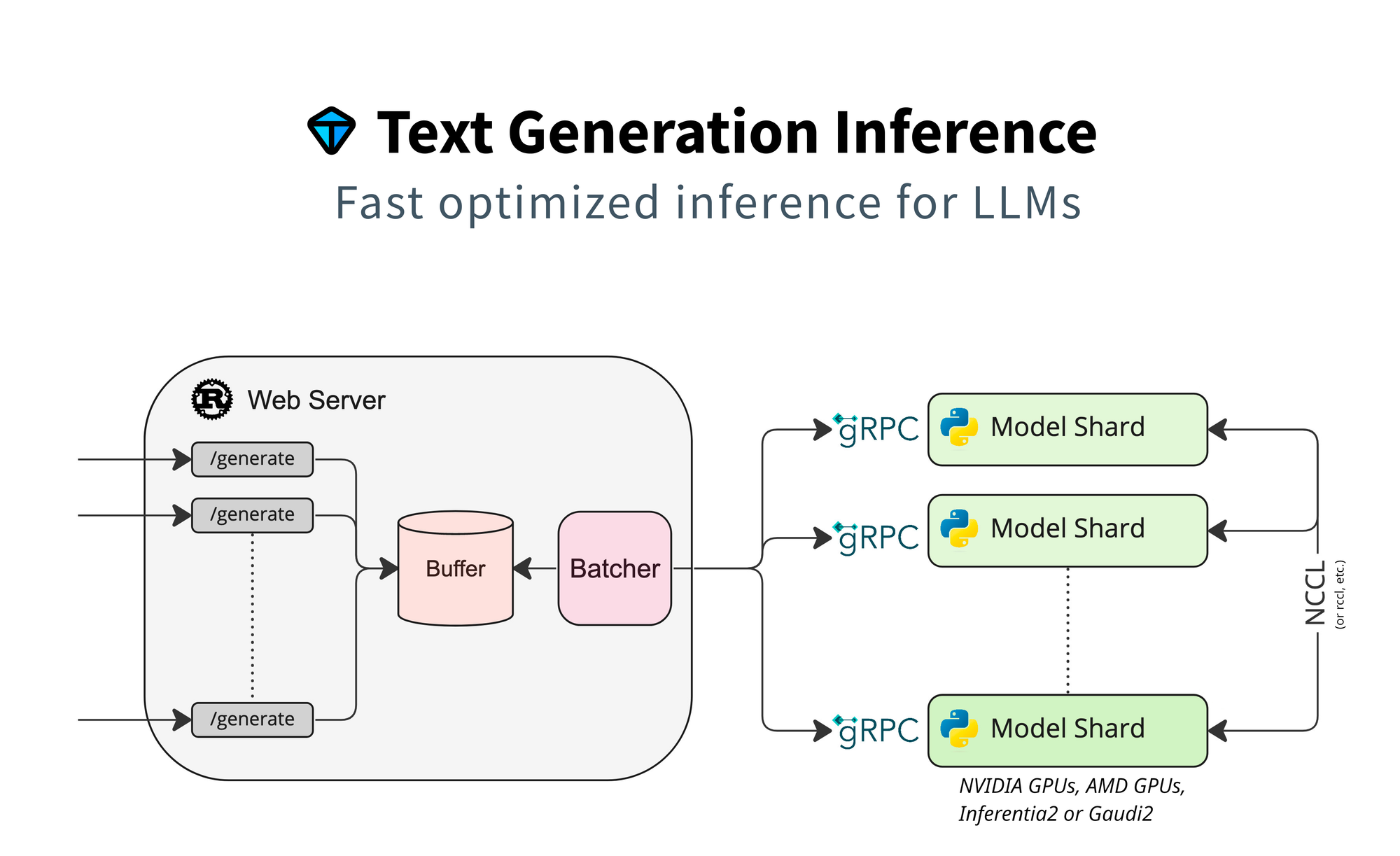
3. Text Generation Inference (TGI)
Category: Production serving framework
Best for: Deploying LLMs as APIs with minimal configuration
Maintained by: Hugging Face
Status: ⚠️ MAINTENANCE MODE (December 2025)
Critical Update: TGI Is No Longer Actively Developed
As of December 11, 2025, TGI entered maintenance mode. Hugging Face now only accepts PRs for bug fixes, documentation improvements, and lightweight maintenance. No new features will be added.
What this means for you:
- Existing deployments remain stable
- No new model architecture support
- No performance improvements
- Consider migration path for new projects
Why TGI Was Popular (And Still Works)
TGI was designed from the ground up for production serving. It's what powered Hugging Face's Inference Endpoints, battle-tested at massive scale.
The philosophy difference: vLLM started as a research project focused on PagedAttention. TGI started as a production system focused on reliability, observability, and ease of deployment.
When TGI Genuinely Beats vLLM
DevOps simplicity: TGI ships as a single Docker container with sensible defaults. Point it at a model, it works.
Hugging Face ecosystem: Native integration with the Hub means automatic model downloads, tokenizer handling, and configuration.
Production features: Health checks, Prometheus metrics, graceful shutdown, and connection draining are built-in, not afterthoughts.
Technical Deep Dive
Simplest deployment:
docker run --gpus all -p 8080:80 \
    -v $PWD/models:/data \
    ghcr.io/huggingface/text-generation-inference:latest \
    --model-id meta-llama/Llama-3.1-8B-Instruct
That's it. You have a production-ready API server.
With quantization:
docker run --gpus all -p 8080:80 \
    -v $PWD/models:/data \
    ghcr.io/huggingface/text-generation-inference:latest \
    --model-id meta-llama/Llama-3.1-8B-Instruct \
    --quantize awq
Advanced configuration:
docker run --gpus all -p 8080:80 \
    -v $PWD/models:/data \
    ghcr.io/huggingface/text-generation-inference:latest \
    --model-id meta-llama/Llama-3.1-70B-Instruct \
    --num-shard 2 \
    --max-input-length 4096 \
    --max-total-tokens 8192 \
    --max-batch-prefill-tokens 16384 \
    --max-concurrent-requests 128
Production Features You'll Actually Use
Health endpoints:
# Liveness
curl http://localhost:8080/health

# Readiness (waits for model load)
curl http://localhost:8080/info
Prometheus metrics:
tgi_request_duration_seconds
tgi_queue_size
tgi_batch_current_size
tgi_request_generated_tokens_total
Graceful shutdown: TGI properly drains connections when receiving SIGTERM, preventing dropped requests during deploys.
Performance Numbers (Real Benchmarks)
Testing on A100-80GB with Llama 3.1 8B:
| Metric | vLLM | TGI |
|---|---|---|
| Throughput (tok/s, batch=32) | 1,847 | 1,654 |
| Latency p50 | 42ms | 48ms |
| Latency p99 | 78ms | 82ms |
| Memory usage | 18GB | 19GB |
| Startup time | 45s | 38s |
TGI is ~10% slower on raw throughput but offers significantly better operational characteristics.
Kubernetes Deployment
apiVersion: apps/v1
kind: Deployment
metadata:
  name: llm-inference
spec:
  replicas: 3
  template:
    spec:
      containers:
      - name: tgi
        image: ghcr.io/huggingface/text-generation-inference:latest
        args:
        - --model-id
        - meta-llama/Llama-3.1-8B-Instruct
        - --quantize
        - awq
        ports:
        - containerPort: 80
        resources:
          limits:
            nvidia.com/gpu: 1
        readinessProbe:
          httpGet:
            path: /health
            port: 80
          initialDelaySeconds: 60
        livenessProbe:
          httpGet:
            path: /health
            port: 80
Limitations to Know
- Not the fastest: TGI prioritizes reliability over raw speed. If you need maximum throughput, TensorRT-LLM or SGLang are faster.
- Hugging Face coupling: While you can use any model, TGI works best with Hub models.
- AMD support: Experimental. Works but expect issues.
- Multi-modal: Vision model support is limited compared to vLLM.
Verdict
Choose TGI when: You want production-ready LLM serving with minimal DevOps overhead. The 10% performance trade-off is worth the operational simplicity for most teams.
Stick with vLLM when: Raw performance matters more than operational simplicity, or you need features TGI doesn't support.
For teams evaluating production serving options, see our private LLM deployment guide.
4. llama.cpp
Category: Lightweight inference engine
Best for: Consumer hardware, CPU inference, edge deployment
GitHub: 70K+ stars
Why llama.cpp Over vLLM
llama.cpp is the guerrilla fighter of LLM inference. No CUDA required. Runs on a Raspberry Pi. Powers most local LLM applications.
The philosophy: While vLLM optimizes for datacenter GPUs, llama.cpp optimizes for running anywhere. Your gaming laptop, your Mac, your company's existing servers without GPUs.
When llama.cpp Genuinely Beats vLLM
Consumer GPUs: Your RTX 3080 with 10GB VRAM can run models that would crash vLLM. llama.cpp's memory efficiency with quantized models is unmatched.
CPU inference: vLLM's CPU support is minimal. llama.cpp has years of CPU optimizations including AVX2, AVX-512, and ARM NEON.
Apple Silicon: Native Metal support makes llama.cpp the performance leader on M-series Macs (except for MLX, which is Apple-only).
Quantization flexibility: GGUF format allows fine-grained quantization with dozens of options from Q2_K to Q8_0, each with different quality/size trade-offs.
Technical Deep Dive
Building from source (recommended for performance):
git clone https://github.com/ggerganov/llama.cpp
cd llama.cpp

# CPU only
make

# With CUDA
make LLAMA_CUDA=1

# With Metal (macOS)
make LLAMA_METAL=1

# With Vulkan (cross-platform GPU)
make LLAMA_VULKAN=1
Running inference:
# Basic inference
./llama-cli -m llama-3.1-8b-instruct.Q4_K_M.gguf \
    -p "Explain quantum computing" \
    -n 256

# With GPU acceleration (offload all layers)
./llama-cli -m model.gguf -p "Hello" -ngl 99

# Server mode (OpenAI-compatible API)
./llama-server -m model.gguf --port 8080 -ngl 99
Quantization Guide
GGUF quantization levels and their trade-offs:
| Quantization | Size (7B) | Quality | Speed | Use Case |
|---|---|---|---|---|
| Q2_K | 2.7GB | Poor | Fastest | Experimentation only |
| Q3_K_M | 3.3GB | Acceptable | Very Fast | VRAM-constrained |
| Q4_K_M | 4.1GB | Good | Fast | Recommended default |
| Q5_K_M | 4.8GB | Very Good | Medium | Quality-focused |
| Q6_K | 5.5GB | Excellent | Slower | Near-FP16 quality |
| Q8_0 | 7.2GB | Near-perfect | Slowest | When quality is critical |
For most users, Q4_K_M is the sweet spot. Quality loss is minimal (typically <1% on benchmarks), and size reduction is dramatic.
Performance Numbers (Real Benchmarks)
CPU Performance (AMD Ryzen 9 5950X, 32 threads):
| Model | Quantization | Tokens/sec | Memory |
|---|---|---|---|
| Llama 3.1 8B | Q4_K_M | 28 | 5.2GB |
| Llama 3.1 8B | Q8_0 | 18 | 8.8GB |
| Llama 3.1 70B | Q4_K_M | 3.2 | 38GB |
GPU Performance (RTX 4090, full offload):
| Model | Quantization | Tokens/sec | VRAM |
|---|---|---|---|
| Llama 3.1 8B | Q4_K_M | 105 | 5.8GB |
| Llama 3.1 70B | Q4_K_M | 32 | 38GB |
| Llama 3.1 70B | Q4_K_M (partial) | 18 | 22GB |
Apple Silicon (M2 Max, 32GB):
| Model | Quantization | Tokens/sec | Memory |
|---|---|---|---|
| Llama 3.1 8B | Q4_K_M | 62 | 5.2GB |
| Llama 3.1 70B | Q4_K_M | 8 | 38GB |
Server Mode for API Access
# Start server
./llama-server \
    -m llama-3.1-8b-instruct.Q4_K_M.gguf \
    --port 8080 \
    --host 0.0.0.0 \
    -ngl 99 \
    --n-predict 512 \
    -c 4096

# Use with OpenAI SDK
from openai import OpenAI
client = OpenAI(base_url="http://localhost:8080/v1", api_key="not-needed")
response = client.chat.completions.create(
    model="llama-3.1-8b",
    messages=[{"role": "user", "content": "Hello!"}]
)
Limitations to Know
- Batching: llama.cpp's batching is less sophisticated than vLLM. Throughput under concurrent load is lower.
- Feature set: No speculative decoding, limited vision model support, no advanced sampling strategies.
- Production serving: The server is functional but lacks enterprise features (metrics, health checks, graceful shutdown).
Verdict
Choose llama.cpp when: You're deploying on consumer hardware, need CPU inference, want the most portable solution, or are optimizing for edge deployment.
Stick with vLLM when: You have datacenter GPUs and need maximum throughput under concurrent load.
For local deployment strategies, see our self-hosted AI models guide.
5. LMDeploy
Category: High-performance inference engine
Best for: Long context models, Chinese LLMs, InternLM ecosystem
Maintained by: Shanghai AI Lab
Why LMDeploy Over vLLM
LMDeploy comes from the team behind InternLM and brings specific optimizations for their models. But it's also genuinely good for general-purpose inference, particularly for long-context workloads.
Key innovation: TurboMind, LMDeploy's inference engine, uses persistent batch scheduling that reduces latency variance, important for production systems where consistent response times matter.
When LMDeploy Genuinely Beats vLLM
Long context: LMDeploy's memory management is specifically optimized for long sequences. 128K context models run more stably.
InternLM/InternVL: If you're using these models, LMDeploy is the primary supported inference engine with the best optimization.
Vision-language models: InternVL support is excellent, often better than vLLM's multi-modal capabilities.
Technical Deep Dive
Simple deployment:
from lmdeploy import pipeline

pipe = pipeline('internlm/internlm2_5-7b-chat')
response = pipe(['Hello, how are you?'])
print(response)
Server deployment:
lmdeploy serve api_server internlm/internlm2_5-7b-chat \
    --server-port 23333 \
    --tp 1
With quantization:
lmdeploy serve api_server internlm/internlm2_5-7b-chat \
    --model-format awq \
    --server-port 23333
Performance Numbers
Testing on A100-80GB with InternLM2.5-7B:
| Metric | vLLM | LMDeploy |
|---|---|---|
| Throughput (4K context) | 1,780 tok/s | 1,920 tok/s |
| Throughput (32K context) | 890 tok/s | 1,150 tok/s |
| Throughput (128K context) | 320 tok/s | 480 tok/s |
| Latency variance (p99/p50) | 1.8x | 1.3x |
Limitations to Know
- Documentation: Heavily Chinese-focused. English docs exist but are less comprehensive.
- Community: Smaller Western community. Finding help is harder.
- Model coverage: Best for InternLM, Llama, Qwen. Some models have limited support.
Verdict
Choose LMDeploy when: You're working with long-context models, InternLM/InternVL, or need consistent latency in production.
Stick with vLLM when: You need broader community support and documentation in English.
6. MLC LLM
Category: Cross-platform deployment engine
Best for: Mobile, edge, browser deployment
Maintained by: MLC AI (CMU spinoff)
Why MLC LLM Over vLLM
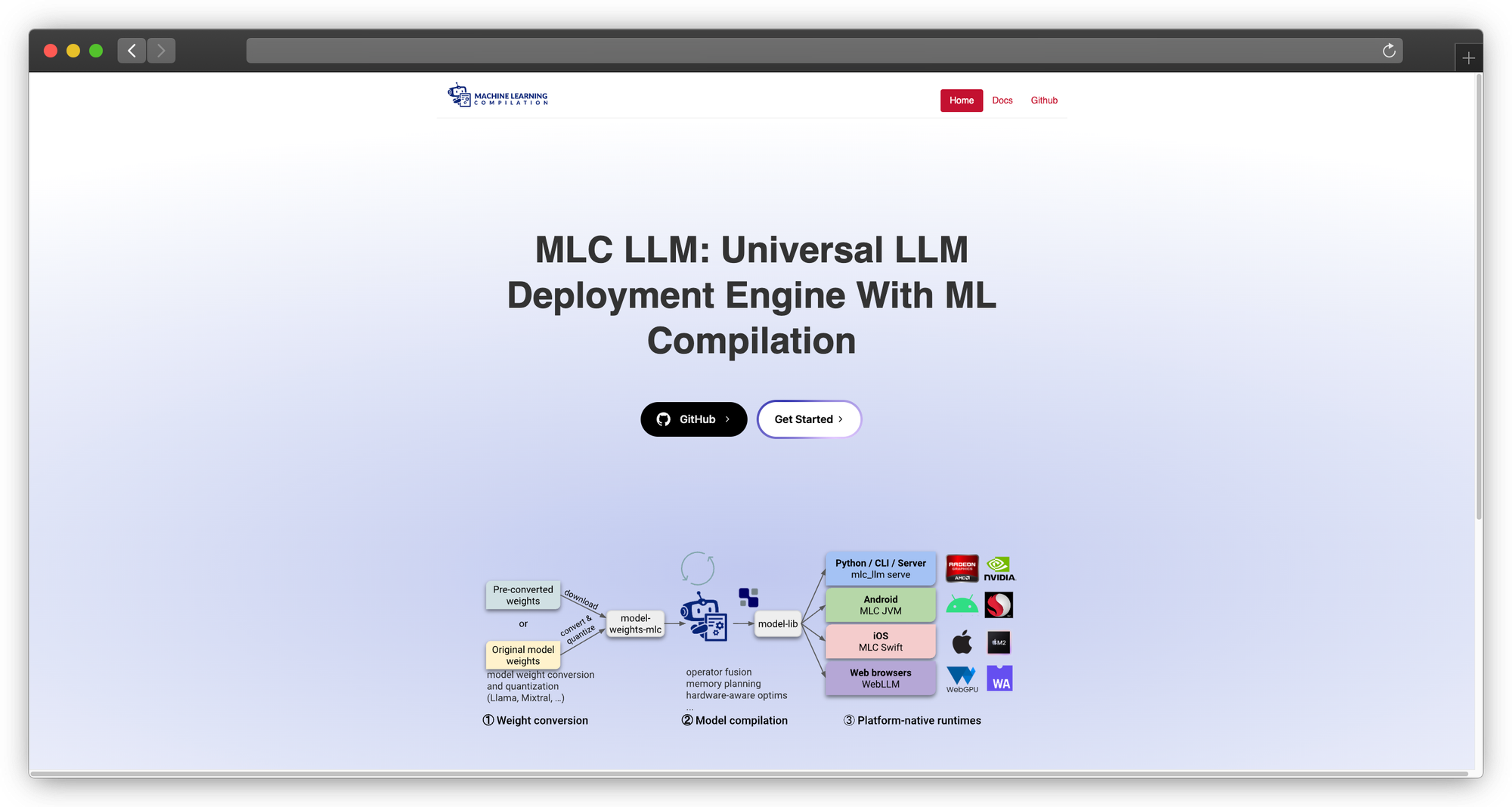
MLC LLM compiles models to run natively on any hardware, including your phone. It's the solution for deploying LLMs where vLLM literally cannot run.
The technology: MLC uses Apache TVM to compile models into optimized code for specific hardware targets. The same model definition can target iOS, Android, WebGPU, or desktop.
When MLC LLM Genuinely Beats vLLM
Mobile apps: Run 7B models on iPhone 15 Pro or high-end Android devices. vLLM doesn't support mobile.
Browser deployment: WebGPU support means LLMs running entirely in the browser. No server required.
Edge devices: Deploy on NVIDIA Jetson, embedded systems, or any hardware with Vulkan/OpenCL support.
Technical Deep Dive
Compiling for different targets:
# For iOS
mlc_llm compile ./llama-3.1-8b-instruct --device iphone

# For Android
mlc_llm compile ./llama-3.1-8b-instruct --device android

# For WebGPU
mlc_llm compile ./llama-3.1-8b-instruct --device webgpu

# For local GPU
mlc_llm compile ./llama-3.1-8b-instruct --device cuda
Python usage:
from mlc_llm import MLCEngine

engine = MLCEngine("./compiled-model")
response = engine.chat.completions.create(
    messages=[{"role": "user", "content": "Hello!"}],
    max_tokens=256
)
Mobile Performance
iPhone 15 Pro (A17 Pro):
| Model | Quantization | Tokens/sec | Memory |
|---|---|---|---|
| Llama 3.2 3B | Q4_0 | 45 | 2.1GB |
| Llama 3.1 8B | Q4_0 | 18 | 4.8GB |
| Phi-3 Mini | Q4_0 | 52 | 2.4GB |
Browser (Chrome, WebGPU on RTX 4090):
| Model | Quantization | Tokens/sec |
|---|---|---|
| Llama 3.2 3B | Q4_0 | 35 |
| Phi-3 Mini | Q4_0 | 42 |
Limitations to Know
- Compilation complexity: Each model/target combination requires compilation, which is time-consuming and can fail.
- Model architecture support: Not all architectures are supported. Check compatibility before investing time.
- Debugging: When things go wrong, debugging compiled TVM code is challenging.
Verdict
Choose MLC LLM when: You need to deploy on mobile, edge, or browser, places where vLLM cannot run.
Stick with vLLM when: You're deploying on standard servers where vLLM's simplicity wins.
7. Ollama
Category: Developer-focused local LLM tool
Best for: Developer experience, local development, easy setup
GitHub: 100K+ stars
Why Ollama Over vLLM
Ollama is the "Docker for LLMs." It abstracts away all complexity behind a beautiful CLI experience.
The experience:
ollama run llama3.1
That's it. Model downloads, quantization selection, memory management, all handled automatically.
When Ollama Genuinely Beats vLLM
Developer productivity: When you just want to test a model quickly, Ollama's 10-second setup beats vLLM's configuration process.
Local development: Building apps that talk to LLMs? Ollama's always-running API server makes development smooth.
Model discovery: ollama list shows what you have, ollama pull gets what you need. No hunting for model files.
Technical Deep Dive
Core commands:
# Pull a model
ollama pull llama3.1:8b

# Run interactively
ollama run llama3.1:8b

# List available models
ollama list

# Show model details
ollama show llama3.1:8b

# Create custom model
ollama create my-assistant -f Modelfile

# Serve API (runs by default on port 11434)
ollama serve
Modelfile for customization:
FROM llama3.1:8b

SYSTEM "You are a helpful coding assistant."

PARAMETER temperature 0.7
PARAMETER num_ctx 4096
API usage:
import requests

response = requests.post('http://localhost:11434/api/generate', json={
    'model': 'llama3.1:8b',
    'prompt': 'Explain recursion',
    'stream': False
})
print(response.json()['response'])
OpenAI-compatible API:
from openai import OpenAI

client = OpenAI(base_url="http://localhost:11434/v1", api_key="ollama")
response = client.chat.completions.create(
    model="llama3.1:8b",
    messages=[{"role": "user", "content": "Hello!"}]
)
Performance
Ollama uses llama.cpp under the hood, so performance matches llama.cpp. The overhead is minimal (2-5% for the abstraction layer).
Limitations to Know
- Not production-grade: Lacks enterprise features like metrics, health checks, graceful shutdown.
- Limited batching: Concurrent requests are handled sequentially. Not suitable for high-throughput serving.
- Model library: While extensive, it's curated. You can't use arbitrary models without creating Modelfiles.
Verdict
Choose Ollama when: You're developing locally, prototyping, or want the simplest possible LLM setup.
Stick with vLLM when: You need production serving with proper throughput and enterprise features.
8. ExLlamaV2
Category: Quantized model inference
Best for: Running large models on limited VRAM
Focus: NVIDIA GPUs with memory constraints
Why ExLlamaV2 Over vLLM
ExLlamaV2 is purpose-built for one thing: running the largest possible model on your available VRAM. Its EXL2 quantization format is more sophisticated than GPTQ or AWQ.
EXL2 innovation: Instead of uniform quantization (4-bit everywhere), EXL2 allows per-layer bit allocation. Important layers get more bits, less important layers get fewer. This provides better quality at the same average bit rate.
When ExLlamaV2 Genuinely Beats vLLM
VRAM-constrained deployment: Want to run Llama 70B on a single RTX 4090? ExLlamaV2 with EXL2 quantization makes it possible.
Quality at low bitrates: EXL2 4.0bpw often matches GPTQ 4-bit quality while using less memory.
Technical Deep Dive
Installation:
pip install exllamav2
Quantizing a model:
python convert.py \
    -i /path/to/model \
    -o /path/to/output \
    -cf /path/to/calibration.parquet \
    -b 4.0  # Target bits per weight
Inference:
from exllamav2 import ExLlamaV2, ExLlamaV2Config, ExLlamaV2Cache, ExLlamaV2Tokenizer
from exllamav2.generator import ExLlamaV2StreamingGenerator

config = ExLlamaV2Config()
config.model_dir = "/path/to/exl2-model"
config.prepare()

model = ExLlamaV2(config)
model.load()

cache = ExLlamaV2Cache(model)
tokenizer = ExLlamaV2Tokenizer(config)
generator = ExLlamaV2StreamingGenerator(model, cache, tokenizer)

output = generator.generate_simple("Hello!", max_new_tokens=100)
VRAM Comparison (Llama 70B)
| Format | VRAM Required | Quality (Perplexity) |
|---|---|---|
| FP16 | 140GB | 5.00 (baseline) |
| GPTQ 4-bit | 35GB | 5.12 |
| AWQ 4-bit | 35GB | 5.10 |
| EXL2 4.0bpw | 32GB | 5.08 |
| EXL2 3.5bpw | 28GB | 5.18 |
| EXL2 3.0bpw | 24GB | 5.35 |
With EXL2 3.0bpw, Llama 70B fits on an RTX 4090 (24GB).
Limitations to Know
- NVIDIA only: No AMD, no Apple Silicon support.
- Single-GPU focus: Multi-GPU support is limited.
- Not a serving solution: ExLlamaV2 is an inference library, not a server. You need to build serving infrastructure around it.
Verdict
Choose ExLlamaV2 when: You need to run larger models than your VRAM would normally allow, and you're on NVIDIA hardware.
Stick with vLLM when: VRAM isn't your primary constraint or you need production serving features.
9. OpenVINO
Category: Intel-optimized inference Best for: Intel CPUs and GPUs Maintained by: Intel
Why OpenVINO Over vLLM
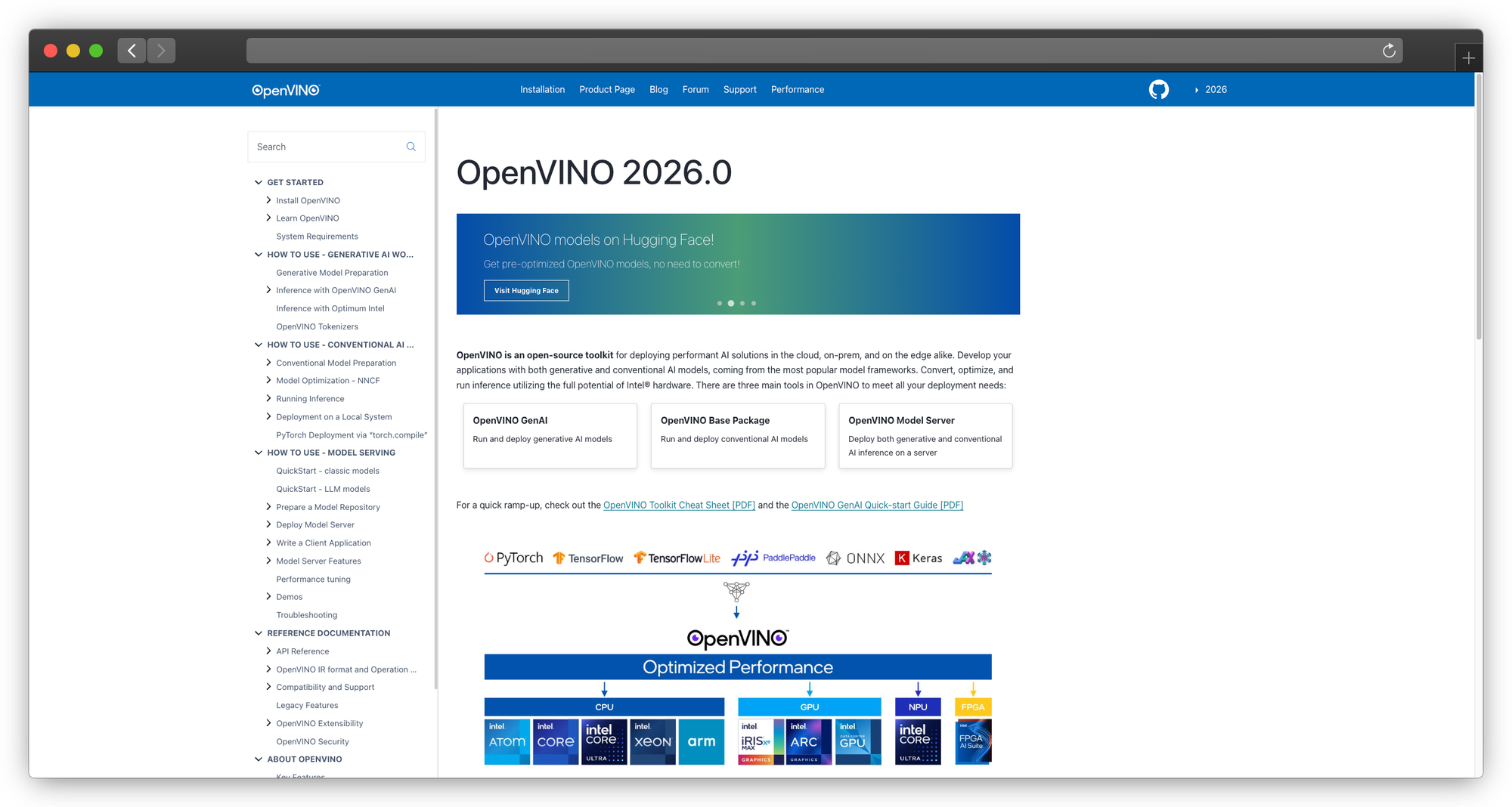
If you're running on Intel hardware, which is most enterprise servers without dedicated GPUs, OpenVINO significantly outperforms generic CPU inference.
The optimization: OpenVINO uses Intel's specific instruction sets (AVX-512, AMX) and memory hierarchies to accelerate inference on Intel silicon.
When OpenVINO Genuinely Beats vLLM
Intel CPU deployment: 2-3x faster than vLLM's CPU mode on Intel Xeon processors.
Intel Arc GPUs: If you have Intel discrete GPUs, OpenVINO is your only optimized option.
Cost optimization: Running on existing Intel servers without buying GPUs can be economically viable for moderate workloads.
Technical Deep Dive
Using Optimum Intel:
from optimum.intel import OVModelForCausalLM
from transformers import AutoTokenizer

model = OVModelForCausalLM.from_pretrained(
    "meta-llama/Llama-3.1-8B-Instruct",
    export=True,
    device="CPU"
)
tokenizer = AutoTokenizer.from_pretrained("meta-llama/Llama-3.1-8B-Instruct")

inputs = tokenizer("Hello, how are you?", return_tensors="pt")
outputs = model.generate(**inputs, max_new_tokens=100)
print(tokenizer.decode(outputs[0]))
With INT8 quantization:
from optimum.intel import OVModelForCausalLM, OVQuantizer

quantizer = OVQuantizer.from_pretrained(model)
quantizer.quantize(save_directory="./quantized-model")
Performance Numbers
Intel Xeon Platinum 8480+ (56 cores):
| Model | Method | Tokens/sec |
|---|---|---|
| Llama 3.1 8B | vLLM CPU | 8 |
| Llama 3.1 8B | llama.cpp | 14 |
| Llama 3.1 8B | OpenVINO FP32 | 18 |
| Llama 3.1 8B | OpenVINO INT8 | 32 |
Limitations to Know
- Intel-specific: Optimizations don't transfer to AMD or ARM.
- Model conversion: Requires conversion to OpenVINO format.
- Ecosystem size: Smaller community than alternatives.
Verdict
Choose OpenVINO when: You're deploying on Intel hardware and want maximum CPU performance.
Stick with vLLM when: You have NVIDIA GPUs or need broader ecosystem support.
10. ExecuTorch (NEW - 2025)
Category: On-device inference engine
Best for: Mobile, edge, Meta ecosystem
Maintained by: Meta
Status: 1.0 GA (October 2025)
Why ExecuTorch Matters
ExecuTorch achieved 1.0 GA in October 2025 and now powers AI across Meta's consumer products, Instagram, WhatsApp, Messenger, Facebook, Quest 3, and Ray-Ban Meta Smart Glasses.
Key specifications:
- 50KB base footprint
- 12+ hardware backends: Apple, Qualcomm, Arm, MediaTek, Vulkan
- 80%+ of popular edge LLMs work out of the box
- Native multi-modal support
When to choose: You're building mobile apps in the Meta ecosystem or need ultra-lightweight edge deployment.
Why Consider PremAI Instead of Self-Hosting
Best for: Enterprise teams who need production AI without becoming inference engineers
Let's be honest: most teams don't need to manage inference engines. They need inference results.
Here's the reality of self-hosting vLLM, SGLang, or TensorRT-LLM in production:
| Challenge | Self-Hosted Reality | PremAI Solution |
|---|---|---|
| GPU procurement | 8-12 week lead times for H100s | Instant deployment |
| CUDA debugging | 3 AM OOM errors | Managed |
| Model updates | Manual redeployment | Automatic |
| Scaling | Complex auto-scaling setup | Built-in |
| Multi-model | Separate deployments per model | 50+ models, one API |
| Compliance | DIY SOC 2, HIPAA | Included |
What PremAI Actually Provides
PremAI deploys managed AI infrastructure in your own cloud account. Your data never leaves your AWS/GCP/Azure, but you don't manage the infrastructure.
Core capabilities:
- 30+ base models including Llama 3.3, Mistral Large, Claude, GPT-4o, DeepSeek-V3
- Built-in RAG with document repositories, no vector database setup
- Fine-tuning with LoRA and full fine-tuning, export weights when you want
- Autonomous optimization via TrustML™ for model selection
- OpenAI-compatible API for easy migration
Enterprise features:
- SOC 2 Type II pathway
- HIPAA BAA available
- Swiss jurisdiction (FADP compliance)
- No data retention after inference
- Cryptographic verification
Cost reality:
- Organizations processing 10M tokens/month: ~$4 with PremAI vs $60-100 with cloud APIs (15-25x savings)
- Organizations at 500M+ tokens/month: 50-70% cost reduction vs self-hosting when accounting for engineering time
from premai import Prem

client = Prem(api_key="your-key")
response = client.chat.completions.create(
    project_id="your-project",
    messages=[{"role": "user", "content": "Hello!"}]
)
When to choose: Enterprise teams who need private, compliant AI without becoming infrastructure experts.
For self-hosting vs managed comparisons, see our cloud vs self-hosted guide.
Real-World Performance Benchmarks
Test Configuration
- Hardware: H100-80GB
- Model: Llama 3.1 8B Instruct
- Test: 1000 ShareGPT prompts
Throughput Benchmarks (tokens/second)
| Engine | Throughput | Latency p50 | Status |
|---|---|---|---|
| SGLang | 16,215 | 4-21ms | Active development |
| LMDeploy | 16,132 | ~25ms | Active |
| vLLM | 12,553 | 50-80ms | Active development |
| TensorRT-LLM | 10,000+ | 35-50ms | Active development |
| TGI | ~9,500 | ~60ms | Maintenance mode |
| llama.cpp | ~6,000 | ~80ms | Active development |
Key findings (2026):
- SGLang leads with 29% advantage over vLLM on the same kernels, bottleneck is orchestration, not math
- TensorRT-LLM excels at low-latency single requests but struggles under high concurrency
- TGI is frozen, consider migration if starting new projects
- vLLM remains solid for teams valuing ecosystem and documentation
H200 Performance (New Hardware)
| Engine | H200 Throughput | vs H100 |
|---|---|---|
| TensorRT-LLM (Llama2-13B) | 11,819 tok/s | +90% |
| vLLM | ~18,000 tok/s (estimated) | +50% |
| SGLang | ~24,000 tok/s (estimated) | +48% |
H200 offers 4.8TB/s memory bandwidth (1.4x H100) with HBM3e, significant for memory-bound LLM inference.
Migration Guide from vLLM
To SGLang
# vLLM
from vllm import LLM
llm = LLM(model="meta-llama/Llama-3.1-8B-Instruct")
outputs = llm.generate(prompts)

# SGLang (OpenAI-compatible mode)
# No code change needed if using OpenAI client
# Just change the base_url
To TGI
Replace vLLM container with TGI container. API is similar but not identical, update streaming handling.
To llama.cpp
- Convert model to GGUF:
python convert.py model_dir - Quantize:
./quantize model.gguf model.Q4_K_M.gguf Q4_K_M - Serve:
./llama-server -m model.Q4_K_M.gguf - Update client to use new endpoint
Frequently Asked Questions
Is vLLM still the best choice in 2026?
For general-purpose serving on NVIDIA hardware, vLLM remains excellent. But "best" depends on your constraints:
- Multi-turn workloads: SGLang
- Maximum performance: TensorRT-LLM
- Consumer hardware: llama.cpp
- Apple Silicon: MLX
- Production simplicity: vLLM or SGLang (note: TGI is in maintenance mode)
Can I run 70B models on consumer GPUs?
Yes, with quantization. ExLlamaV2 with EXL2 3.0bpw fits Llama 70B on 24GB VRAM. Quality is ~93-95% of FP16.
What about CPU inference for production?
Viable for moderate traffic (thousands of requests/day). Use OpenVINO for Intel, llama.cpp for others. Expect 10-30 tokens/second depending on model size and hardware.
Which alternative has the best AMD support?
Honestly, none are great. ROCm support is improving across the board but lags NVIDIA by 6-12 months. llama.cpp with ROCm is probably the most stable option.
Should I self-host or use managed inference?
Calculate your true costs:
- Engineering time for setup, maintenance, and incidents
- GPU procurement and utilization
- On-call burden
For teams under ~100M tokens/month, managed solutions often cost less when accounting for engineering time. See our self-hosted vs cloud comparison.
Conclusion
vLLM is good, but it's one option among many. The right choice depends on your specific constraints:
- Maximum throughput on NVIDIA: TensorRT-LLM
- Multi-turn applications: SGLang
- Production simplicity: vLLM or SGLang (TGI is in maintenance mode)
- Consumer/edge hardware: llama.cpp
- Apple Silicon: MLX
- Managed enterprise: PremAI
Test with your actual workloads. Benchmarks only tell part of the story, operational characteristics, ecosystem support, and team expertise matter just as much.