
Custom AI Model Development: A Practical Guide for Enterprise Teams (2026)
Custom AI model development explained for enterprise teams. From dataset prep to deployment, with real cost comparisons and practical steps you can follow today.
Your team tried GPT-4 for compliance review. It works maybe 70% of the time.
The other 30% is hallucinated policy references, missed terminology specific to your industry, and confidently wrong answers that someone had to catch manually.
That 30% gap is where custom AI model development enters the conversation.
This guide covers the full custom AI model development process for enterprise use. Not building an AI model from scratch (almost nobody needs that), but through fine-tuning, evaluation, and deployment that turns a generic model into one that actually knows your domain.
What "Custom AI Model" Actually Means?
Most people hear "custom AI model development" and picture a team of researchers training a large language model from zero.
That picture of artificial intelligence development is outdated. Training an AI model from scratch costs millions in compute and requires datasets most organizations do not have.
Custom model development in practice means taking a pre-trained foundation model and adapting it to your data and tasks. The AI model learns your terminology, your document formats, your domain logic. It becomes yours.
The spectrum looks like this:
Prompt engineering and RAG sit at one end. Cheapest, fastest, works for plenty of use cases. But both hit limits when you need consistent output formatting, domain-specific reasoning, or cost efficiency at high volume.
Fine-tuning sits in the middle. You train an existing model on your data using techniques like LoRA (Low-Rank Adaptation) that update roughly 1% of model parameters. A fraction of the cost, a fraction of the time.
Full pre-training sits at the far end. Only makes sense if you have massive proprietary datasets and a specific need no existing model covers, like a completely novel domain or a specialized task where purpose-built small language models outperform larger general ones.
For most enterprise teams, fine-tuning is where the math works. It gets you 90%+ of the model performance benefit at a small fraction of pre-training cost. Even teams building generative AI applications like chatbots and code assistants are increasingly fine-tuning smaller models rather than paying for expensive API calls to frontier models.
When Custom AI Models Matter (And When They Don't)
Not every AI project needs a custom model. A well-crafted prompt or a solid RAG pipeline covers plenty of ground.
The question is whether your use case has hit the ceiling of what off-the-shelf AI tools and open-source models can deliver.
Custom AI models make sense when:
- Your domain has specialized terminology that generic models consistently get wrong (legal, medical, financial, industrial)
- You are spending $10K+ monthly on API calls and a smaller, tailored AI model could replace them
- Data sovereignty matters because regulated industries need control over where data goes and where the model runs
- You need consistent output formatting that prompt engineering alone cannot reliably enforce
- Accuracy on your specific task needs to be above 90%, but generic AI solutions plateau around 70-80%
Skip the custom route when:
- Your use case is well-served by existing models for basic summarization or general Q&A
- You have fewer than 100 quality training examples
- Speed to market matters more than accuracy right now
- Requirements shift so frequently that retraining would be constant
One useful mental model: if you are manually correcting AI outputs more than 20% of the time, that correction effort is your training data waiting to happen. A custom AI model trained on those corrections will compound in value.
The Custom AI Model Development Process, End-to-End
The full workflow from raw data to a deployed custom model:
Dataset Preparation > Base Model Selection > Fine-Tuning > Evaluation > Deployment
Each step matters. Skipping any usually means going back later.
Step 1: Build Your Dataset
Every custom AI model is only as good as the data it trains on. This is where most projects succeed or quietly fail months later.
You need input-output pairs: a user message and the response you want the model to learn. The standard format is JSONL, where each line contains a conversation with system, user, and assistant messages.
{"messages": [
  {"role": "system", "content": "You are a compliance review assistant for EU financial regulations."},
  {"role": "user", "content": "Does this transaction require SAR filing?"},
  {"role": "assistant", "content": "Based on the transaction amount exceeding the reporting threshold and the customer profile flags..."}
]}
Quality matters far more than quantity. 500 well-curated examples beat 50,000 noisy ones. Start small, iterate, expand later.
Two bottlenecks show up in almost every enterprise project:
"We don't have structured training data."
Most enterprises have domain knowledge trapped in PDFs, internal docs, support tickets, and knowledge bases. It just needs conversion into the right format.
In Prem Studio, you can generate synthetic datasets directly from PDFs, websites, and YouTube videos. Set how many QA pairs to generate per source, add rules and constraints for quality, and control creativity level. We built this as dataset automation for model customization to turn unstructured knowledge into training-ready data.
"Our data contains PII and sensitive information."
Especially in healthcare, finance, and legal, any custom AI model development process for regulated industries needs automatic PII redaction before training data touches a model. Prem Studio handles this at the dataset level, stripping sensitive information before fine-tuning begins.
Once your dataset exists, you can enrich it with synthetic data augmentation. The platform generates 10 to 1,000 additional datapoints per batch based on your existing examples. Useful when you have high-quality seed data but not enough volume.
Before moving to fine-tuning, create a snapshot of your dataset. Think of it as version control for training data. Split it into training and validation sets (80/20 is standard). You will need that validation set later.
Step 2: Choose the Right AI Base Model
Fine-tuning starts with a foundation model. Which one you pick depends on task, language, model size, and licensing.
Open-source models worth considering in 2026:
Common mistake: picking the biggest model available. A fine-tuned 7B parameter model often outperforms a generic 70B model on domain-specific tasks, at 10x lower inference cost.
This is more than theory. When we built Prem-1B-SQL, a specialized Text-to-SQL model, we fine-tuned a 1.3B parameter DeepSeek model using our autonomous fine-tuning workflow with about 50K synthetically generated samples. That model now has over 10K monthly downloads on HuggingFace and competes with models 50x its size on SQL generation tasks.
Match model size to task complexity, not to marketing.
Prem Studio offers 30+ base models. After you upload your dataset, the platform analyzes your data and recommends which base models fit your specific use case. Combined with the ability to run up to 6 concurrent experiments, you are testing rather than guessing.
Step 3: Fine-Tune and Experiment
This is where the AI model actually learns your domain. Fine-tuning takes your base model, trains it on your dataset, and produces a custom model tailored to your use case.
Two approaches:
1. LoRA fine-tuning updates roughly 1% of the model's parameters by adding small trainable matrices on top of existing weights. Fast (often under 10 minutes for smaller datasets), memory-efficient, works for most enterprise tasks. The output is a lightweight adapter file of about 100MB.
2. Full fine-tuning updates all parameters. Takes longer, uses more compute, but gives maximum adaptation. Use it when LoRA results plateau or when the model needs to deeply absorb a new domain.
The experiment loop is where real progress happens. One run is almost never enough.
- Run multiple experiments with different base models, batch sizes (1-8), learning rates, and epoch counts
- Compare training loss curves across experiments
- Test top performers in a playground before committing
In Prem Studio, each experiment tracks parameters and visualizes training loss so you can see which configuration performs best. Our autonomous fine-tuning agent handles data augmentation and distributed training behind the scenes. You spend time on configuration decisions, not infrastructure.
Practical tip: start with LoRA on two or three different base models. Pick the best performer. Then decide if full fine-tuning gives you a meaningful bump. In many cases, LoRA is enough.
Step 4: Evaluate Your Custom AI Model
Shipping a model based on "it seems to work in the few examples I tried" is how AI projects become production incidents.
Evaluation separates an experiment from a deployed AI solution. It has two layers:
Automated metrics. Use your validation dataset from Step 1 and run the fine-tuned model against it. LLM-as-a-judge scoring compares outputs against ground truth across dimensions like accuracy, relevance, and formatting.
In Prem Studio, you can define custom evaluation metrics using plain language. Describe what "good" looks like for your use case, and the platform auto-generates scoring rules.
Side-by-side comparison. Run the same prompts through your fine-tuned model AND a baseline (like GPT-4o or the untuned base model). Compare outputs directly. This is the fastest way to see if your tailored AI solution actually performs better in real-world conditions.
The results can be significant. In an invoice parsing use case on our platform, a fine-tuned Qwen 2.5 7B outperformed GPT-4o. The fine-tuned Qwen 2.5 1B, with far fewer parameters, matched GPT-4o accuracy at roughly 25x lower cost.
That kind of result only surfaces through structured comparison, not manual spot-checking.
If evaluation shows gaps, the fix is usually better data rather than more data. Go back to Step 1, add examples that cover failure cases, enrich, re-snapshot, and fine-tune again. This continual learning loop is what separates a one-off experiment from a production-grade custom AI model.
Step 5: Deploy Your Model
A custom AI model living in a notebook is just an experiment. Deployment makes it count.
Options depend on infrastructure needs and data sovereignty requirements:
Self-hosted. Download model checkpoints and run on your own infrastructure. We support self-hosting through vLLM, Ollama, or HuggingFace Transformers. Full control over where the model runs.
from vllm import LLM, SamplingParams
model_path = 'path/to/your/finetuned/model/checkpoint'
llm = LLM(model=model_path, tokenizer=model_path)
Managed cloud. Deploy to AWS VPC or use our managed infrastructure for production reliability without managing GPU instances. Also available: deployment with NVIDIA NIM for high-throughput inference, or export to HuggingFace Hub.
API integration. Integrate through the Prem SDK (Python and JavaScript) using an OpenAI-compatible format:
from premai import Prem
client = Prem(api_key=YOUR_API_KEY)
response = client.chat.completions.create(
    project_id=project_id,
    messages=[{"role": "user", "content": "Your domain-specific query"}],
    model="your-fine-tuned-model-name"
)
Where your custom AI model runs determines your compliance posture. Self-hosting on your infrastructure or within your VPC means data never leaves your control. For enterprises in regulated industries, this often decides the entire deployment architecture.
What Custom AI Model Development Actually Costs
Cost is the question everyone asks second, right after "will it work?"
API-only (GPT-4o, Claude): Zero upfront compute. No team needed. Production in days. But at scale, $10K-50K+ monthly in API spend, and you own nothing.
Fine-tuned on a managed platform: $100-500 per training run. One or two people. Production in one to two weeks. Significantly lower ongoing inference costs, and you own the model.
Self-hosted fine-tuned: Hardware or cloud GPU investment upfront. One or two people plus infrastructure knowledge. Two to four weeks to production. Complete control, predictable costs long-term.
The math often works like this: a team spending $20K monthly on API calls fine-tunes a smaller model that performs equally well on their specific use case. Inference costs drop by up to 90%. Fine-tuning costs a few hundred dollars per experiment. Payback: one to two months.
The hidden cost most teams miss is iteration. Your first fine-tuning run will not be your best. Budget for 3-5 experiment cycles, each refining data and parameters. Running multiple concurrent experiments compresses this timeline significantly.
Custom AI Models in Production: Real Examples
This is not theoretical. Teams across regulated industries are deploying custom AI models today.
Grand (Nordic compliance automation SaaS, serving ~700 financial institutions through Advisense) needed to replace their OpenAI dependencies because of client data privacy requirements. They deployed on-premise with us, fine-tuning open-source models for compliance workflows. Their CEO said the commitment to client data privacy led them to choose on-premise fine-tuning over cloud AI.
European banking. We have worked with over 15 European banks to build compliance automation agents powered by small language models. These institutions cannot send proprietary financial data to external AI services. Custom fine-tuned models running within their own infrastructure solved the data sovereignty problem while matching or exceeding commercial model accuracy.
Sellix (e-commerce platform) used our fine-tuning to build a fraud detection tool that was over 80% more accurate at spotting fake transactions compared to their previous approach.
Zero (Web3 gaming) chose our on-premise solution specifically for client data privacy commitments. They fine-tuned image generation models for personalized gaming content while keeping all data within their own environment.
These are production AI systems processing real data. Not experiments. Built by teams that needed domain-specific accuracy and data control that off-the-shelf AI tools could not deliver.
Mistakes That Waste Time and Money
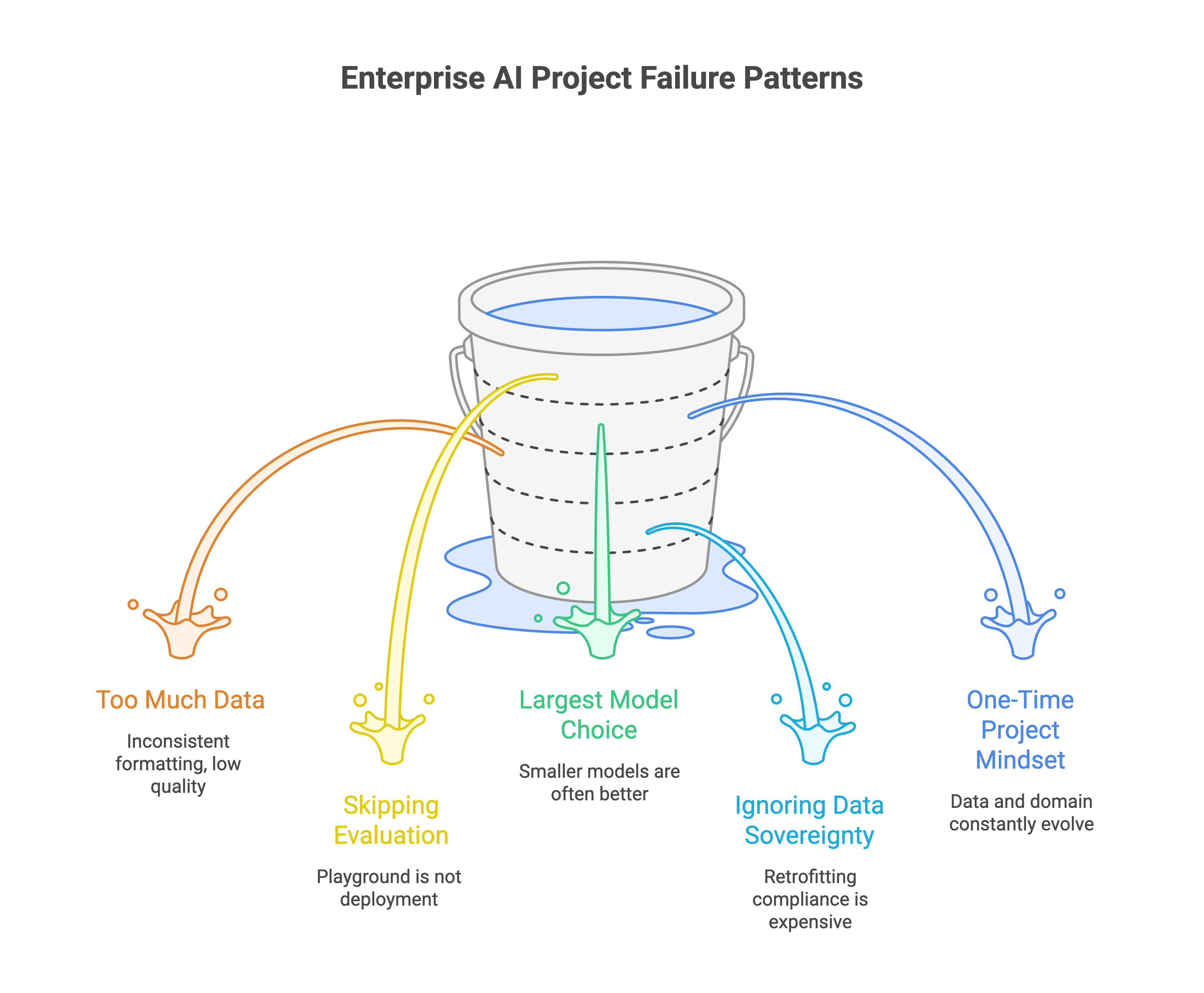
The same failure patterns keep showing up across enterprise teams:
1. Starting with too much data instead of too little. 200 high-quality examples with clear input-output mapping beat 20,000 scraped ones with inconsistent formatting. Start small. Let augmentation handle scale.
2. Skipping evaluation. "It looks good in the playground" is not a deployment criterion. Run structured evaluations. Compare against baselines. Check individual failure cases.
3. Picking the largest available model. A fine-tuned 7B parameter model can outperform GPT-4o on your specific task. Smaller models cost less to run, respond faster, and deploy easier on-premise.
4. Ignoring data sovereignty until audit time. If your industry has data residency requirements, model deployment architecture needs to account for that from day one. Retrofitting compliance is always more expensive than building it in.
5. Treating it as a one-time project. Your data changes. Your domain evolves. The best custom models are part of a continual learning loop where production feedback becomes new training data for the next iteration.
Getting Started
Custom AI model development is more accessible than it was even a year ago. You do not need a machine learning team. You do not need to build AI infrastructure from scratch or train an AI model from scratch. You need clear use cases, decent data, and a platform that handles the infrastructure.
The practical path: start with a small, well-curated dataset for your highest-value use case. Fine-tune. Evaluate against your current solution. If it wins, deploy. If not, refine your data and try again.
Prem Studio runs the full workflow: dataset creation > fine-tuning > evaluation > deployment, all in one platform.
Get started here or book a demo to walk through your specific use case.