Foundations for Proactive AI
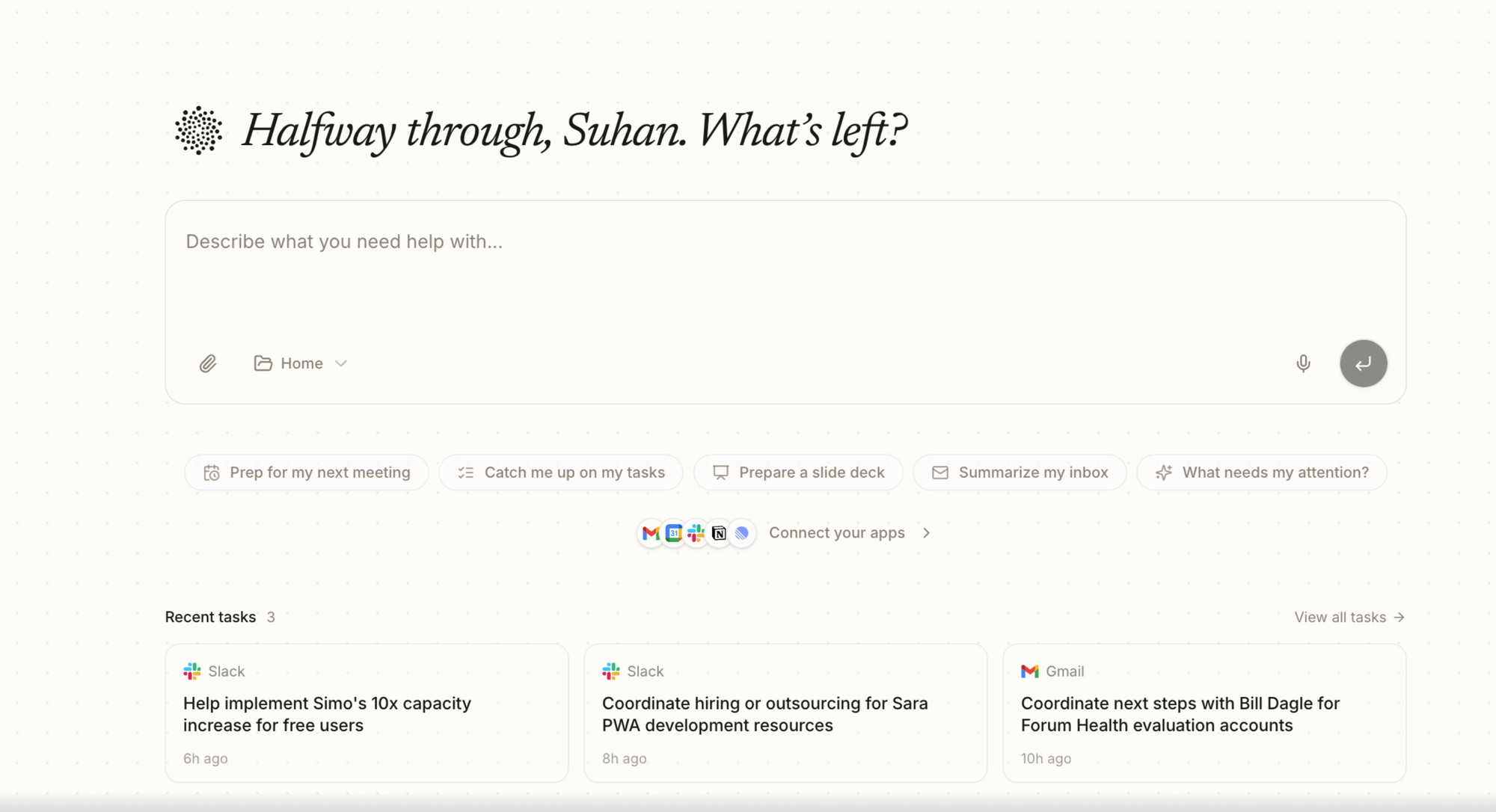
Last week we launched Fluso, our private AI workspace. People use it to manage calendars, build presentations, run load tests, and a hundred other small things that fill up a workday. Fluso is a product to "Get Work Done".
For Fluso to do that well across all those tasks, it needs a memory layer that lets agents move quickly through the work signals scattered across your tools without re-reading everything every time. This post is the technical story of how we built that memory layer. We call it Chronograph.
Chronograph turns communication streams and agent sessions into a typed, temporal memory graph: documents become events, entities, tasks, deadlines, routines, status changes, and source citations. The goal is not to replace semantic search, but to give agents a smaller, more structured path through memory once the first relevant signal is found.
What Ingestion Extracts
Chronograph ingestion is designed around the units agents actually need when working across a user's operational context.
| Extracted unit | What it captures | Why it matters |
|---|---|---|
| Documents | Emails, Slack threads, notes, agent sessions, and other source records | Keeps every claim traceable to source evidence |
| Events | Things that happened, were decided, were requested, or changed over time | Lets agents reconstruct timelines instead of reading every message |
| Entities | People, teams, organizations, projects, repos, customers, vendors, and artifacts | Creates a shared namespace across channels |
| Tasks | Current obligations, follow-ups, questions, approvals, reviews, and handoffs | Makes work items first-class, not an afterthought of retrieval |
| Deadlines and routines | Dates, recurrence signals, and time-bound commitments | Supports planning and prioritization |
| Status changes | Completed, superseded, blocked, or updated work | Prevents stale reminders and duplicated tasks |
| Source links | The raw document or thread behind each extracted fact | Enables citations and auditability |
Instead of just indexing the text, the ingestion process creates a working a memory substrate that the agent can traverse.
Semantic Graph
A vector result can tell an agent that a message is similar to the query. A semantic graph can tell the agent how that message relates to the user's work.
A simplified view looks like this:
| Graph layer | Example relationship |
|---|---|
| Document -> Thread | This email or message belongs to a source conversation |
| Thread -> Event | This conversation contains a decision, request, or update |
| Event -> Entity | This event involved a person, organization, project, repo, or artifact |
| Event -> Task | This request created or updated a work item |
| Task -> Deadline | This work item has a time constraint |
| Task -> Source | This task can be justified by the original evidence |
| Event -> Event | One event followed, caused, superseded, or clarified another |
The important part is that the agent can move from a broad query to a small number of typed graph reads: relevant entity, related thread, recent events, pending tasks, deadline, and source citation.
How Chronoghraph Works
Use The Graph
Consider a common productivity question:
What do we know about the launch dashboard work, and what is still open?
Without Chronograph, an agent has to search Gmail, search Slack, fetch many threads, expand channel history, merge aliases, deduplicate repeated messages, infer which messages are current, and only then decide which source snippets to quote.
With Chronograph, the agent can use the graph:
- Find the project or document cluster.
- Traverse to the source thread and related entities.
- Read recent events and pending tasks.
- Check deadlines, status updates, and routine indicators.
- Fetch only the source documents needed for final citations.
That is the difference between retrieval as a pile of snippets and retrieval as a navigable memory system.
What The Data Says
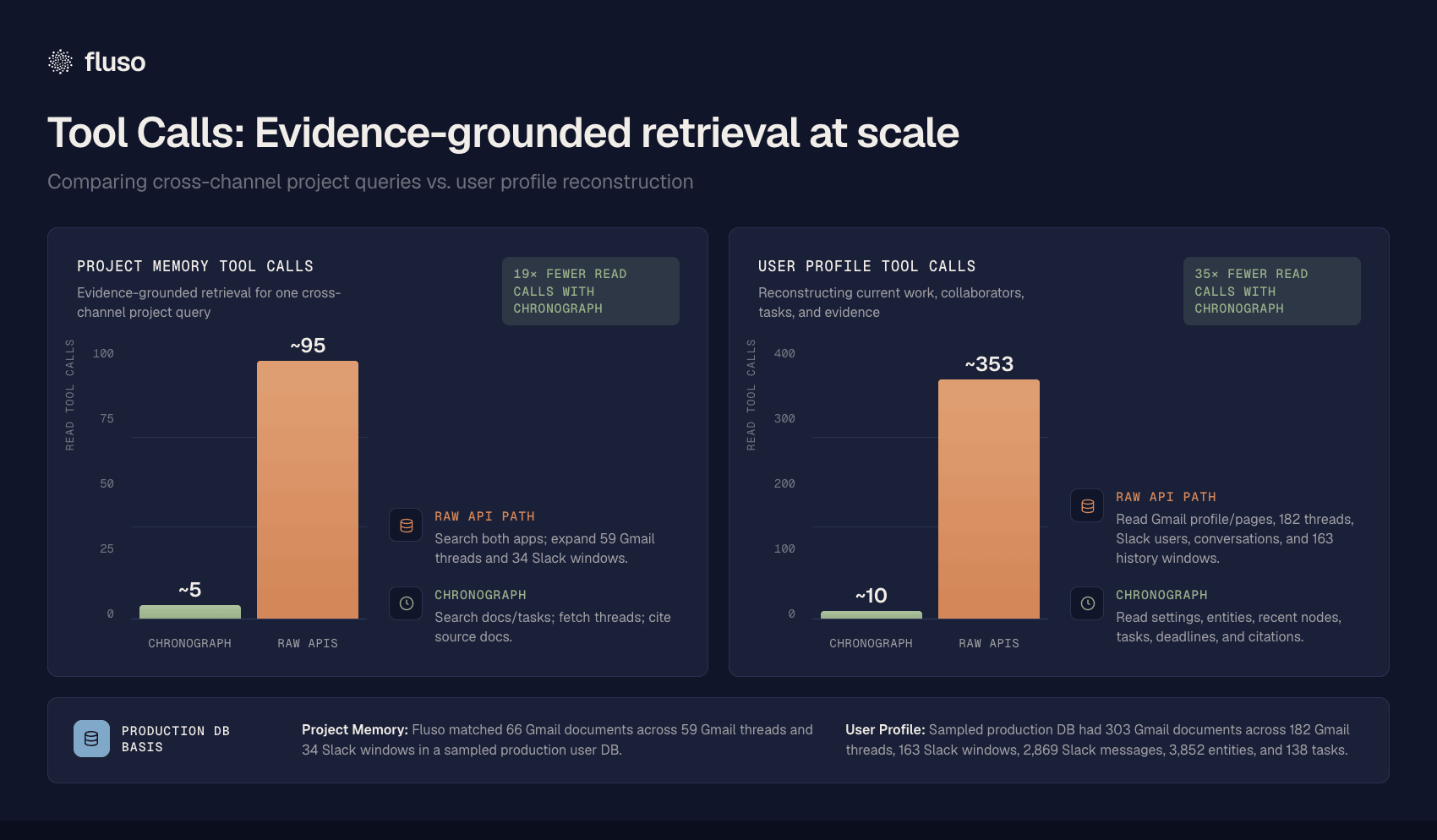
The clearest operational signal is 'read-tool-call' reduction. These counts come from sampled production Chronograph databases and compare raw app traversal with a graph path that returns equivalent evidence for the agent.
Kshana - Tiny but Mighty SLM
Kshana (Sanskrit: क्षण) is a Sanskrit word meaning "moment," "instant," or "the blink of an eye"
Kshana is a compact but powerful small language model built to tackle the costly challenge of processing hundreds of Slack messages and emails per day for every user.
The model was post-trained on Qwen3.5-4B for all chronograph extraction tasks, using distillation from Kimi K2.6. The journey began with internal version of chronograph that relied on a pre-trained model and hand-crafted prompts. These prompts were then run through Kimi K2.6 to produce the first iteration of fine-tuned models, and the team iterated this process several times. To broaden coverage across domains and designations, large-scale synthetic data was generated using Nemotron DataDesigner, creating detailed user personas and fake Gmail and Slack histories. DeepSeek v4 Flash was employed to filter this data for quality.
The resulting training corpus exceeded 240,000 examples, spanning all chronograph structured data extraction tasks as well as SCATE code generation. For the Direct Preference Optimization (DPO) dataset, we deliberately prompted an LLM to behave poorly—producing incomplete, overly broad, or vague tasks with hallucinated entities. They generated numerous negative examples and retained only the hardest ones, following the recipe outlined in https://arxiv.org/html/2508.18312v1
| Artifact | Size | What it covers |
|---|---|---|
| Kshana SFT Dataset | 257,036 rows | Task extraction, task relevance, proposition/event extraction, temporal parsing, causal confirmation, and graph traversal |
| Kshana DPO Dataset | 10,930 rows | Preference optimization across task quality, SCATE temporal parsing, field/agentic repair, Chronograph agentic traversal, and anti-hallucinated entities |
Task Quality Results
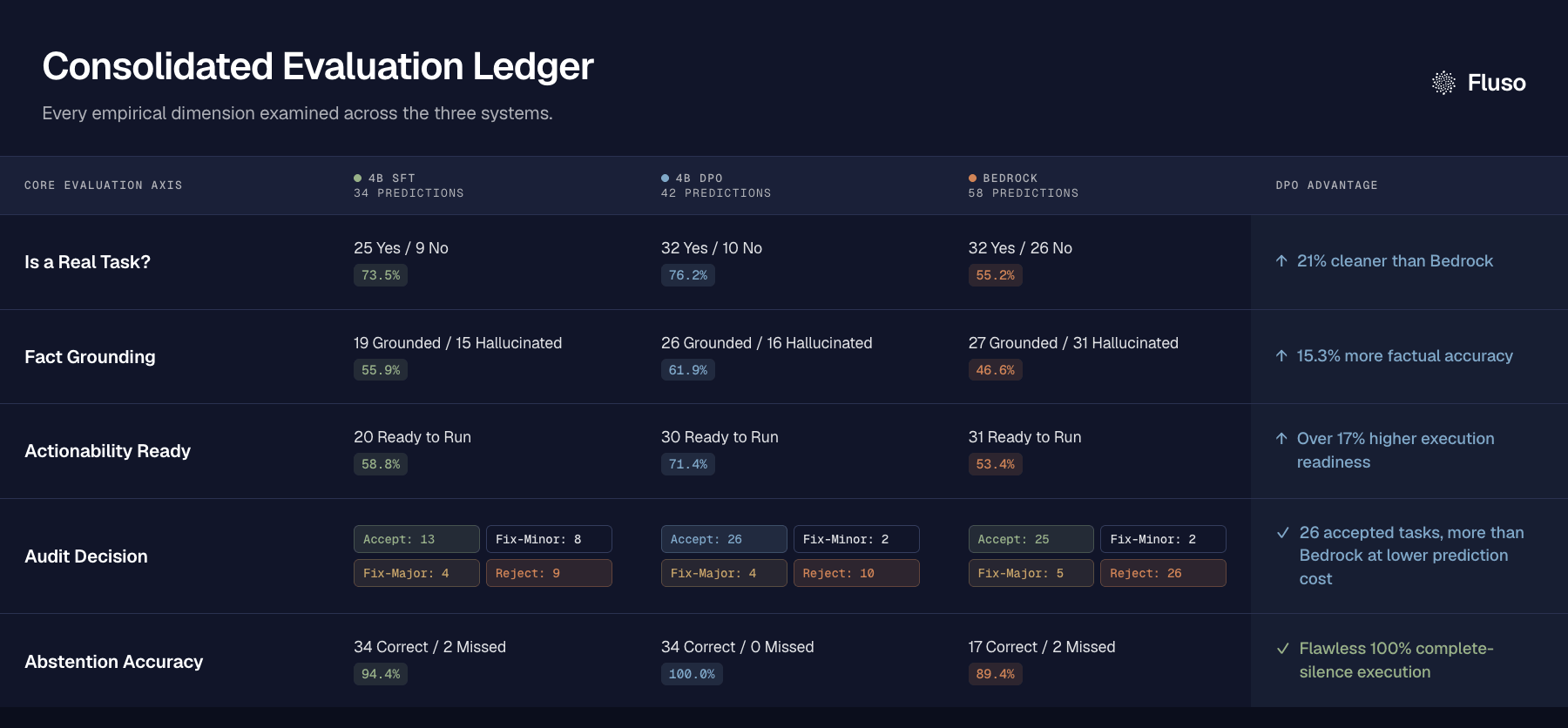
On manually annotated prompts, we outperform previous production baseline by > 50% increase in Task Quality, lower hallucinations, and 30% reduction in false positive tasks!
Scaling To The First Billion Tokens And Beyond
We moved from Serverless to auto-scaling containers serving NVFP4 quantized version of Kshana on RTX PRO 6000. 3x reduction in costs.
In order to make it economical, we decided to batch ingestion requests.
On a high level - that looks like this:
- Batch Ingestions into set amount of documents.
- Spin up a container.
- Drain the queue. If Queue is still growing, spin up another replica.
- Repeat.
- Scale to zero if replica is idle.
What’s Next
With Kshana, extraction gives us typed memory. However, memory is only useful if an agent can retrieve it effectively.
We are currently experimenting with building subagents for traversing ChronoGraph in real time, in order to fetch context for the task Fluso is working on. Think FastContext, but for productivity, and async-parallel. All memories, blazing fast, retrieved at runtime, so Fluso always seems to know everything.
Try Fluso
Chronograph is part of what makes Fluso feel different from a chatbot with a few tools attached. The fastest way to see it work is to use Fluso yourself. Connect a tool at fluso.ai, and the workspace will start building its memory of your work.
If you missed the launch announcement last week, you can read it here: Introducing Fluso.