
How to Fine-Tune AI Models: Techniques, Examples & Step-by-Step Guide
Learn how to fine-tune AI models with practical steps. Covers LoRA, full fine-tuning, dataset prep, and when fine-tuning beats RAG or prompt engineering. Real enterprise use cases included.
A general-purpose LLM can write decent marketing copy and answer trivia questions. Ask it to handle insurance claim adjudication or generate clinical notes with the correct ICD-10 codes, and it falls apart.
Fine-tuning fixes this. You take a pre-trained AI model and continue training it on your data so it learns the terminology, formatting, and reasoning patterns your task requires. The result is a fine-tuned model that handles your specific work better than a model 10x its size running on generic training.
This guide covers the practical side of fine-tuning AI models: when it makes sense, which techniques to pick, how to prepare your dataset, and how to evaluate results.
What Is Fine-Tuning in Machine Learning?
Fine-tuning is the process of taking a foundation model (Llama, Mistral, Qwen, Gemma) and continuing its training on a smaller, task-specific dataset. The model keeps its general language understanding but picks up domain knowledge, tone, and behavior specific to your task.
Think of it like hiring a smart generalist and giving them focused on-the-job training. You don't need to teach them language from scratch. You just need them to learn the specifics of your domain.
These same fine-tuning principles apply across LLMs, vision models, and audio models. This guide focuses on LLMs, since that's where most enterprise teams start. If you're working with smaller models specifically, the approach stays the same with even lower compute requirements.
Fine-Tune, RAG, or Prompt Engineering?
Before committing to fine-tuning, rule out simpler approaches. Fine-tuning is powerful, but it's not always the right tool.
Start with prompt engineering. If the model still gets domain terms wrong, hallucinates on internal knowledge, or can't maintain a consistent output format, add retrieval-augmented generation. If you need the model to consistently behave differently (think tone, reasoning style, output structure), that's when you fine-tune.
Many production systems combine all three. A tuned model paired with retrieval-augmented generation and well-structured prompts consistently outperforms any single approach. The question isn't which to choose. It's which combination fits your use case, and where fine-tuning earns its place in that stack.
Fine-Tuning Techniques: Full, LoRA, and QLoRA Compared
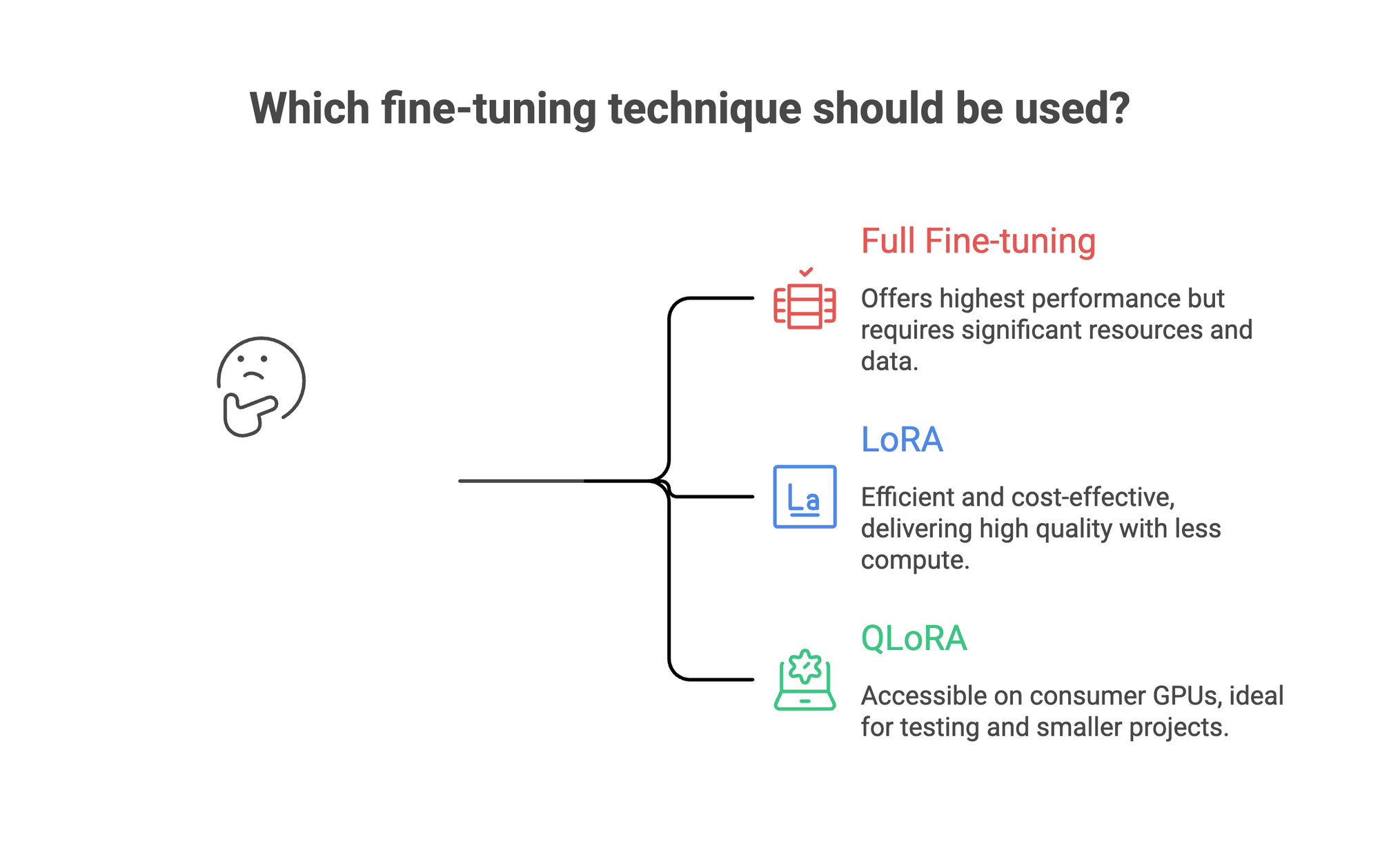
Not all fine-tuning looks the same. The technique you pick determines your compute costs, training time, and quality ceiling.
Full fine-tuning updates every parameter in the model. It offers the highest performance ceiling for complex tasks, but demands multiple GPUs, large datasets, and careful regularization to avoid overfitting. Reserve this for cases where you have 10,000+ high-quality examples and the budget to match.
LoRA (Low-Rank Adaptation) takes a different approach. It freezes the original model weights and trains small adapter layers on top. This cuts compute costs dramatically while delivering 90%+ of the quality you'd get updating all parameters. LoRA is the default choice for enterprise fine-tuning, and for good reason: it's fast, it's efficient, and the resulting model stays easy to version and swap.
QLoRA goes further. It loads the model in 4-bit precision and trains LoRA adapters in 16-bit. This means you can train a 7B parameter model on a single consumer GPU. Quality is slightly lower than standard LoRA, but it's an excellent entry point for teams testing whether fine-tuning works for their task before committing to larger infrastructure.
There's also supervised fine-tuning (SFT), which isn't a separate technique but a training paradigm. SFT means training on instruction-response pairs where you show the model exactly what inputs look like and what outputs you expect. Most teams use SFT regardless of whether they're updating all parameters or just LoRA adapters.
For a deeper comparison of LoRA vs small language models for edge deployment, we've covered the tradeoffs separately. And if your goal is to compress a larger model's knowledge into something smaller, look into data distillation.
How to Fine-Tune a Model: Step by Step
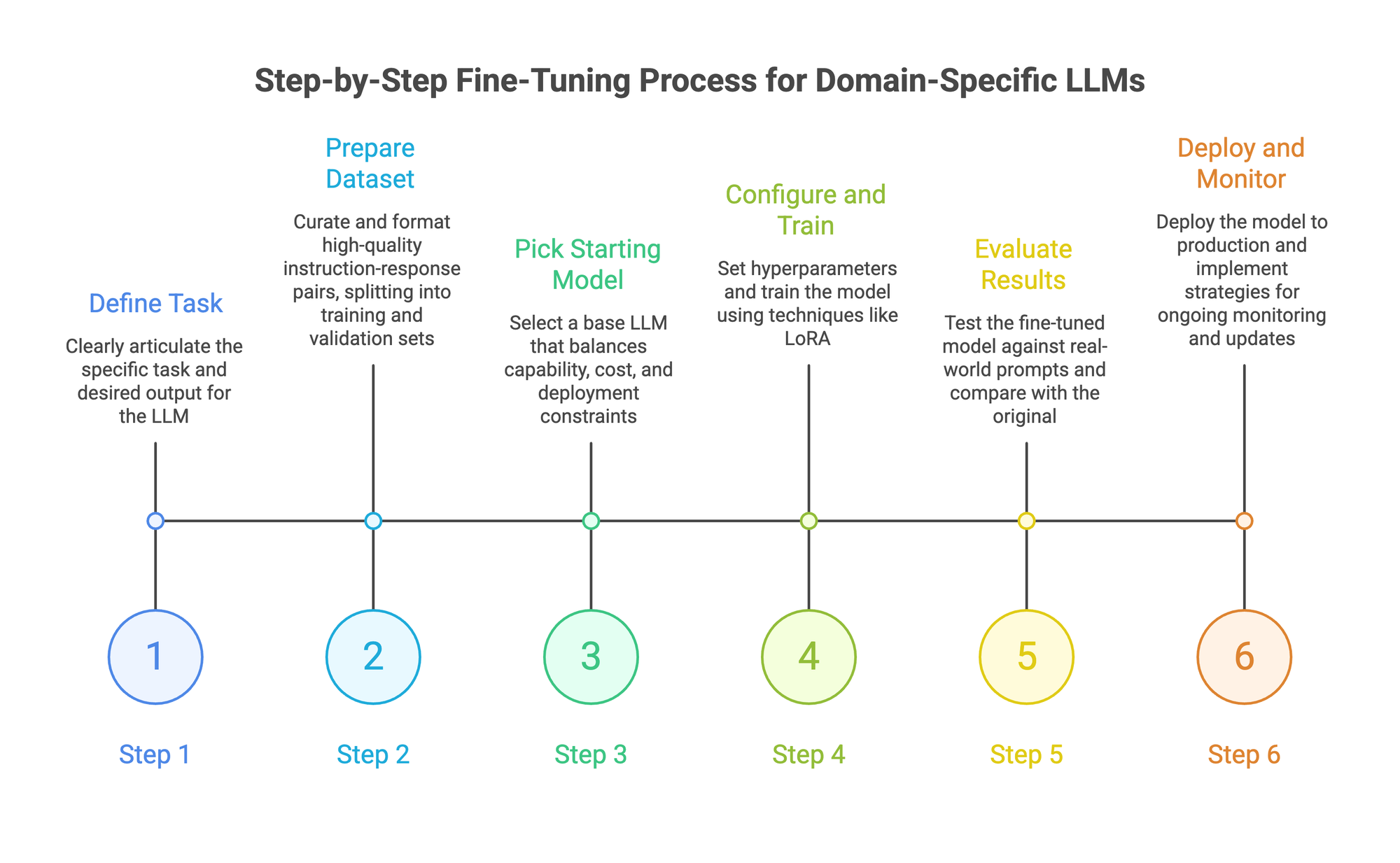
Step 1: Define the task with precision
"Better customer support responses" is too vague to build a training set around. You need specifics: responses that follow brand tone, cite relevant help articles, handle billing disputes with de-escalation language, and route complex issues to human agents.
The clearer your task definition, the easier every downstream step becomes. Write 20-30 example input-output pairs by hand before touching any tooling. If you can't clearly articulate what a good output looks like, fine-tuning won't help.
Step 2: Prepare your dataset
This is where most fine-tuning projects succeed or fail. Quality beats quantity every time. 500 carefully curated instruction-response pairs will outperform 5,000 noisy ones.
Format your data as JSONL with instruction-response pairs. Include edge cases and examples of what the model should not do. Split into training (80%) and validation (20%) sets so you can catch overfitting early.
Your training data should reflect the real distribution of inputs the model will see in production. If 60% of customer queries are about billing, your dataset should reflect that ratio.
For teams that need to scale dataset creation without sacrificing quality, automating dataset enrichment can help. Techniques like synthetic data augmentation generate additional training examples from your existing data while maintaining consistency.
Step 3: Pick your starting model
Match model size to task complexity and deployment constraints. Your base model choice matters. For most enterprise tasks, these are solid starting points:
- Mistral 7B / Llama 3 8B / Qwen 2.5 7B: Good balance of capability and cost. Train well with LoRA on a single GPU.
- Llama 3 70B / Qwen 2.5 72B: Better reasoning and instruction following. Need more compute but worth it for complex tasks.
- Specialized models: If your task is narrow (code generation, text-to-SQL, clinical text), start with a model already fine-tuned for a related task.
A fine-tuned 7B model often beats a general-purpose 70B model on domain-specific tasks. Smaller models are also cheaper to serve in production and faster at inference.
Step 4: Configure and train
Key hyperparameters to set:
- Learning rate: 1e-5 to 5e-5 when updating all parameters, 1e-4 to 3e-4 for LoRA. Too high and you destroy the pre-trained model's knowledge. Too low and the model barely learns your data.
- Epochs: Start with 2-3. Watch for overfitting where validation loss increases while training loss keeps dropping.
- Batch size: Larger batches are more stable but need more memory. Start with what fits on your hardware and adjust.
The fine-tuning process itself is fairly quick with LoRA. A 7B model on a few hundred examples typically completes in under an hour on a single A100.
Step 5: Evaluate results
Loss curves tell you whether training converged, but they don't tell you whether the model is actually useful. You need to test with real-world prompts and compare outputs against the original pre-trained model.
Run your validation set through both models. Look at specific examples where the original failed and check if the tuned version handles them correctly. Use LLM-as-a-judge scoring for qualitative assessment on dimensions like accuracy, tone, and format adherence.
If model performance isn't where it needs to be, check your data first. In almost every case, bad outputs trace back to noisy or insufficient training data, not hyperparameter issues.
Step 6: Deploy and monitor
Deploying your model to production is a separate challenge from training it. Self-hosting with vLLM or Ollama gives you full control. Managed platforms handle infrastructure so you can focus on the model itself.
Either way, monitor for drift. The world changes, your product changes, and your model will need updating. Continual learning strategies keep your AI accurate as new data emerges.
For teams building their first production AI pipeline, we wrote a walkthrough on going from dataset to production model that covers the full workflow.
Doing This in Prem Studio
If managing GPU infrastructure and training scripts isn't how you want to spend your time, Prem Studio handles the workflow above end to end. Here's how those steps map to the platform.
1. Dataset → Snapshot.
Upload your data (JSONL, PDF, TXT, DOCX, HTML) and split it into training and validation sets. The platform handles format conversion and can auto-redact PII before training. If you're starting with limited examples, toggle synthetic data generation on. You set creativity level and provide positive/negative instructions ("more edge cases," "fewer generic examples"), and the system expands your dataset while preserving structure. Once your dataset looks right, create an immutable snapshot. This locks the version so your experiments are always reproducible.
2. Fine-Tuning Job → Experiments.
Click "Create Fine-Tuning Job," name it, and select your snapshot. Prem's engine analyzes your data and recommends a starting model (typically Qwen 2.5 7B for general tasks, with smaller 3B/1B/0.5B variants offered alongside). You don't have to accept the recommendation, but it's informed by task complexity and data characteristics.
From there, configure experiments. Each experiment is a combination of starting model, batch size, epoch count, learning rate, and whether to use LoRA or update all parameters. Run up to four experiments concurrently within a single job.
The platform sets sensible defaults for hyperparameters based on your data, so you can start an experiment without touching a single setting if you prefer.
3. Monitor → Evaluate → Deploy.
Training loss curves update in real time. Once experiments complete, compare results side by side. Test your model in the built-in playground before committing to deployment. When ready, deploy directly to Prem's managed infrastructure, your AWS VPC, or download the weights as a ZIP file and self-host with vLLM, Hugging Face Transformers, or Ollama. The model is yours to keep.
For the full experiment parameter reference, the docs cover each setting in detail.
Use Cases Where Fine-Tuning Delivers Results
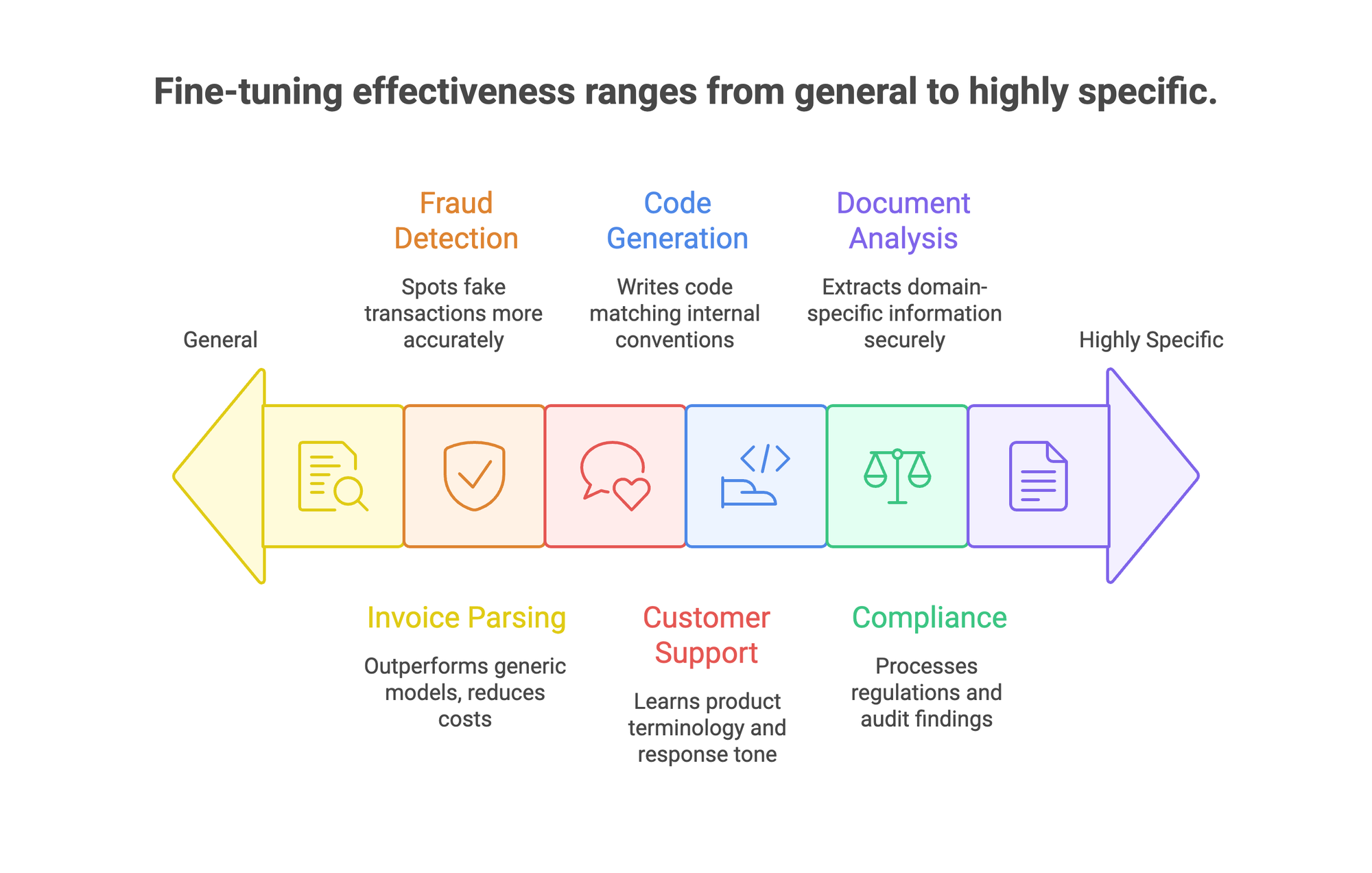
Fine-tuning works best when general-purpose AI gets 70% of the way there but can't close the last 30% that matters. Here's where teams are getting real returns.
1. Invoice and document parsing.
One of PremAI's documented examples: a team fine-tuned Qwen 2.5 7B on invoice extraction data using Prem Studio. The resulting model outperformed both GPT-4o and GPT-4o-mini on accuracy. Even more striking, a fine-tuned Qwen 2.5 1B (a far smaller model) matched GPT-4o's performance on the same task. Inference costs dropped to roughly 50x less than GPT-4o and 4x less than GPT-4o-mini. Smaller model, better results, fraction of the cost. That's the case for fine-tuning in a single example.
2. Compliance and RegTech.
Regulatory language is precise, domain-specific, and constantly evolving. One European fintech using Prem's sovereign infrastructure replaced manual compliance review with a fine-tuned model that processes massive datasets hourly and maintains 100% data residency compliance. Grand, which serves approximately 700 financial institutions through Advisense, reported that adding fine-tuning to their workflow fundamentally changed how they manage compliance. The key: these models train on the actual regulation text and real audit findings, catching violations that generic models miss entirely.
3. Fraud detection.
Sellix, an e-commerce platform, fine-tuned a model on transaction data and built a fraud detection tool that's over 80% more accurate at spotting fake transactions than their previous approach. Payment fraud has patterns that generic models haven't been trained to recognize. Fine-tuning on your actual transaction history gives the model context about what normal looks like for your platform specifically.
4. Customer support.
Fine-tuned models learn your product terminology, escalation rules, and response tone from existing support tickets. The gap between a generic chatbot and one trained on your actual conversations is immediately obvious to customers. One pattern that works well: export 6 months of resolved tickets, filter for high-satisfaction interactions, format as instruction-response pairs, and fine-tune. The model picks up your team's voice and resolution patterns.
5. Code generation.
Internal codebases have naming conventions, architecture patterns, and API structures that public models have never seen. Fine-tuning on your codebase gives you a model that writes code your team would actually ship. PremAI's own Prem-1B-SQL is a real-world example: they fine-tuned DeepSeek Coder 1.3B using their autonomous fine-tuning workflow with ~50K synthetic samples, and the model hit 10K+ monthly downloads on Hugging Face. A 1.3B model, running locally, handling text-to-SQL better than models 10x its size.
6. Document analysis.
Healthcare, legal, and finance teams customize models to extract and classify domain-specific information. A small model running at the edge can process sensitive documents without data ever leaving your infrastructure. This matters especially in healthcare, where PHI can't touch third-party APIs.
Why Data Sovereignty Matters for Fine-Tuning
Fine-tuning means feeding your most sensitive data into a training pipeline. Customer records, financial documents, internal codebases, medical information. Where that data lives during training matters.
Prem Studio is built around this constraint. SOC 2, GDPR, and HIPAA compliant, with zero data retention and cryptographic verification for every interaction. Your data and models deploy to your AWS VPC or on-premises infrastructure. Nothing leaves your environment.
The Swiss jurisdiction adds another layer. Prem operates under the Federal Act on Data Protection (FADP), which provides strong legal protections for training data beyond what US-based platforms offer. For regulated industries (banking, healthcare, government), this isn't a nice-to-have. It's a procurement requirement.
For the technical details on how the autonomous fine-tuning system works under the hood, including multi-agent orchestration and distributed training, the architecture documentation covers the full pipeline.
FAQ
How much data do you need for fine-tuning?
For most fine-tuning with LoRA, 500 to 1,000 high-quality instruction-response pairs is a solid starting point. Complex tasks or updating all parameters may need 10,000+ examples. Quality matters more than volume. A smaller set of accurate, well-formatted examples trains better than a large set of noisy ones.
How long does fine-tuning take?
With LoRA on a single GPU, a 7B model completes training in under an hour on a few hundred examples. Training larger models (70B+) with all parameters takes hours to days depending on dataset size and hardware.
Can fine-tuning make a model worse?
Yes. Overfitting, poor data quality, or a learning rate that's too high can all degrade the model's general capabilities. This is called catastrophic forgetting. Always evaluate against the original model on both your specific task and general benchmarks to make sure you haven't lost important capabilities.
Is fine-tuning better than retrieval-augmented generation?
They solve different problems. Fine-tuning changes how the model behaves (tone, format, reasoning patterns). Retrieval-augmented generation gives models access to external knowledge at inference time. For most production systems, combining both delivers the best results.
What does fine-tuning cost?
LoRA fine-tuning a 7B model on cloud GPUs runs under $10 for small datasets. Training 70B+ models with all parameters updated can cost hundreds to thousands of dollars. Managed platforms like Prem Studio simplify cost management by bundling compute, storage, and tooling. For a detailed breakdown, see our guide on reducing model customization costs.
Fine-tuning turns a general-purpose model into something that actually works for your business. Pick a narrow, well-defined task. Curate a clean dataset. Fine-tune with LoRA. Evaluate against real-world inputs. Ship it.
You don't need a massive ML team or thousands of GPU hours to get started. A single engineer with good data and the right tooling can have a production-ready model running within a week.
Explore the fine-tuning docs to set up your first experiment, or talk to the team if you want help scoping your use case.