
How to Train Custom Language Models: Fine-Tuning vs Training From Scratch (2026)
Learn how to train custom language models with working code. Compare fine-tuning vs training from scratch with real compute costs and step-by-step Python examples.
Training a custom language model gives you full control. No per-token API fees. A model that understands your domain. Complete ownership of the weights.
But "train a language model" means different things to different teams.
Some need to adapt an existing LLM to follow specific instructions. Others need a model trained entirely on proprietary data. A few need to build from absolute zero.
Each path has different requirements. Different costs. Different timelines.
Choosing wrong means overspending on infrastructure you don't need. Or hitting walls because you underestimated the complexity.
This guide covers all three approaches to training custom language models. We walk through dataset preparation, model selection, training code, evaluation, and deployment. With specific compute estimates, working Python examples, and honest trade-offs at each step.
Let's figure out which approach actually fits your situation.
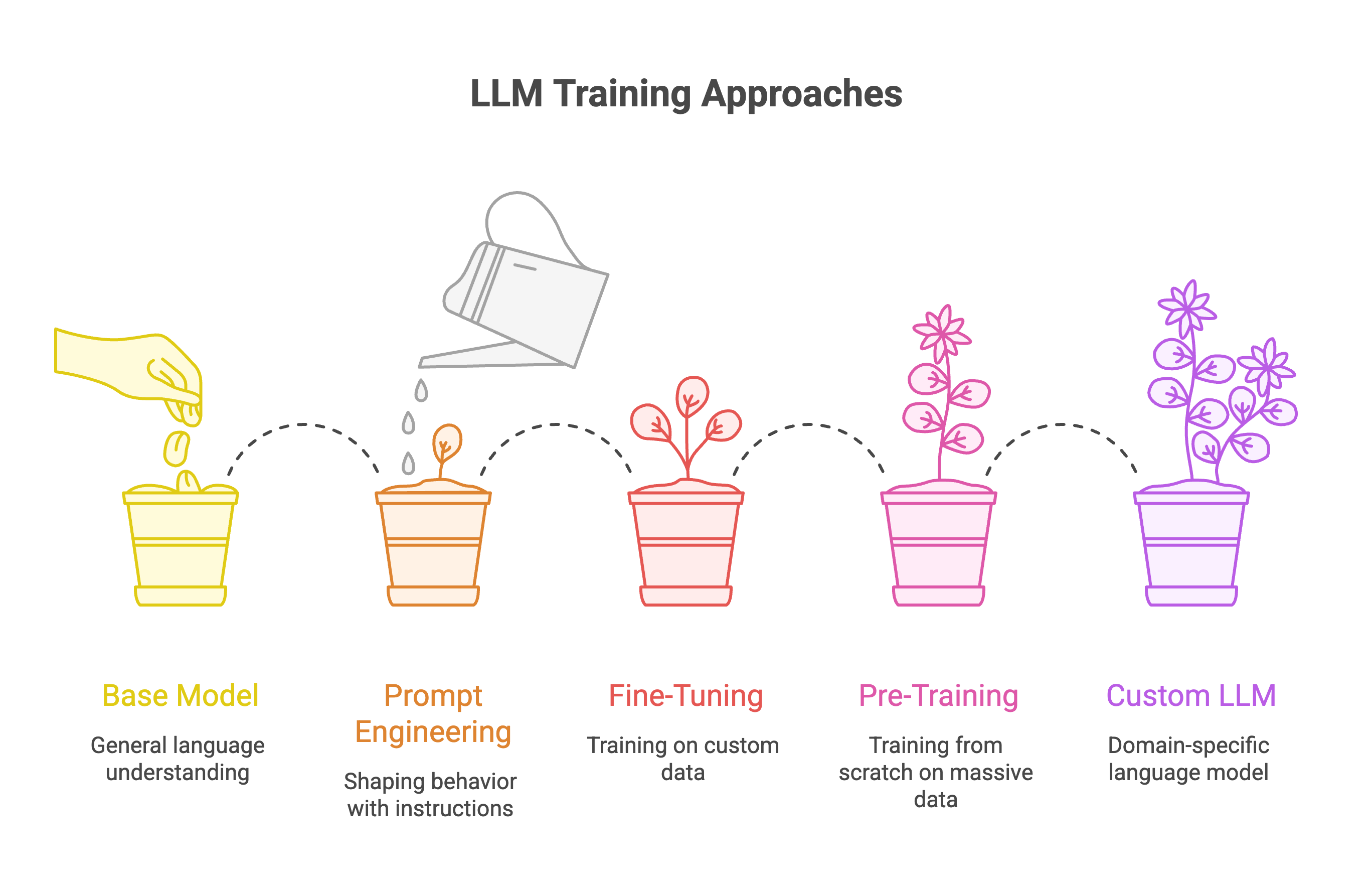
Three Approaches to Custom Language Models
Understanding Your Options: Fine-Tuning, Pre-Training, and Prompt Engineering
Before writing any training scripts, understand what each approach involves.
1. Prompt Engineering (No Training Required)
You shape model behavior through instructions, examples, and system prompts. The model weights never change.
This handles more use cases than people expect. Formatting outputs. Adjusting tone. Following domain-specific rules. Few-shot learning for new tasks.
If you haven't exhausted prompt engineering, you're probably not ready for fine-tuning.
When it works: The task can be defined through instructions. The base model has the underlying capability. You need flexibility to change behavior without retraining.
When it falls short: The model consistently fails despite good prompts. You need behavior the base model can't produce. Latency from long prompts is unacceptable.
2. Fine-Tuning Pre-Trained Models
You take an existing large language model and train it further on your custom data. The model learns your domain while retaining general capabilities.
Fine-tuning is the sweet spot for most production use cases. You inherit billions of dollars worth of pre-training investment. You add your specific knowledge on top.
This is how most enterprises build custom LLMs today. Not from scratch. Through fine-tuning small language models that already understand language fundamentals.
When it works: You need domain-specific expertise the base model lacks. You want consistent behavior on specific tasks. You have hundreds to thousands of training examples.
When it falls short: No existing model handles your language well. Your domain is so different that transfer learning won't help. You need architectural changes.
Pre-Training From Scratch
You initialize random weights and train on your entire corpus. The model learns language patterns, facts, and reasoning entirely from your training data.
This is the most expensive option. It's also the only option for certain requirements.
Training a language model from scratch means building everything. The tokenizer. The model architecture. The training pipeline. You need massive datasets and significant compute.
When it works: Your target language is underrepresented in existing models. Regulatory requirements demand full data lineage. You have billions of tokens of domain-specific data.
When it falls short: Fine-tuning would solve your problem. You have less than 10B tokens of training data. You don't have ML infrastructure expertise.
Most teams reading this guide need fine-tuning. We'll cover that path in depth. But we'll also show what pre-training involves so you can make an informed choice.
Do You Actually Need Custom Training?
Before spending GPU cycles, answer a few questions.
Fine-Tuning Is Enough If You Need:
- Better performance on specific downstream tasks (summarization, extraction, classification)
- Domain-specific vocabulary and terminology (legal, medical, financial)
- Consistent output formatting or tone
- Data privacy through on-premise deployment
- Budget under $50K and timeline under 2 months
For these use cases, start with a pre-trained language model like Llama 3.1 or Mistral. Fine-tune it on your custom dataset. You'll get production-ready results without building infrastructure from scratch.
If you want to understand how open-source models compare today, the landscape has changed dramatically. Models like Qwen 2.5 and Llama 3.1 now match or exceed proprietary alternatives on many benchmarks.
Pre-Training From Scratch Might Be Necessary If:
- Your target language isn't well-supported by existing LLMs
- Transfer learning won't help because your domain is fundamentally different
- You need a non-transformer model architecture
- You have 100B+ tokens of clean, domain-specific training data
- Regulatory compliance requires full control over what data trained the model
The Decision Shortcut
If you're asking "should I train a language model from scratch?", the answer is probably no.
Start with fine-tuning. Validate that it works for your use case. Scale up only if you hit a ceiling that fine-tuning can't solve.
Most teams overestimate how much customization they need. A well-tuned 7B parameter model often outperforms a poorly trained larger model on domain-specific tasks.
The goal isn't maximum complexity. It's solving your specific problem effectively.
For teams watching costs, saving 90% on LLM API expenses through fine-tuning and self-hosting is realistic. But only if you pick the right approach from the start.
Your Model Is Only as Good as Your Data
Model quality has a hard ceiling: your data quality. No architecture or hyperparameter tuning overcomes bad training data.
This is where most custom language model projects fail. Not in training. In data preparation.
Data Requirements by Approach
For fine-tuning:
- Minimum viable: 500-1,000 high-quality examples
- Recommended: 5,000-50,000 examples
- Format: Instruction-input-output pairs (JSONL)
For pre-training from scratch:
- Minimum viable: 10-50 billion tokens
- Competitive performance: 1-2 trillion tokens
- Format: Raw text, cleaned and deduplicated
For reference, Llama 2 was trained on 2 trillion tokens. Mistral 7B used a similarly large corpus. When you train a new language model from scratch, you're competing against that baseline.
H3: Dataset Format for Fine-Tuning
Structure your training data as instruction-response pairs:
json
{"messages": [
  {"role": "system", "content": "You are a technical support assistant."},
  {"role": "user", "content": "How do I reset my password?"},
  {"role": "assistant", "content": "Go to Settings > Security. Click Reset Password. Check your email for the reset link."}
]}
Alternative format for instruction tuning:
{"instruction": "Summarize this support ticket", "input": "Customer reports dashboard loading slowly since Tuesday. Cleared cache, tried different browser. Issue persists.", "output": "Performance issue: Dashboard slow since Tuesday. Troubleshooting attempted: cache cleared, multiple browsers. Unresolved."}Consistency matters more than format choice. Pick one structure and use it across your entire dataset.
Data Cleaning Pipeline
Raw data needs preprocessing before it can train a language model. Here's a working pipeline:
import re
import hashlib
from typing import List
def clean_text(text: str) -> str:
    """Normalize and clean training text."""
    # Normalize unicode
    text = text.encode('utf-8', errors='ignore').decode('utf-8')

    # Normalize whitespace
    text = re.sub(r'\s+', ' ', text)

    # Remove control characters
    text = re.sub(r'[\x00-\x08\x0b\x0c\x0e-\x1f\x7f-\x9f]', '', text)

    return text.strip()
def remove_pii(text: str) -> str:
    """Basic PII removal. Expand based on your requirements."""
    # Email addresses
    text = re.sub(r'\b[\w.-]+@[\w.-]+\.\w+\b', '[EMAIL]', text)

    # Phone numbers
    text = re.sub(r'\b\d{3}[-.]?\d{3}[-.]?\d{4}\b', '[PHONE]', text)

    # SSN pattern
    text = re.sub(r'\b\d{3}-\d{2}-\d{4}\b', '[SSN]', text)

    return text
def deduplicate(documents: List[str]) -> List[str]:
    """Remove exact duplicates using hashing."""
    seen = set()
    unique = []

    for doc in documents:
        doc_hash = hashlib.md5(doc.encode()).hexdigest()
        if doc_hash not in seen:
            seen.add(doc_hash)
            unique.append(doc)

    return unique
def prepare_training_data(
    documents: List[str],
    min_length: int = 100,
    max_length: int = 10000
) -> List[str]:
    """Full preprocessing pipeline."""
    # Clean
    cleaned = [clean_text(doc) for doc in documents]

    # Remove PII
    cleaned = [remove_pii(doc) for doc in cleaned]

    # Filter by length
    filtered = [doc for doc in cleaned if min_length < len(doc) < max_length]

    # Deduplicate
    return deduplicate(filtered)
This handles the basics. Production pipelines add near-duplicate detection, language filtering, and quality scoring.
Data Quality Checklist
Before training, verify:
- No duplicate entries (exact or near-duplicate)
- Consistent formatting across all examples
- Balanced representation across categories
- PII removed or anonymized
- No corrupted text or encoding issues
- Output labels are accurate (spot-check manually)
- Train/validation/test splits created (80/10/10 typical)
Spend 60% of project time on data. The remaining 40% on training and evaluation. This ratio feels wrong but produces better models.
For teams handling large-scale dataset preparation, automating the dataset pipeline removes manual bottlenecks. Especially when you need to iterate on data quality multiple times before training.
H2: Choosing the Right Pre-Trained Model
Your base model choice determines training efficiency, final performance, and deployment requirements. Pick wrong and you'll waste weeks on a model that doesn't fit your use case.
H3: 2025 Model Landscape
The open-source LLM ecosystem has matured significantly. Models like Llama 3.1, Mistral, and Qwen 2.5 now compete with proprietary alternatives on most benchmarks.
Selection Criteria
- Task alignment matters more than raw size. A 7B model fine-tuned for your specific task often outperforms a generic 70B model. If you need code generation, start with Qwen 2.5 Coder or DeepSeek Coder. For multilingual tasks, Qwen 2.5 handles non-English languages better than most alternatives.
- Size vs. capability trade-off. Larger models perform better but cost more to fine-tune and deploy. A 7B model fine-tuned with QLoRA fits on a single 24GB GPU. A 70B model needs multiple GPUs or expensive cloud instances.
- Start with the 7B-8B range. Scale up only if you hit a performance ceiling on your evaluation set.
- Context length requirements. If your use case involves long documents, you need models trained with extended context. Llama 3.1 and Qwen 2.5 support 128K tokens natively. Mistral caps at 32K.
- License considerations. Apache 2.0 models (Mistral, Qwen) allow commercial use with minimal restrictions. Llama has specific license terms that restrict certain commercial applications. Review before committing.
Where to Find Models
Hugging Face Hub hosts most open-weight models. The Open LLM Leaderboard provides benchmark comparisons across model families.
For teams evaluating whether open-source models are production-ready, the answer in 2025 is yes. The gap between open and closed models has narrowed dramatically.
from huggingface_hub import list_models
# Find top instruction-tuned models
models = list_models(
    filter="text-generation",
    sort="downloads",
    direction=-1,
    limit=10
)
for model in models:
    print(f"{model.id}: {model.downloads:,} downloads")
Fine-Tuning a Pre-Trained Language Model Step by Step
Fine-tuning adapts a pre-trained LLM to your specific downstream task. Modern techniques like LoRA and QLoRA make this efficient enough to run on consumer hardware.
Full Fine-Tuning vs. Parameter-Efficient Methods
Full fine-tuning updates all model parameters. Best quality, but a 7B model needs ~60GB GPU memory for training. Impractical for most teams.
LoRA (Low-Rank Adaptation) trains small adapter matrices instead of full weights. Reduces trainable parameters by 99%+. Quality comes within 1-2% of full fine-tuning for most tasks.
QLoRA combines LoRA with 4-bit quantization. The base model loads in 4-bit precision while adapters train in higher precision. A 7B model fits in 16GB VRAM. A 65B model fits on a single 48GB GPU.
For most production fine-tuning, QLoRA provides the best trade-off between quality and resource requirements. QLoRA reduces memory usage enough to finetune a 65B parameter model on a single 48GB GPU while preserving full 16-bit finetuning task performance. arXiv
QLoRA Fine-Tuning with Hugging Face
Here's a complete working example:
import torch
from transformers import (
    AutoModelForCausalLM,
    AutoTokenizer,
    BitsAndBytesConfig,
    TrainingArguments
)
from peft import LoraConfig, get_peft_model, prepare_model_for_kbit_training
from trl import SFTTrainer
from datasets import load_dataset
# Model to fine-tune
model_id = "mistralai/Mistral-7B-v0.1"
# 4-bit quantization configuration
bnb_config = BitsAndBytesConfig(
    load_in_4bit=True,
    bnb_4bit_quant_type="nf4",
    bnb_4bit_compute_dtype=torch.bfloat16,
    bnb_4bit_use_double_quant=True
)
# Load model with quantization
model = AutoModelForCausalLM.from_pretrained(
    model_id,
    quantization_config=bnb_config,
    device_map="auto",
    trust_remote_code=True
)
# Load tokenizer
tokenizer = AutoTokenizer.from_pretrained(model_id)
tokenizer.pad_token = tokenizer.eos_token
tokenizer.padding_side = "right"
# Prepare for k-bit training
model = prepare_model_for_kbit_training(model)
# LoRA configuration
lora_config = LoraConfig(
    r=16,                           # Rank of update matrices
    lora_alpha=32,                  # Scaling factor (common: 2x rank)
    target_modules=[
        "q_proj", "k_proj", "v_proj", "o_proj",
        "gate_proj", "up_proj", "down_proj"
    ],
    lora_dropout=0.05,
    bias="none",
    task_type="CAUSAL_LM"
)
# Apply LoRA
model = get_peft_model(model, lora_config)
model.print_trainable_parameters()
# Output: trainable params: 13,631,488 || all params: 3,752,071,168 || trainable%: 0.36%
That 0.36% is the key number. You're training a tiny fraction of the model while getting most of the benefit.
Training Configuration
# Load your custom dataset
dataset = load_dataset("json", data_files={
    "train": "train.jsonl",
    "validation": "val.jsonl"
})
# Format function for instruction tuning
def format_instruction(example):
    return f"""### Instruction:
{example['instruction']}
### Input:
{example['input']}
### Response:
{example['output']}"""
# Training arguments
training_args = TrainingArguments(
    output_dir="./mistral-custom",
    num_train_epochs=3,
    per_device_train_batch_size=4,
    gradient_accumulation_steps=4,
    learning_rate=2e-4,
    weight_decay=0.01,
    warmup_ratio=0.03,
    lr_scheduler_type="cosine",
    logging_steps=25,
    save_strategy="epoch",
    evaluation_strategy="epoch",
    fp16=True,
    optim="paged_adamw_8bit",
    max_grad_norm=0.3,
    report_to="none"
)
# Initialize trainer
trainer = SFTTrainer(
    model=model,
    train_dataset=dataset["train"],
    eval_dataset=dataset["validation"],
    tokenizer=tokenizer,
    args=training_args,
    formatting_func=format_instruction,
    max_seq_length=2048,
    packing=True
)
# Train
trainer.train()
# Save adapter weights
trainer.save_model("./mistral-custom/final")
Hyperparameter Guidelines
The common pattern for LoRA: lora_alpha = 2 * r. This ratio was empirically determined by the original researchers and works well across most tasks. Reintech
Compute Requirements and Costs
These estimates assume A100 40GB or equivalent. Actual times vary based on sequence length and dataset characteristics.
For teams that want to skip infrastructure management, Prem Studio handles the training pipeline. Upload your dataset, configure experiments, deploy. Useful when iteration speed matters more than infrastructure control.
For a deeper comparison of fine-tuning approaches including LoRA vs full SLM training, the trade-offs depend heavily on your deployment constraints.
Pre-Training From Scratch: The Complete Picture
Pre-training builds a language model from zero. You initialize random weights and train on raw text until the model learns language patterns, facts, and reasoning.
This section exists for completeness. Most teams should fine-tune. But if you have specific requirements that existing models can't meet, here's what's involved.
When Pre-Training Actually Makes Sense
- Language coverage: Your target language is underrepresented. Low-resource languages often benefit from dedicated pre-training.
- Domain density: You have billions of tokens of domain-specific text (legal, medical, scientific) and want deep internalization.
- Data sovereignty: Regulations require full control over training data. No external pre-training allowed.
- Architectural research: You're exploring novel architectures that don't map to existing weights.
Resource Requirements (Real Numbers)
Pre-training is expensive. Published training runs show:
Llama 3 8B was trained on 15 trillion tokens using 7.7 million GPU hours on H100s. That's the baseline you're competing against when you train from scratch.
Architecture Configuration
from transformers import LlamaConfig, LlamaForCausalLM
# Configure a ~1B parameter model
config = LlamaConfig(
    vocab_size=32000,
    hidden_size=2048,
    intermediate_size=5632,
    num_hidden_layers=22,
    num_attention_heads=32,
    num_key_value_heads=4,        # Grouped-query attention
    max_position_embeddings=4096,
    rope_theta=10000.0,
    rms_norm_eps=1e-5,
    initializer_range=0.02,
    use_cache=True,
    tie_word_embeddings=False
)
# Initialize model with random weights
model = LlamaForCausalLM(config)
print(f"Parameters: {model.num_parameters():,}")
Training a Custom Tokenizer
Pre-training requires a tokenizer matched to your corpus. Don't use a general-purpose tokenizer if your domain has specialized vocabulary.
from tokenizers import (
    Tokenizer,
    models,
    trainers,
    pre_tokenizers,
    processors,
    decoders
)
# Initialize BPE tokenizer
tokenizer = Tokenizer(models.BPE())
tokenizer.pre_tokenizer = pre_tokenizers.ByteLevel(add_prefix_space=False)
# Configure training
trainer = trainers.BpeTrainer(
    vocab_size=32000,
    special_tokens=["<s>", "</s>", "<unk>", "<pad>"],
    min_frequency=2,
    show_progress=True
)
# Train on your corpus
corpus_files = ["data/corpus_part1.txt", "data/corpus_part2.txt"]
tokenizer.train(files=corpus_files, trainer=trainer)
# Add post-processor and decoder
tokenizer.post_processor = processors.ByteLevel(trim_offsets=False)
tokenizer.decoder = decoders.ByteLevel()
# Save
tokenizer.save("custom_tokenizer.json")
The Honest Assessment
Unless you have a specific technical requirement that fine-tuning can't solve, pre-training from scratch probably isn't worth it.
The open-source ecosystem has strong foundations. Llama 3.1, Mistral, Qwen 2.5 represent billions in training investment across trillions of tokens. Fine-tuning lets you leverage that investment for a fraction of the cost.
Train from scratch when:
- No existing model supports your language adequately
- You need full control over training data for compliance
- Your domain is so specialized that transfer learning fundamentally won't help
- You have the budget, timeline, and ML expertise to execute it properly
For most enterprise use cases, the fine-tuning path from dataset to production delivers better ROI than starting from zero.
Evaluating Your Custom Language Model
Training without evaluation is guessing. You need metrics that tell you whether your model actually improved on the task you care about.
Metrics by Task Type
Evaluation Implementation
import torch
from evaluate import load
from tqdm import tqdm
def evaluate_model(model, tokenizer, test_dataset, max_new_tokens=256):
    """Evaluate fine-tuned model against test set."""

    model.eval()
    predictions = []
    references = []

    for example in tqdm(test_dataset):
        prompt = f"### Instruction:\n{example['instruction']}\n\n### Input:\n{example['input']}\n\n### Response:\n"

        inputs = tokenizer(prompt, return_tensors="pt").to(model.device)

        with torch.no_grad():
            outputs = model.generate(
                **inputs,
                max_new_tokens=max_new_tokens,
                temperature=0.1,
                do_sample=False,
                pad_token_id=tokenizer.pad_token_id
            )

        generated = tokenizer.decode(outputs[0], skip_special_tokens=True)
        response = generated.split("### Response:\n")[-1].strip()

        predictions.append(response)
        references.append(example['output'])

    # Calculate ROUGE scores
    rouge = load("rouge")
    results = rouge.compute(predictions=predictions, references=references)

    return {
        "rouge1": results["rouge1"],
        "rouge2": results["rouge2"],
        "rougeL": results["rougeL"],
        "num_examples": len(predictions)
    }
# Compare base vs fine-tuned
base_results = evaluate_model(base_model, tokenizer, test_data)
finetuned_results = evaluate_model(finetuned_model, tokenizer, test_data)
print(f"Base ROUGE-L: {base_results['rougeL']:.4f}")
print(f"Fine-tuned ROUGE-L: {finetuned_results['rougeL']:.4f}")
improvement = (finetuned_results['rougeL'] - base_results['rougeL']) / base_results['rougeL']
print(f"Improvement: {improvement * 100:.1f}%")
Debugging Poor Results
If your model underperforms, debug in this order:
- Data quality (most common). Check for label errors, inconsistent formatting, data leakage between train/test splits.
- Overfitting. Training loss drops but validation loss increases. Reduce epochs, add dropout, or collect more data.
- Underfitting. Both losses plateau high. Increase learning rate, train longer, or increase LoRA rank.
- Base model mismatch. The pre-trained model isn't suited to your task. Try a different foundation.
- Hyperparameters. Grid search learning rate (1e-5 to 1e-3), batch size, and LoRA rank.
Quality first: 5-20k curated samples can outperform 200k noisy ones for targeted use-cases.
For production systems where evaluation determines whether you can ship, invest time in building robust evaluation pipelines before scaling training.
Deploying Your Custom Language Model
A trained model sitting on disk isn't useful. You need inference infrastructure to serve requests at production scale.
Deployment Options
Local Deployment with Ollama
Fastest path from trained weights to running inference:
# Create Modelfile pointing to your fine-tuned model
cat << 'EOF' > Modelfile
FROM ./mistral-custom/final
PARAMETER temperature 0.7
PARAMETER top_p 0.9
TEMPLATE """### Instruction:
{{ .Prompt }}
### Response:
"""
EOF
# Build and run
ollama create my-custom-model -f Modelfile
ollama run my-custom-model "Your prompt here"
Production Deployment with vLLM
For high-throughput production workloads, vLLM is the standard. Stripe cut inference costs 73% with vLLM migration, processing 50M daily API calls on 1/3 the GPU fleet. Introl
vLLM's PagedAttention algorithm eliminates memory fragmentation that wastes 60-80% of GPU memory in traditional inference systems.
from vllm import LLM, SamplingParams
# Load your fine-tuned model
llm = LLM(
    model="./mistral-custom/final",
    tensor_parallel_size=1,
    max_model_len=4096,
    gpu_memory_utilization=0.9
)
# Configure generation
sampling_params = SamplingParams(
    temperature=0.7,
    top_p=0.9,
    max_tokens=512
)
# Generate
prompts = ["Your prompt here"]
outputs = llm.generate(prompts, sampling_params)
for output in outputs:
    print(output.outputs[0].text)
Serving with OpenAI-Compatible API
vLLM provides an OpenAI-compatible server out of the box:
python -m vllm.entrypoints.openai.api_server \
    --model ./mistral-custom/final \
    --host 0.0.0.0 \
    --port 8000
Then query it like any OpenAI endpoint:
python
from openai import OpenAI
client = OpenAI(base_url="http://localhost:8000/v1", api_key="not-needed")
response = client.chat.completions.create(
    model="./mistral-custom/final",
    messages=[{"role": "user", "content": "Your prompt"}]
)
Deployment Considerations
- Latency requirements. Sub-100ms needs quantization (AWQ, GPTQ) and optimized serving.
- Concurrent users. Affects GPU sizing. vLLM's continuous batching handles variable load efficiently.
- Cost model. On-demand cloud vs reserved capacity vs on-premise.
For teams deploying small language models at the edge, quantization and model size become critical factors.
For self-hosting fine-tuned models without managing infrastructure, Prem's deployment docs walk through the full workflow.
Mistakes That Derail Custom Model Projects
After the technical steps, here are the non-obvious failure modes:
1. Starting Too Big
Teams often begin with the largest model they can access. This slows iteration and burns budget on experiments.
Better: Start with a 7B model. Get the pipeline working. Validate that fine-tuning improves your metrics. Scale up only if smaller models hit a ceiling.
2. Underinvesting in Data
Collecting data feels less exciting than training models. But data quality determines your ceiling.
Spend 60% of project time on data collection, cleaning, and validation. The remaining 40% on training and evaluation.
3. No Success Criteria
"Make the model better" isn't measurable. Define specific metrics before training:
- "Improve classification F1 from 0.72 to 0.85"
- "Reduce hallucination rate below 5%"
- "Match human expert agreement at 90%+"
4. Skipping Evaluation Until The End
A single evaluation after training completes tells you almost nothing useful.
Evaluate at checkpoints during training. Compare against baselines. Use a held-out test set that never touches training.
5. Overcomplicating Early
Start simple. A basic fine-tuning run with default hyperparameters often gets you 80% of possible improvement.
# Start here. Add complexity only when this plateaus.
training_args = TrainingArguments(
    output_dir="./output",
    num_train_epochs=3,
    per_device_train_batch_size=4,
    learning_rate=2e-4
)
For teams building custom reasoning models, the temptation to add complexity early is strong. Resist it.
Start With the Simplest Path That Works
Training custom language models isn't about maximum complexity. It's about solving your specific problem effectively.
For most teams, the path looks like this:
- Exhaust prompt engineering first
- Fine-tune a 7B model with QLoRA on your custom data
- Evaluate rigorously against baselines
- Scale up only if metrics demand it
Pre-training from scratch is the right choice for a small percentage of use cases. If you're unsure whether you're in that percentage, you're probably not.
Start simple. Measure everything. Iterate based on evidence.
The teams that ship production language models aren't the ones with the biggest budgets. They're the ones who pick the right approach and execute it well.
Frequently Asked Questions
1. How much data do I need to train a custom language model?
It depends on your approach. For fine-tuning a pre-trained model, 1,000-5,000 high-quality examples is a solid starting point. Many teams see strong results with 10,000-50,000 examples for domain-specific tasks.
For pre-training from scratch, you need billions of tokens. Llama 3 was trained on 15 trillion tokens. Competitive models typically require 1-2 trillion tokens minimum. This is why most teams fine-tune instead.
2. Can I fine-tune a large language model on a single GPU?
Yes. QLoRA makes this practical. A 7B parameter model fine-tunes on a single 24GB GPU (RTX 3090, RTX 4090, or A10). A 13B model fits on 32GB. Even 65B models can fine-tune on a single 48GB A100 using QLoRA's 4-bit quantization.
The key is parameter-efficient fine-tuning. You're training 0.1-1% of the model's parameters, not the full weights.
3. How long does fine-tuning take?
For a 7B model with 10,000 training examples using QLoRA:
- Single A100 40GB: 3-6 hours
- Single RTX 4090: 4-8 hours
- Single RTX 3090: 6-12 hours
Larger models and datasets scale linearly. A 70B model takes roughly 10x longer than a 7B model on equivalent hardware.
4. What's the difference between LoRA and QLoRA?
LoRA (Low-Rank Adaptation) trains small adapter matrices while keeping base model weights frozen. It reduces trainable parameters by 99%+.
QLoRA adds 4-bit quantization on top of LoRA. The base model loads in 4-bit precision (NF4 format), reducing memory by ~75%. Adapters still train in higher precision for quality. QLoRA lets you fine-tune larger models on smaller GPUs with minimal quality loss.
5. Should I fine-tune or train a language model from scratch?
Fine-tune in almost all cases. Pre-trained models like Llama 3.1, Mistral, and Qwen 2.5 already understand language fundamentals. Fine-tuning adds your domain knowledge on top.
Train from scratch only if:
- Your language isn't supported by existing models
- Regulatory requirements demand full data lineage control
- You have 10B+ tokens and the budget to match
Fine-tuning costs $10-$500. Pre-training costs $100K-$10M+. The ROI math is clear for most use cases.
6. How do I know if my fine-tuned model is actually better?
Compare against the base model on a held-out test set. Measure task-specific metrics (accuracy, F1, ROUGE) before and after fine-tuning.
If fine-tuning helped, you'll see measurable improvement on your evaluation metrics. If the numbers are flat or worse, check your data quality first. Bad training data is the most common cause of failed fine-tuning.
7. Can I fine-tune closed models like GPT-4 or Claude?
OpenAI offers fine-tuning for GPT-3.5 and GPT-4. Anthropic doesn't currently offer Claude fine-tuning. These services have limitations: you don't own the weights, you pay per-token for training and inference, and you can't self-host.
For full control and ownership, fine-tune open-weight models like Llama 3.1, Mistral, or Qwen 2.5. You own the resulting weights and can deploy anywhere.
8. Is my training data safe during fine-tuning?
If you fine-tune locally or on your own infrastructure, your data never leaves your environment. This is a key advantage of open-weight models over API-based fine-tuning.
For teams with strict data privacy requirements, self-hosted fine-tuning with on-premise deployment eliminates third-party data exposure entirely.
Start Building Your Custom Language Model
Training a custom language model comes down to picking the right path for your situation.
Most teams should:
- Start with fine-tuning. Take a pre-trained model like Llama 3.1 or Mistral 7B. Fine-tune it on your custom dataset using QLoRA. This gets you 90% of the benefit at 1% of the cost of training from scratch.
- Invest in data quality. Your model's ceiling is your data's quality. Spend more time on dataset preparation than you think you need.
- Evaluate rigorously. Compare against baselines. Measure what matters for your specific use case. Don't ship without evidence that fine-tuning actually helped.
- Scale only when necessary. A well-tuned 7B model often outperforms a generic 70B model on domain-specific tasks. Start small, scale based on evidence.
Pre-training from scratch makes sense for a small subset of teams with specific requirements and significant resources. Everyone else should fine-tune.
Ready to train your own custom language model?
Prem Studio handles the infrastructure complexity. Upload your dataset, select a base model, run experiments, and deploy. No GPU management. No distributed training debugging. Just results. Book a demo to see how teams are building production custom LLMs without the infrastructure overhead. Or explore the docs to get started on your own.