
No-Code AI Model Trainer: The Practical Guide for Enterprise Teams
No ML team? No problem. A practical guide to no-code AI model training, how it works, and what it takes to build custom models without code.
Most companies know they need custom AI. Models trained on their data, for their workflows, solving their problems. The blocker has always been the same: you need ML engineers, GPU clusters, and months of development time.
That assumption is about three years out of date.
No-code AI model trainers have moved well past simple image classifiers and basic sentiment analysis. In 2026, they handle LLM fine-tuning, dataset preparation, model evaluation, and deployment.
All through a visual interface. No Python. No command-line arguments. No YAML configs.
This guide covers what no-code AI model training actually looks like today, who benefits most from it, and how to pick a platform that does more than marketing demos.
What Is a No-Code AI Model Trainer?
A no-code AI model trainer is a platform that lets you build custom AI models without writing code. You upload your data, pick a base model, configure training parameters through a UI, and deploy the result.
The concept isn't new. Platforms like Google's Teachable Machine and Microsoft's Lobe have offered drag-and-drop model training for years. But those tools focus on traditional ML: image classification, object detection, pose estimation.
The 2025 version is different. Modern no-code AI platforms handle LLM fine-tuning. You take a foundation model like Mistral, LLaMA, or Qwen and train it on your company's data. The output is a model that understands your domain, your terminology, and your use cases.
The technical work still happens under the hood. LoRA adapters, hyperparameter tuning, data validation. You just don't write the code for it.
Who This Is Actually For
No-code AI model training solves a specific problem: your team needs custom AI but doesn't have dedicated ML engineers.
That describes a lot of companies. Product teams building AI features into SaaS applications. Operations leads automating document processing or support workflows. Small engineering teams that can ship products but have never touched PyTorch.
Enterprise teams use it too. Not because they lack ML talent, but because no-code platforms compress timelines. A fine-tuning job that takes an ML engineer two weeks to set up can run in a day through a managed platform. Prem's autonomous fine-tuning system, for instance, handles experiment orchestration that would normally require significant engineering effort.
Where no-code doesn't fit: research teams pushing model architecture boundaries, teams with highly specialized training pipelines already built, or anyone who needs granular control over every training hyperparameter. If you're writing custom loss functions, you need code.
For everyone else, no-code closes the gap between "we have data" and "we have a working model."
What You Can Build Without Code
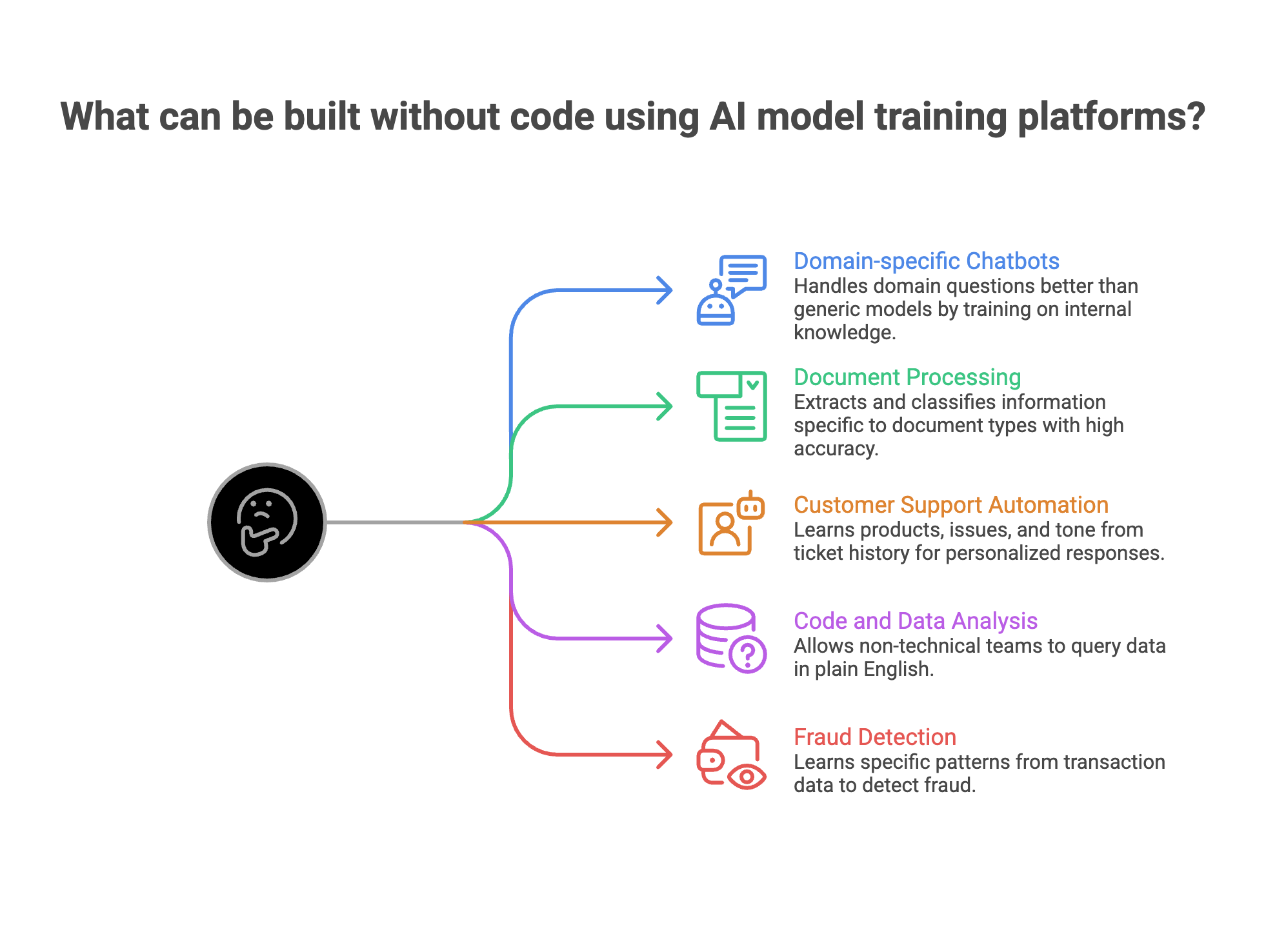
The use cases have expanded well beyond image classifiers. Here's what teams actually build with no-code AI model training platforms today.
1. Domain-specific chatbots and assistants.
Train a model on your internal knowledge base, product docs, or customer interaction history. The result handles domain questions that generic models fumble. A financial services firm training on regulatory documents gets better compliance answers than GPT-4 out of the box.
2. Document processing models.
Insurance claims, legal contracts, medical records. Fine-tuned models extract and classify information specific to your document types, with accuracy that pre-trained models can't match on specialized formats.
3. Customer support automation.
Feed your ticket history into a fine-tuned model. It learns your products, your common issues, and your tone. The difference between a generic AI response and one trained on your actual data is obvious to customers.
4. Code and data analysis.
Text-to-SQL models trained on your database schema let non-technical teams query data in plain English. Smaller fine-tuned models often outperform larger general models on specific database structures.
5. Fraud detection and risk scoring.
Train classification models on your transaction data. The model learns your specific patterns rather than generic ones.
Each of these used to require an ML team and months of work. With no-code platforms, a technical product manager can have a working prototype in days.
How No-Code AI Model Training Works
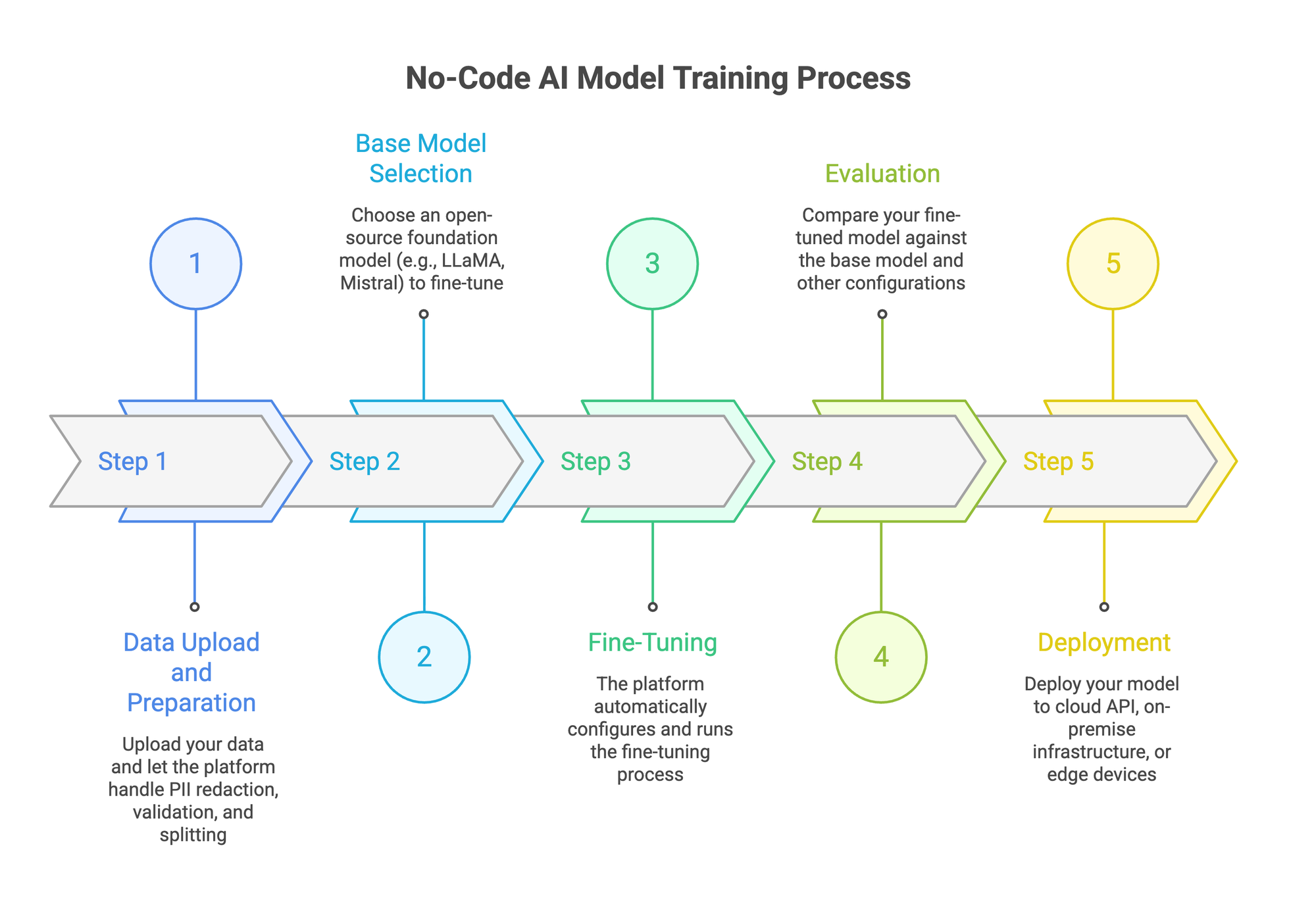
The process follows a consistent pattern across most platforms. Five steps from raw data to a deployed model.
Step 1: Data Upload and Preparation
You start with your data. Most platforms accept JSONL, CSV, PDF, TXT, and DOCX files. Upload is typically drag-and-drop.
Good platforms handle the messy parts automatically. That includes PII redaction (stripping personal data before training), format validation, and splitting data into training and evaluation sets. Some platforms also generate synthetic data to fill gaps in your dataset.
Fine-tuning quality depends directly on data quality. If your platform skips data preparation, expect problems downstream.
Step 2: Base Model Selection
You pick a foundation model to fine-tune. Options typically include open-source models like LLaMA, Mistral, Qwen, and Gemma in various sizes. Smaller models (7B-13B parameters) train faster and cost less. Larger models handle more complex tasks.
The right choice depends on your use case. A customer support chatbot might work fine with a 7B model. Complex reasoning tasks might need something bigger. Most platforms let you run experiments across multiple sizes to compare.
Step 3: Fine-Tuning
This is where the no-code part actually earns its name. Behind the interface, the platform handles LoRA configuration, learning rates, batch sizes, and training epochs. You set high-level preferences, and the system manages the rest.
Autonomous fine-tuning takes this further. The platform runs multiple experiments with different configurations, compares results, and selects the best-performing model. No manual hyperparameter tuning required.
Step 4: Evaluation
Training a model is half the work. You also need to know if it's any good.
Evaluation tools let you compare your fine-tuned model against the base model and against other configurations. The best platforms offer LLM-as-a-judge scoring, where another model evaluates response quality across metrics like accuracy, relevance, and safety.
Skip this step and you're deploying blind. Evaluation is where most DIY fine-tuning efforts fail, because building a proper eval pipeline from scratch is tedious work that most teams underestimate.
Step 5: Deployment
Once you have a model that passes evaluation, you deploy it. Options vary by platform: cloud API endpoints, on-premise infrastructure, or edge deployment.
For enterprise teams, deployment flexibility matters. You might need the model running in your own VPC for data sovereignty reasons, or self-hosted on your infrastructure for compliance.
What to Look for in a No-Code AI Platform
Not all platforms are equal. Some are glorified wrappers around a single API call. Others cover the full pipeline. Here's what separates serious platforms from marketing demos.
If a platform covers data prep, training, evaluation, and deployment in one workflow, you avoid the integration headaches that kill most AI projects before they ship.
How Prem Studio Handles This?
Prem Studio is built around the workflow described above. Here's how it maps in practice.
You upload datasets in JSONL, PDF, TXT, or DOCX through a drag-and-drop interface. The platform handles PII redaction automatically, generates synthetic data to augment small datasets, and splits data for training and evaluation.
For fine-tuning, you choose from 30+ base models including Mistral, LLaMA, Qwen, and Gemma. The autonomous fine-tuning system runs up to 6 concurrent experiments, tests different configurations, and surfaces the best-performing model. No hyperparameter tuning on your end.
Evaluation uses LLM-as-a-judge scoring with side-by-side model comparisons. You see exactly how your fine-tuned model stacks up against the base model and other experiment runs.
Deployment options include AWS VPC and on-premise infrastructure. Your data never leaves your control. Prem operates under Swiss jurisdiction (FADP), with SOC 2, GDPR, and HIPAA compliance. For teams in regulated industries like finance or healthcare, that's the difference between a viable option and a non-starter.
The full cycle runs through one interface. No switching between tools, no integration glue code.
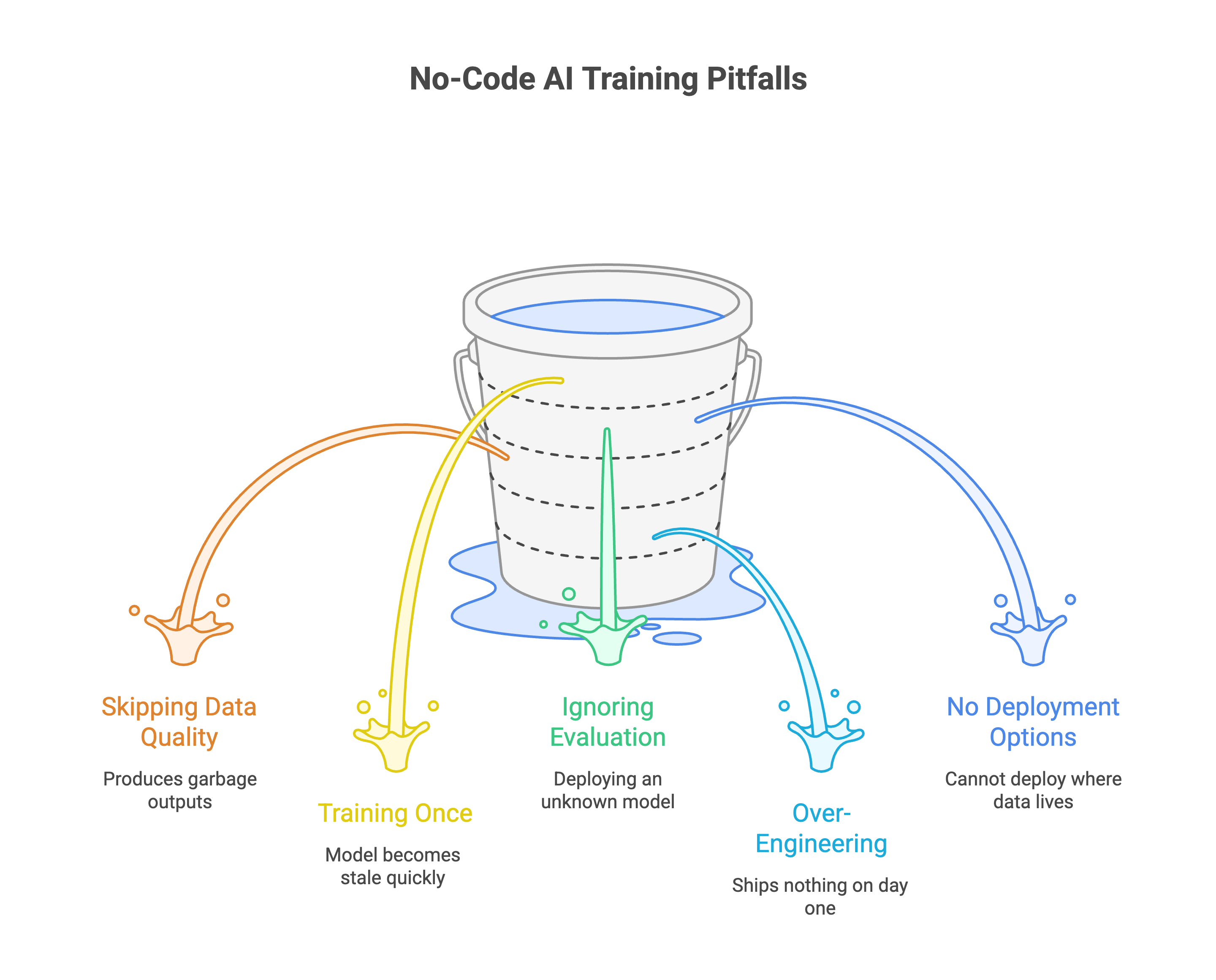
Mistakes That Waste Time and Money
A few patterns show up repeatedly when teams start with no-code AI training.
1. Skipping data quality. The most common failure. Teams upload raw data without cleaning, deduplication, or validation. The model trains fine but produces garbage outputs. Spend time on your dataset. It matters more than which model you pick.
2. Training once and deploying forever. Data changes. Customer behavior shifts. Regulations update. A model trained in January is stale by June. Plan for retraining cycles from the start. Continual learning is how production models stay accurate over time.
3. Ignoring evaluation. "It seems to work" is not evaluation. Without structured testing against specific metrics, you're deploying a model you don't understand. That's a liability in regulated industries.
4. Over-engineering the first version. Start small. Fine-tune a 7B model on a narrow use case. Prove it works. Then expand. Teams that try to build a do-everything model on day one usually ship nothing. Data distillation can help you start with a smaller, faster model and iterate from there.
5. Choosing a platform without deployment options. You trained a great model. Now you can't deploy it where your data lives because the platform only supports cloud endpoints. Check deployment options before you start training.
FAQ
Can no-code fine-tuned models match hand-coded ones?
For most enterprise use cases, yes. LoRA fine-tuning through a managed platform uses the same techniques an ML engineer would apply manually. The platform automates the configuration, not the underlying math. Where hand-coded approaches still win: highly experimental setups with custom architectures or novel reasoning pipelines.
How much data do I need?
Depends on the task. For classification and extraction, a few hundred high-quality examples can work. For complex generation, you might need thousands. Quality beats quantity every time. 500 well-curated examples outperform 10,000 messy ones. Synthetic data augmentation can bridge gaps in smaller datasets.
What does no-code AI model training cost?
Training costs depend on model size, dataset size, and compute time. A fine-tuning run on a 7B model with a few thousand examples typically costs $50-$200 on most platforms. Larger models and longer runs scale up from there. Compare that to hiring ML engineers at $150K+/year, and the math gets clear fast. You can also cut inference costs by up to 90% by fine-tuning smaller models that replace expensive API calls.
Can I move my model to a different platform later?
Look for platforms that export standard model formats (GGUF, SafeTensors). This prevents vendor lock-in. If a platform won't let you export your trained model, treat that as a dealbreaker. Prem Studio supports self-hosting fine-tuned models through vLLM and Ollama, giving you full control over where and how your model runs.
Building Custom AI Without the Overhead
The science behind fine-tuning hasn't changed. LoRA adapters, evaluation metrics, data preprocessing, it all still runs under the hood. No-code AI model trainers just remove the engineering bottleneck so your team can focus on what matters: your data and your use case.
Prem Studio handles the full pipeline in one no-code interface. Dataset prep, fine-tuning across 30+ models, built-in evaluation, and deployment to your own infrastructure, without writing a single line of code. For teams that need custom AI models without a dedicated ML team, it's the shortest path from data to production.