
Private LLM Deployment: A Practical Guide for Enterprise Teams (2026)
Learn how to deploy a private LLM for your enterprise. Covers infrastructure options, cost models, compliance requirements, and when self-hosting actually makes sense.
Most enterprises start with LLM APIs. OpenAI, Anthropic, Google. It's fast, it works, and someone else handles the infrastructure.
Then reality sets in.
Legal flags the data privacy risks. Finance questions the unpredictable API costs. Engineering wants to fine-tune models on proprietary data but can't. Everything runs through a third-party.
That's when private LLM deployment enters the conversation.
A private LLM is a large language model you control. It runs on infrastructure you own or manage. On-prem, private cloud, or inside your VPC. No data leaves your environment. No third-party has access to your prompts, outputs, or training data.
This guide covers what it actually takes to deploy a private LLM: infrastructure options, cost models, compliance requirements, and the trade-offs you'll face along the way.
Why Enterprises Choose Private LLMs
Four reasons keep coming up.
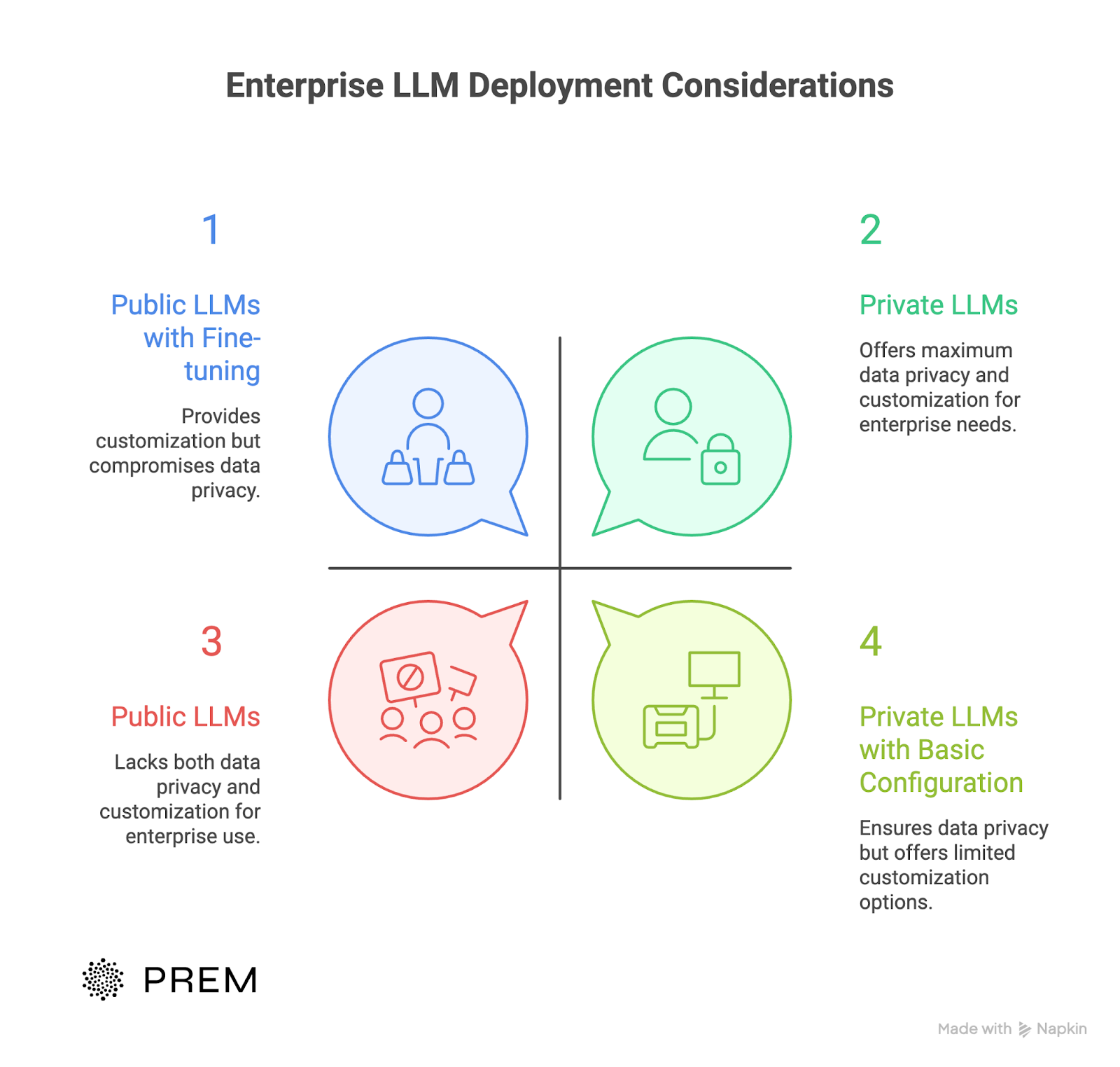
1. Data privacy and control
Public LLM APIs process your prompts on external servers. Your data leaves your environment. You lose visibility into how it's stored, logged, or used.
With a private LLM, sensitive data stays inside your firewall. You control every input and output. No third-party ever sees your proprietary information.
For enterprises handling customer data, financial records, or intellectual property, this should be the baseline.
2. Regulatory compliance
GDPR requires you to know where data goes and who processes it. HIPAA demands strict access controls for health information. Financial regulations add another layer.
Public APIs make compliance complicated. You're trusting a third-party to meet your obligations.
Private LLMs simplify the audit trail. Data never leaves your infrastructure. You define the access controls. You own the logs.
3. Cost predictability
API pricing looks cheap at first. Then usage scales.
A single API call costs fractions of a cent. But multiply that across thousands of employees, millions of queries, and months of usage. Costs become unpredictable.
Private deployment shifts the model. Higher upfront investment, but predictable ongoing costs. At scale, the math often favors self-hosting.
4. Customization and fine-tuning
Public LLMs are generalists. They work for broad use cases but struggle with your specific terminology, workflows, and domain knowledge.
Private LLMs let you fine-tune models on proprietary datasets. Train on your internal documents. Adapt to your industry language. Build something that actually fits your business.
What are the Deployment Options?
Three paths. Each comes with trade-offs.
1. On-premises deployment
You own the hardware. Servers sit in your data center. The LLM runs entirely within your physical infrastructure.
Maximum control. Maximum responsibility.
This works for organizations with strict data sovereignty requirements. Think defense contractors, government agencies, financial institutions with air-gapped environments.
The upside: complete control over data processing. Nothing leaves your building. Ever.
The downside: you need GPU clusters, cooling systems, physical security, and a team to maintain it all. Upfront costs run high. Scaling means buying more hardware.
Best for: Highly regulated industries where data can never touch external infrastructure.
2. Private cloud deployment
You rent dedicated infrastructure from a cloud provider. AWS, Azure, or Google Cloud provisions resources exclusively for you. No shared tenancy.
You get cloud flexibility without the shared environment risks.
The upside: faster deployment than on-prem. Easier scaling. The provider handles hardware maintenance.
The downside: data still lives on someone else's physical servers. Some compliance frameworks don't allow this. Costs scale with usage.
Best for: Enterprises that need scalability but want isolation from public cloud environments.
3. VPC (Virtual Private Cloud)
Your LLM runs in an isolated network segment within a public cloud. Traffic stays within your virtual boundary. You control access, routing, and security policies.
This is the most common choice for enterprise private LLM deployment.
The upside: balances security with practicality. You get cloud economics with network-level isolation. Easier to connect with existing cloud workloads.
The downside: still relies on the cloud provider's underlying infrastructure. Requires solid cloud architecture skills to configure correctly.
Best for: Most enterprises already running workloads in AWS, Azure, or GCP.
No single option wins. Your choice depends on where your data needs to live, what your compliance team requires, and how much infrastructure your team can realistically manage.
Infrastructure Requirements for Private LLM Deployment
Private LLM deployment requires serious computational resources. No way around it.
1. Hardware: GPUs are non-negotiable
Large language models run on GPUs. CPUs can't handle the parallel processing inference demands.
For a 7B parameter model, you need at least one high-end GPU. Think NVIDIA A100 or H100. For larger models (30B to 70B parameters), you're looking at GPU clusters with multiple cards working together.
This is where many teams underestimate costs. Enterprise-grade GPUs don't come cheap. A single H100 runs $25,000 or more. And you'll likely need several.
The good news: enterprise AI doesn't always need enterprise hardware. Smaller, fine-tuned models often outperform generic large models on specific tasks. More on that later.
2. Memory and storage
LLMs consume memory. A 7B model needs around 14GB of GPU RAM for inference. A 70B model needs 140GB or more.
Storage requirements depend on your use case. The base model weights, your training data, fine-tuned model versions, and logs all add up. Plan for terabytes, not gigabytes.
3. Networking
If you're deploying across multiple machines, network bandwidth matters. Model sharding and distributed inference require fast interconnects between GPU nodes.
For VPC deployments, configure your network to handle the traffic between your application layer and the inference servers. Latency here affects response times.
4. Frameworks and serving infrastructure
You need software to actually run the model. Common frameworks include:
- vLLM: High-throughput inference engine. Great for production workloads.
- Ollama: Simpler setup. Good for smaller deployments and testing.
- NVIDIA NIM: Enterprise-grade option with optimizations for NVIDIA hardware.
Your choice depends on scale, existing infrastructure, and team expertise. Check how to self-host fine-tuned models for a practical walkthrough.
The realistic minimum
For a basic private LLM deployment handling internal workflows:
- 1-2 enterprise GPUs (A100 or equivalent)
- 256GB+ system RAM
- High-speed NVMe storage (2TB+)
- Dedicated networking if distributed
For production workloads with high concurrency, multiply everything. And budget for redundancy.
How to Choose a Base Model?
You don't train a large language model from scratch. That costs millions and takes months.
Instead, you start with an open-source model and customize it.
1. Open-source LLMs worth considering
The landscape has matured fast. Several open-source models now rival proprietary APIs in quality.
- LLaMA 3 (Meta): The current benchmark. Available in 8B, 70B, and 405B parameter versions. Strong general performance. Large community and ecosystem. Commercially licensed.
- Mistral: Punches above its weight. The 7B model competes with much larger alternatives. Fast inference. Great for resource-constrained deployments.
- Qwen 2.5 (Alibaba): Strong multilingual capabilities. Good for enterprises operating across regions. Available in sizes from 0.5B to 72B.
- Falcon (TII): Open-source with permissive licensing. Solid performance, though less community momentum than LLaMA or Mistral.
- DeepSeek: Impressive reasoning capabilities. Worth watching, especially the R1 series. Read more on why open source is driving the future of enterprise AI.
2. What to actually look for
Model size isn't everything. A well-tuned 7B model often beats a generic 70B model on specific tasks.
Here's what matters:
- License terms: Can you use it commercially? Some models have restrictions. Check before you build.
- Task fit: Some models excel at conversation. Others handle code or structured data better. Match the model to your use case.
- Inference cost: Bigger models need more GPUs. If your budget is tight, a smaller model with fine-tuning may deliver better results at lower cost.
- Ecosystem support: Popular models have better tooling, more tutorials, and faster bug fixes. LLaMA and Mistral lead here.
- Language support: If you operate globally, check multilingual benchmarks. Not all models handle non-English languages well.
The small model advantage
Here's something competitors won't tell you: small language models often make more sense for enterprise deployment.
A 7B model fine-tuned on your data can outperform GPT-4 on your specific workflow. It runs faster, costs less, and fits on fewer GPUs.
The key is fine-tuning. Which brings us to the next section.
Fine-Tuning Private LLM for Your Use Case
A base model gets you 80% of the way. Fine-tuning gets you the rest.
Why fine-tuning matters
Public LLMs train on general internet data. They don't know your products, your terminology, or your internal processes.
Fine-tuning adapts a model to your specific tasks. You train it on your proprietary data. The model learns your domain. Outputs become relevant to your actual business.
This is where private LLMs pull ahead of public APIs. You can't fine-tune GPT-4 on your confidential documents. With a private deployment, you can.
What you need
Good training data. That's the hard part.
Your dataset should represent the tasks you want the model to perform. Customer support tickets. Internal documentation. Industry-specific content. Whatever reflects your actual workflows.
Quality beats quantity. A small dataset of well-curated examples often outperforms a massive dump of messy data. Enterprise dataset automation can help clean and structure your data at scale.
Full fine-tuning vs LoRA
Full fine-tuning updates all model parameters. It's thorough but expensive. You need significant GPU resources and time.
LoRA (Low-Rank Adaptation) updates only a small subset of parameters. It's faster, cheaper, and often just as effective for specific tasks. Most enterprise deployments start here.
For a deeper comparison, see SLM vs LoRA LLM for edge deployment.
The practical path
Start with a strong base model. Prepare a focused dataset. Run fine-tuning experiments. Evaluate results against your actual use case.
This sounds simple. It's not. The dataset to production model pipeline has many steps where things can go wrong.
The payoff is worth it. A fine-tuned private LLM understands your business in ways a generic API never will.
Keeping models current
Your business changes. Your model should too.
Continual learning lets you update models as new data comes in. Without it, your fine-tuned model becomes stale over time
Security and Compliance
Private deployment solves half the compliance puzzle. You still need to get the rest right.
1. Data never leaving isn't enough
Yes, your data stays inside your environment. That's the starting point. But auditors want more.
They want to know who accessed what. When. Why. They want proof that sensitive data is handled correctly at every step.
Private LLM deployment gives you the foundation. You build the controls on top.
2. Access controls
Not everyone needs access to everything.
Role-based access limits who can query the model, view outputs, or modify configurations. Your legal team might access contract analysis. Your engineering team accesses code generation. Neither sees the other's data.
Implement authentication through your existing identity provider. SSO, MFA, the usual enterprise stack. The LLM infrastructure should plug into what you already use.
3. Audit logging
Every interaction should leave a trail.
Log the prompts. Log the outputs. Log who sent them and when. Store logs in a tamper-evident system.
This isn't just for regulators. It helps you debug issues, monitor for misuse, and understand how people actually use the system.
4. GDPR and data residency
GDPR requires you to control where EU citizen data goes. With public APIs, proving compliance gets complicated. Data crosses borders. Third parties process it.
Private deployment simplifies this. Data stays where you put it. You control the geography. For teams building GDPR compliant AI chat systems, this is often the deciding factor.
5. Handling sensitive data in context
Here's a risk teams overlook: what goes into the prompt.
Users paste sensitive information into LLM queries. Customer names. Account numbers. Health records. The model processes it. Now that data exists in logs, memory, and potentially cached outputs.
Build guardrails. Automatic PII detection. Input sanitization. Clear policies on what users can and can't submit. Read about privacy concerns in RAG applications for deeper coverage.
6. Continuous monitoring
Security isn't a one-time setup.
Monitor for anomalies. Unusual query patterns. Attempts to extract training data. Prompt injection attacks. Your LLM infrastructure needs the same monitoring you'd apply to any critical system.
What Is The Total Cost of Ownership?
Everyone asks: is private deployment cheaper than APIs?
The honest answer: it depends on scale. The numbers tell you where the line is.
1. API costs at enterprise scale
Public LLM APIs charge per token. 2025 costs typically range from $0.25 to $15 per million input tokens and $1.25 to $75 per million output tokens.
At low volume, this works. A few hundred queries a day? API pricing is fine.
At enterprise scale, the math changes. One team's first full-month invoice came in near $15k. The second hit $35k. By month three it was touching $60k. On that run rate, the annual API bill would clear $700k.
And that's before hidden costs. Monitoring, logging, auditing, and security layers often account for 20-40% of total LLM operational expenses.
2. The breakeven point
A private LLM starts to pay off when you process over 2 million tokens a day or require strict compliance like HIPAA or PCI. Most teams see payback within 6 to 12 months.
For context: minimum viable scale is roughly 8,000+ conversations per day before self-hosted beats managed solutions.
Below that threshold? Stick with APIs.
3. Self-hosted cost breakdown
Independent research found that chips and staff typically make up 70-80% of total LLM deployment costs.
Here's what a realistic setup looks like:
A single 7B model running on an H100 spot node at 70% utilization costs roughly $10k per year. Add power costs around $300 annually. Total bare-metal run: approximately $10.3k per year.
That's for a smaller model. Larger deployments scale accordingly.
True 8×H100 operational cost runs $8-15 per hour including cooling, facilities, and maintenance.
4. Utilization is everything
Here's what most cost analyses miss: GPU utilization determines whether self-hosting makes sense.
A GPU running at 10% load transforms $0.013 per thousand tokens into $0.13. That's more expensive than premium APIs.
The math shifts based on model size. Hosting a 7B model requires approximately 50% utilization to cost less than GPT-3.5 Turbo. A 13B model achieves cost parity with GPT-4-turbo at only 10% utilization.
Larger models break even at lower utilization because they replace more expensive API alternatives.
Real-world example
One telemedicine client cut monthly spend from $48k to $32k after shifting chat triage to a self-hosted LLM. That's a 33% reduction.
For teams looking to optimize costs without going fully self-hosted, there are strategies that deliver quick wins. One company cut their LLM spend by 90% by moving away from API-based pricing.
When private deployment wins
The decision framework is straightforward:
- Under 1 million tokens/day: APIs probably win
- 1-2 million tokens/day: Run the numbers for your specific case
- Over 2 million tokens/day: Private deployment often makes financial sense
- Compliance requirements (HIPAA, PCI, GDPR): Cost becomes secondary to control
For a detailed infrastructure walkthrough, see our self-hosted LLM guide.
Common Pitfalls While Deploying Private LLM
Private LLM deployment fails for predictable reasons. Most have nothing to do with the model itself.
1. Starting too big
Teams jump straight to a 70B parameter model when a 7B would do the job. They plan for company-wide rollout before proving value with a single team.
This backfires. Infrastructure costs balloon. Timelines slip. Stakeholders lose patience.
Start with one use case. One team. Clear success metrics. Prove it works, then expand.
2. Treating it like a normal software project
This isn't deploying a web app. Model files run 10GB or more. GPU drivers have compatibility quirks. Memory requirements are brutal.
Teams that staff this like a standard deployment get stuck debugging infrastructure for months. Bring in people who've done it before, or budget extra time for the learning curve.
3. Bad data, bad model
Your fine-tuned model reflects your training data. If that data is messy, outdated, or biased, your model will be too.
Most teams underestimate how long data preparation takes. It's not a weekend task. Clean, validate, and structure your datasets properly. This step determines whether fine-tuning actually helps.
4. No evaluation framework
How do you know if your model is good enough? Many teams can't answer this.
Without clear benchmarks, you can't measure improvement. You can't catch regressions. You can't justify continued investment.
Set up evaluation before deployment, not after. Define what "good" looks like for your specific use case. Our guide on LLM evaluation covers the practical steps.
5. Underestimating hallucinations
LLMs make things up. Confidently. This is fine for brainstorming. It's dangerous for legal, financial, or customer-facing applications.
Ground your model with RAG pipelines connected to verified internal data. Add human review for high-stakes outputs. Don't trust raw model responses in production.
6. Thinking deployment is the finish line
It's not. Models drift. Business needs change. New data emerges.
Plan for ongoing maintenance from day one. Monitor performance. Retrain periodically. Budget for it. Teams that treat deployment as a one-time project end up with stale, underperforming systems within months.
Getting Started with Private LLM Depoyment
You don't need to figure this out alone.
1. Assess your actual needs
Before touching infrastructure, answer three questions:
- What specific problem are you solving? Generic "AI transformation" isn't a use case. "Reduce support ticket response time by 40%" is.
- What data do you have? Fine-tuning requires quality training data. If you don't have it, start there.
- What are your compliance requirements? This determines your deployment model. Some industries have no choice but on-prem.
2. Start with managed tooling
Building from scratch makes sense for companies with dedicated ML teams and infrastructure experience. For everyone else, it's a distraction.
Managed platforms handle the hard parts: dataset preparation, fine-tuning workflows, model evaluation, deployment. You focus on your actual business problem.
Prem Studio was built for this. Upload your data, fine-tune on 30+ base models, evaluate results, deploy to your own infrastructure. No data leaves your environment. The platform handles complexity so your team doesn't have to.
3. Run a pilot
Pick a low-risk, high-value use case. Internal knowledge search. Document summarization. Support ticket routing.
Set a 90-day timeline. Define success metrics upfront. Measure honestly.
A successful pilot gives you the evidence to expand. A failed pilot, caught early, saves you from a larger mistake.
4. Build internal expertise
Vendors can accelerate your start. They shouldn't become permanent dependencies.
Invest in your team's capabilities. Document what works. Build institutional knowledge. The goal is owning your AI stack and not renting it indefinitely.
Private LLM deployment is a journey. Start small, learn fast, scale what works.
FAQs
How much does private LLM deployment cost?
It depends on scale. A basic setup with a single GPU runs $10-15k annually. Enterprise deployments with multiple GPUs and high availability start at $100k+. The breakeven point versus API costs is typically around 2 million tokens per day.
What infrastructure do I need to deploy a private LLM?
At minimum: enterprise GPUs (NVIDIA A100 or H100), 256GB+ system RAM, fast NVMe storage, and a serving framework like vLLM. For VPC or cloud deployment, you need properly configured networking and security. Smaller models (7B parameters) need less. Larger models require GPU clusters.
How long does it take to deploy a private LLM?
A basic proof-of-concept takes 4-8 weeks. Production deployment with fine-tuning, evaluation, and security controls typically runs 3-6 months. The timeline depends heavily on data readiness and team experience.
Do I need a dedicated ML team to run a private LLM?
Not necessarily. Managed platforms like Prem Studio handle infrastructure and fine-tuning workflows. You still need someone who understands the system, but a full ML team is only required if you're building from scratch or doing heavy customization.
Is private LLM deployment GDPR and HIPAA compliant?
Private deployment makes compliance easier, not automatic. Data stays in your environment, which solves the third-party data transfer problem. You still need proper access controls, audit logging, encryption, and documentation. The infrastructure supports compliance. Your policies and processes complete it.
Conclusion
Private LLM deployment isn't simple. But for enterprises serious about data control, compliance, and long-term cost efficiency, it's increasingly the right path.
Start with a clear use case. Get your data in order. Choose infrastructure that matches your actual constraints. And don't try to build everything from scratch unless you have a good reason.
The technology is mature enough. The tooling exists. The question is whether your organization is ready to operate one.