
Private RAG Deployment: Building Zero-Leakage Retrieval Pipelines for Enterprise
Private RAG deployment matters when you’re handling sensitive data. But here’s the problem: most implementations leak information at multiple points without teams realizing it.
We’ve seen this firsthand.
The BadRAG attack’s optimized variant achieves 98.2% success rate by poisoning just 0.04% of your document corpus. Vec2Text can reconstruct original text from embeddings with 92% exact match accuracy on short inputs. Embeddings are not cryptographically secure, and attackers with database access can recover meaningful content.
This guide covers the architecture we use for building truly air-gapped RAG pipelines. We’ll walk through specific attack vectors with their CVEs, compare self-hosted embedding models by MTEB benchmarks, evaluate vector database security features, and provide deployable code for each component.
By the end, you’ll have a production-ready blueprint for secure RAG pipelines that keeps every byte of data under your control.
Why Your “Private” RAG Probably Isn’t
Most organizations believe self-hosting an LLM makes their RAG pipeline private. This assumption ignores the multiple data exfiltration points in a typical implementation.
Consider the standard RAG architecture: documents flow through parsing services, text gets chunked and sent to embedding APIs, vectors land in cloud-hosted databases, queries hit those same APIs, and retrieved context finally reaches the LLM. At minimum, five separate services see your data.
Data Exposure Points in Typical RAG Pipelines
| Pipeline Stage | Common Implementation | Data Exposure Risk |
|---|---|---|
| Document Ingestion | AWS Textract, Google Document AI | Full document content including PII |
| Embedding Generation | OpenAI text-embedding-3-large, Cohere | Every text chunk sent externally |
| Vector Storage | Pinecone, Weaviate Cloud | Semantic representations of all content |
| Query Processing | Same embedding API | User queries reveal intent and topics |
| Response Generation | GPT-4, Claude API | Complete prompt including retrieved documents |
The math of leakage makes this worse than it appears. Embedding inversion attacks like Vec2Text reconstruct original text from dense vectors with surprisingly high fidelity. Membership inference attacks determine whether specific documents exist in your corpus. Query pattern analysis across your embedding calls reveals sensitive topics your organization researches.
Even “private” vector databases hosted in your cloud account often send telemetry, model updates, or backup data to vendor infrastructure. The attack surface extends far beyond what most security teams audit.
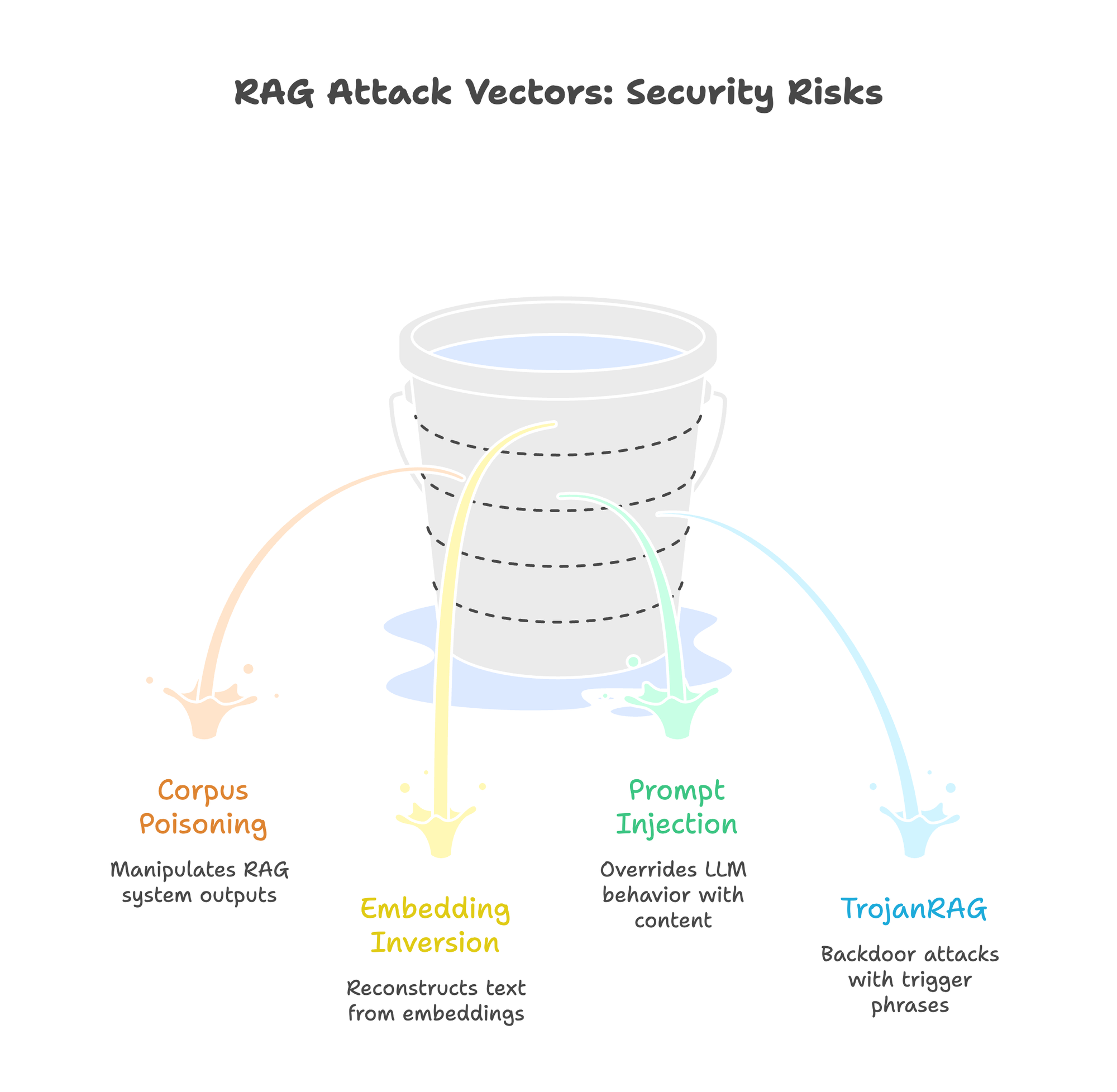
RAG Attack Vectors Security Teams Must Know
Understanding specific attack patterns helps design appropriate defenses. These aren’t theoretical. Each has published research or real-world CVEs.
Corpus Poisoning: The BadRAG Attack
BadRAG (Xue et al., 2024) shows how attackers manipulate RAG system outputs by injecting carefully crafted documents. The attack requires poisoning only 0.04% of a corpus. The optimized Merged Adaptive COP variant achieves 98.2% attack success rate.
The mechanism works by creating documents with artificially high semantic similarity to target queries. When a user asks about topic X, the poisoned document ranks highest in retrieval and delivers attacker-controlled content to the LLM. The model, instructed to answer based on retrieved context, propagates the malicious information.
Defenses include provenance tracking for all ingested documents, anomaly detection on embedding distributions (poisoned docs often cluster unusually), and retrieval diversity requirements that prevent single-source dominance.
Embedding Inversion: Vec2Text
Morris et al. demonstrated that dense text embeddings are not one-way functions. Their Vec2Text system reconstructs original text from embedding vectors, achieving 92% exact match accuracy on short (32-token) inputs using the GTR-base model with optimized beam search. Accuracy drops for longer texts. 128-token inputs show around 8% exact match on OpenAI ada-002.
The security implication: embeddings are not cryptographically secure. While not equivalent to plaintext for all scenarios, motivated attackers with database access can recover meaningful content. Cloud vector databases, even with encryption at rest, expose embeddings to the service provider. Follow-up research showed that simple defenses like Gaussian noise can reduce inversion accuracy, but the fundamental risk remains.
This attack applies to any embedding model, though reconstruction accuracy varies significantly by model architecture and input length. None provide cryptographic security guarantees.
Prompt Injection via Retrieved Content
When RAG systems retrieve attacker-controlled documents, those documents can contain hidden instructions that override the LLM’s behavior. This transforms your knowledge base into an attack vector.
Real-world vulnerabilities show the severity:
- CVE-2025-68664 (LangChain): CVSS 9.3 critical serialization injection vulnerability. Unescaped internal markers in LangChain’s
dumps()/dumpd()serialization functions allow attacker-controlled data, including via prompt injection in RAG contexts, to be deserialized as trusted objects, enabling secret extraction and potential code execution. - CVE-2025-1793 (LlamaIndex): CVSS 9.8 critical SQL injection across eight vector store integrations (ClickHouse, Couchbase, DeepLake, Jaguar, Lantern, Nile, OracleDB, SingleStoreDB) where user-supplied inputs to methods like
delete()were not properly parameterized.
These aren’t edge cases. Any RAG system that ingests external documents (web scraping, user uploads, partner data feeds) faces prompt injection risk. The LLM cannot reliably distinguish between legitimate context and injected instructions.
TrojanRAG: Backdoor Attacks
Proposed by Cheng et al. (2024), TrojanRAG demonstrates backdoor attacks where specific trigger phrases activate malicious behavior. The attack embeds triggers during fine-tuning or through corpus poisoning that the model learns to respond to differently.
Unlike prompt injection, TrojanRAG attacks persist across sessions and resist standard content filtering. The trigger phrases can be innocuous terms that only activate malicious behavior in specific combinations.
Architecture: True Private RAG Stack
Genuine private RAG deployment requires air-gapping every component. No external API calls. No cloud-hosted services. No telemetry leaking to vendors.
┌─────────────────────────────────────────────────────────────────┐
│                      AIR-GAPPED BOUNDARY                         │
├─────────────────────────────────────────────────────────────────┤
│                                                                  │
│  ┌──────────────┐    ┌──────────────┐    ┌──────────────┐      │
│  │   Document   │    │  Self-Hosted │    │    Local     │      │
│  │   Ingestion  │───▶│  Embeddings  │───▶│  Vector DB   │      │
│  │ (Unstructured)│    │  (BGE-M3/TEI)│    │   (Qdrant)   │      │
│  └──────────────┘    └──────────────┘    └──────────────┘      │
│                                                     │            │
│                                                     ▼            │
│  ┌──────────────┐    ┌──────────────┐    ┌──────────────┐      │
│  │   Response   │◀───│   Private    │◀───│    Query     │      │
│  │   Delivery   │    │     LLM      │    │   Routing    │      │
│  │              │    │(PremAI/vLLM) │    │              │      │
│  └──────────────┘    └──────────────┘    └──────────────┘      │
│                                                                  │
└─────────────────────────────────────────────────────────────────┘
          ▲
          │ Network segmentation: No outbound internet access
          │ All model weights pre-loaded via secure transfer
The core principle: zero external network calls during the entire RAG pipeline. Every component (document parsing, embedding generation, vector storage, query processing, and response generation) runs on infrastructure your organization controls.
Network segmentation enforces this at the infrastructure level. The RAG subnet has no route to the internet. Model weights transfer through a controlled staging process. Updates flow through an air-gapped approval workflow.
Self-Hosted Embedding Models: Performance Comparison
Embedding generation is the most commonly overlooked leak point. Every text-embedding-3-large API call sends your document chunks to OpenAI. Self-hosted embeddings eliminate this entirely.
The good news: open-source embedding models now match or exceed proprietary options on standard benchmarks.
Self-Hosted Embedding Model Comparison
| Model | Parameters | MTEB Score | Memory (FP16) | License | Deployment Notes |
|---|---|---|---|---|---|
| NV-Embed-v2 | 7.85B | 72.31 | ~16GB | CC-BY-NC-4.0 | Highest accuracy, requires A100 |
| GTE-Qwen2-7B | 7B | 70.24 | ~14GB | Apache 2.0 | Best open commercial license |
| E5-Mistral-7B | 7B | 66.63 | ~14GB | MIT | Strong multilingual support |
| Jina-embeddings-v3 | 570M | 65.6 | ~1.2GB | CC-BY-NC-4.0 | 8K context, efficient |
| BGE-M3 | 568M | 63.0 | ~1.2GB | MIT | Production workhorse |
| Nomic-embed-text-v1.5 | 137M | 62.28 | ~300MB | Apache 2.0 | CPU-viable, smallest footprint |
MTEB scores as of February 2026. The leaderboard updates frequently. Check huggingface.co/spaces/mteb/leaderboard for current standings. Memory estimates for FP16 inference.
For most enterprise deployments, BGE-M3 offers the optimal balance: MIT license allows commercial use without restrictions, 568M parameters run efficiently on modest GPU hardware, and 63.0 MTEB score provides competitive retrieval quality. Organizations with GPU clusters can upgrade to GTE-Qwen2-7B for 7+ points improvement.
Deployment with Text Embeddings Inference (TEI)
Hugging Face’s TEI provides production-grade embedding serving with optimized batching:
# Deploy BGE-M3 with TEI
docker run --gpus all -p 8080:80 \
  -v ~/.cache/huggingface:/data \
  ghcr.io/huggingface/text-embeddings-inference:latest \
  --model-id BAAI/bge-m3 \
  --max-batch-tokens 16384

# Verify deployment
curl http://localhost:8080/embed \
  -X POST \
  -H 'Content-Type: application/json' \
  -d '{"inputs": "Test document for embedding"}'
TEI handles GPU batching automatically, achieving 10,000+ embeddings per second on A100 hardware for short inputs (throughput varies with sequence length and batch configuration). For air-gapped deployments, pre-download model weights and load from local volume.
Alternative: Direct Python Deployment
For simpler setups or development environments:
from sentence_transformers import SentenceTransformer
import numpy as np

# Load locally - no external API calls
model = SentenceTransformer('BAAI/bge-m3', device='cuda')

def embed_documents(chunks: list[str], batch_size: int = 32) -> np.ndarray:
    """Generate embeddings entirely on-premise."""
    embeddings = model.encode(
        chunks,
        batch_size=batch_size,
        show_progress_bar=True,
        normalize_embeddings=True  # For cosine similarity
    )
    return embeddings

# Usage
chunks = ["Document chunk 1...", "Document chunk 2..."]
vectors = embed_documents(chunks)
Vector Database Security Deep Dive
Vector databases vary dramatically in security capabilities. Choose based on your compliance requirements, not just performance benchmarks.
Vector Database Security Feature Matrix
| Feature | Qdrant | Milvus | Weaviate | pgvector | Chroma |
|---|---|---|---|---|---|
| TLS/mTLS | Full | Full | Full | PostgreSQL native | Via proxy |
| RBAC | JWT-based | Full RBAC | API key | PostgreSQL RLS | Token-based |
| At-Rest Encryption | AES-256 | AES-256 | AES-256 | PostgreSQL TDE | None |
| Multi-Tenancy | Collection-level | Partition-level | Native classes | Schema-level | None |
| Audit Logging | Configurable | Full | Configurable | PostgreSQL native | None |
| Air-Gap Ready | Excellent | Excellent | Good | Excellent | Limited |
Chroma has added basic authentication in recent versions but lacks enterprise security features. Production private RAG typically requires Qdrant, Milvus, pgvector, or Weaviate self-hosted.
Qdrant Security Configuration
Qdrant provides robust security with minimal configuration overhead. For enterprise deployments:
# qdrant-config.yaml
service:
  enable_tls: true
  api_key: ${QDRANT_API_KEY}  # Rotate regularly

storage:
  storage_path: /qdrant/storage
  snapshots_path: /qdrant/snapshots

# Enable JWT authentication for fine-grained RBAC
security:
  jwt_rbac: true
  jwt_secret: ${JWT_SECRET}

# TLS configuration
tls:
  cert: /certs/server.crt
  key: /certs/server.key
  ca_cert: /certs/ca.crt  # For mTLS
Deploy with Docker:
docker run -p 6333:6333 -p 6334:6334 \
  -v $(pwd)/qdrant-config.yaml:/qdrant/config/config.yaml \
  -v $(pwd)/certs:/certs \
  -v $(pwd)/storage:/qdrant/storage \
  -e QDRANT_API_KEY=${QDRANT_API_KEY} \
  qdrant/qdrant
PostgreSQL + pgvector: Leverage Existing Security
If your organization already runs PostgreSQL with security hardening, pgvector adds vector capabilities without new infrastructure:
-- Enable pgvector extension
CREATE EXTENSION vector;

-- Create table with row-level security
CREATE TABLE documents (
    id SERIAL PRIMARY KEY,
    tenant_id UUID NOT NULL,
    content TEXT,
    embedding vector(1024),  -- BGE-M3 dimension
    created_at TIMESTAMP DEFAULT NOW()
);

-- Enable RLS
ALTER TABLE documents ENABLE ROW LEVEL SECURITY;

-- Tenant isolation policy
CREATE POLICY tenant_isolation ON documents
    USING (tenant_id = current_setting('app.tenant_id')::uuid);

-- Create HNSW index for fast similarity search
CREATE INDEX ON documents
    USING hnsw (embedding vector_cosine_ops)
    WITH (m = 16, ef_construction = 64);
This pattern inherits PostgreSQL’s battle-tested security: TDE for encryption, RLS for multi-tenancy, pg_audit for compliance logging, and SCRAM-SHA-256 for authentication.
Complete Pipeline Implementation
Here’s a production-ready private RAG implementation connecting all components:
from qdrant_client import QdrantClient
from qdrant_client.models import VectorParams, Distance, PointStruct
from sentence_transformers import SentenceTransformer
import requests
from typing import List
import uuid

class PrivateRAGPipeline:
    """Zero-leakage RAG pipeline with all components self-hosted."""

    def __init__(
        self,
        qdrant_host: str = "localhost",
        qdrant_port: int = 6333,
        llm_endpoint: str = "http://localhost:8000/v1",  # PremAI or vLLM
        embedding_model: str = "BAAI/bge-m3"
    ):
        # All connections are to local services
        self.qdrant = QdrantClient(host=qdrant_host, port=qdrant_port)
        self.embedder = SentenceTransformer(embedding_model, device='cuda')
        self.llm_endpoint = llm_endpoint

    def create_collection(self, name: str, vector_dim: int = 1024):
        """Initialize vector collection with security settings."""
        self.qdrant.create_collection(
            collection_name=name,
            vectors_config=VectorParams(
                size=vector_dim,
                distance=Distance.COSINE
            )
        )

    def ingest_documents(
        self,
        documents: List[str],
        collection: str,
        batch_size: int = 32
    ):
        """Embed and store documents entirely on-premise."""
        embeddings = self.embedder.encode(
            documents,
            batch_size=batch_size,
            normalize_embeddings=True
        )

        points = [
            PointStruct(
                id=str(uuid.uuid4()),
                vector=emb.tolist(),
                payload={"text": doc}
            )
            for doc, emb in zip(documents, embeddings)
        ]

        self.qdrant.upsert(collection_name=collection, points=points)

    def query(
        self,
        question: str,
        collection: str,
        top_k: int = 5
    ) -> str:
        """Execute private RAG query with zero external calls."""
        # Embed query locally
        query_vector = self.embedder.encode(
            question,
            normalize_embeddings=True
        ).tolist()

        # Retrieve from local Qdrant
        results = self.qdrant.search(
            collection_name=collection,
            query_vector=query_vector,
            limit=top_k
        )

        # Build context from retrieved documents
        context = "\n\n".join([
            f"[Document {i+1}]: {r.payload['text']}"
            for i, r in enumerate(results)
        ])

        # Generate response with local LLM
        response = requests.post(
            f"{self.llm_endpoint}/chat/completions",
            json={
                "model": "mistral-7b",
                "messages": [
                    {
                        "role": "system",
                        "content": "Answer based only on the provided context. "
                                   "If the context doesn't contain the answer, say so."
                    },
                    {
                        "role": "user",
                        "content": f"Context:\n{context}\n\nQuestion: {question}"
                    }
                ],
                "temperature": 0.1
            }
        )

        return response.json()["choices"][0]["message"]["content"]

# Usage
pipeline = PrivateRAGPipeline(
    llm_endpoint="http://localhost:8000/v1"  # Self-hosted via PremAI
)
pipeline.create_collection("enterprise_docs")
pipeline.ingest_documents(documents, "enterprise_docs")
answer = pipeline.query("What is our data retention policy?", "enterprise_docs")
The llm_endpoint connects to a self-hosted inference server. PremAI simplifies this by providing a unified API across multiple local models. You can switch between Mistral, Llama, or fine-tuned variants without changing application code. Combined with self-hosted embeddings and local Qdrant, this achieves complete air-gapping.
Network Architecture for Zero Trust RAG
Code alone doesn’t guarantee privacy. Network architecture must enforce air-gapping at the infrastructure level.
Network Segmentation
Deploy RAG components in an isolated subnet with no internet gateway:
# Terraform example for AWS VPC
resource "aws_subnet" "rag_private" {
  vpc_id                  = aws_vpc.main.id
  cidr_block              = "10.0.100.0/24"
  map_public_ip_on_launch = false  # No public IPs

  tags = {
    Name = "rag-air-gapped-subnet"
  }
}

# No NAT gateway attachment - truly air-gapped
# Models loaded via S3 VPC endpoint or secure transfer
resource "aws_vpc_endpoint" "s3" {
  vpc_id       = aws_vpc.main.id
  service_name = "com.amazonaws.us-east-1.s3"

  # Only allow specific model buckets
  policy = jsonencode({
    Version = "2012-10-17"
    Statement = [{
      Effect    = "Allow"
      Principal = "*"
      Action    = "s3:GetObject"
      Resource  = "arn:aws:s3:::your-model-bucket/*"
    }]
  })
}
mTLS for Internal Communication
Every service-to-service call should require mutual TLS authentication:
# Istio PeerAuthentication for RAG namespace
apiVersion: security.istio.io/v1beta1
kind: PeerAuthentication
metadata:
  name: rag-strict-mtls
  namespace: rag-system
spec:
  mtls:
    mode: STRICT
This prevents network-level attacks even if an attacker gains access to the RAG subnet. Each service must present valid certificates signed by your internal CA.
Defense-in-Depth: Hardening the Pipeline
Air-gapping prevents external leakage. Defense-in-depth protects against internal threats and compromised components.
Input Validation Layer
Sanitize all inputs before they enter the pipeline:
import re
import hashlib
from datetime import datetime
from typing import Optional

class InputValidator:
    """Validate and sanitize RAG inputs."""

    # Patterns that might indicate prompt injection
    INJECTION_PATTERNS = [
        r"ignore previous instructions",
        r"disregard.*context",
        r"you are now",
        r"new instructions:",
        r"<\|.*\|>",  # Special tokens
    ]

    def validate_query(self, query: str) -> tuple[bool, Optional[str]]:
        """Check query for potential injection attempts."""
        query_lower = query.lower()

        for pattern in self.INJECTION_PATTERNS:
            if re.search(pattern, query_lower):
                return False, f"Blocked pattern: {pattern}"

        # Length limits
        if len(query) > 2000:
            return False, "Query exceeds maximum length"

        return True, None

    def validate_document(self, doc: str, source: str) -> tuple[bool, dict]:
        """Validate document before ingestion."""
        metadata = {
            "source": source,
            "ingested_at": datetime.utcnow().isoformat(),
            "hash": hashlib.sha256(doc.encode()).hexdigest()
        }

        # Check for injection in documents
        for pattern in self.INJECTION_PATTERNS:
            if re.search(pattern, doc.lower()):
                metadata["flagged"] = True
                metadata["flag_reason"] = pattern
                # Log but don't necessarily block - may need human review

        return True, metadata
Output Filtering
Screen generated responses before delivery:
def filter_response(response: str, pii_detector) -> str:
    """Filter PII and sensitive content from responses."""
    # PII detection (use presidio or similar)
    pii_results = pii_detector.analyze(response)

    if pii_results:
        # Process in reverse order to maintain correct string offsets
        for result in sorted(pii_results, key=lambda r: r.start, reverse=True):
            response = response[:result.start] + "[REDACTED]" + response[result.end:]

    return response
Monitoring and Audit
Log all queries for security analysis and compliance:
import structlog
from datetime import datetime
from cryptography.fernet import Fernet

logger = structlog.get_logger()

class AuditLogger:
    """Encrypted audit logging for RAG queries."""

    def __init__(self, encryption_key: bytes):
        self.cipher = Fernet(encryption_key)

    def log_query(
        self,
        query: str,
        user_id: str,
        retrieved_doc_ids: list[str],
        response_hash: str
    ):
        """Log query with encryption for sensitive fields."""
        encrypted_query = self.cipher.encrypt(query.encode()).decode()

        logger.info(
            "rag_query",
            user_id=user_id,
            query_encrypted=encrypted_query,
            retrieved_docs=retrieved_doc_ids,
            response_hash=response_hash,
            timestamp=datetime.utcnow().isoformat()
        )
Compliance Mapping: Private RAG vs. Regulatory Requirements
Private RAG deployment directly addresses multiple regulatory requirements:
| Requirement | GDPR | HIPAA | SOC 2 | Private RAG Implementation |
|---|---|---|---|---|
| Data Minimization | Art. 5(1)© | - | CC6.1 | No cloud copies; data stays on-premise |
| Access Controls | Art. 32 | §164.312(a) | CC6.1-6.3 | RBAC on vector DB and LLM endpoints |
| Encryption | Art. 32 | §164.312(e) | CC6.1 | TLS 1.3 in transit, AES-256 at rest |
| Audit Trails | Art. 30 | §164.312(b) | CC7.2 | Encrypted query logs, access tracking |
| Data Residency | Art. 44-49 | - | - | Self-hosted = controlled jurisdiction |
| Breach Notification | Art. 33 | §164.404-414 | CC7.3 | Air-gapped system reduces blast radius |
For organizations under multiple regulatory frameworks, private RAG provides a single architecture that satisfies overlapping requirements. The data residency article covers jurisdiction-specific requirements in detail.
Production Deployment Checklist
Before going live, verify every security control:
Security Verification
- All embedding generation confirmed on-premise (no OpenAI/Cohere calls)
- Vector database TLS enabled and RBAC configured
- LLM inference endpoint accepts only internal traffic
- Network segmentation verified (no outbound from RAG subnet)
- Document ingestion pipeline air-gapped
- Audit logging enabled with encrypted storage
- Input validation active for queries and documents
- Output filtering configured for PII
- Incident response playbook documented and tested
Performance Verification
- Embedding throughput meets document ingestion SLA
- Query latency < 500ms p95 (including retrieval + generation)
- GPU utilization optimized (batch sizes tuned)
- Horizontal scaling tested for embedding service
- Vector DB handles expected corpus size with headroom
Building Secure RAG: The Complete Stack
True enterprise RAG architecture requires security at every layer. The combination of self-hosted embeddings (BGE-M3 or GTE-Qwen2), local vector storage (Qdrant or pgvector with RLS), and private LLM inference creates a pipeline where no data leaves your infrastructure.
The critical insight: “private” means different things at different layers. Self-hosting just the LLM still leaks data through embedding APIs and cloud vector databases. Complete privacy requires air-gapping the entire pipeline, from document ingestion through response generation.
For the LLM inference layer, PremAI’s self-hosted deployment provides OpenAI-compatible APIs backed by local models. This eliminates the final leakage point while maintaining the developer experience teams expect. Combined with the embedding and vector storage patterns above, organizations achieve genuine zero-leakage RAG without sacrificing capability or developer productivity.
The attacks are real. BadRAG, Vec2Text, and the CVEs affecting major frameworks demonstrate that RAG security isn’t theoretical. But the defenses are achievable. Self-hosted models now match cloud API quality. Vector databases offer enterprise security features. The tooling has matured.
Audit your current RAG implementation for leakage points. Map every external API call. Then systematically replace each with self-hosted alternatives. The architecture in this guide provides the blueprint. Adapt it to your compliance requirements and infrastructure constraints.