
Self-Hosted AI Models: A Practical Guide to Running LLMs Locally (2026)
Learn how to self-host AI models for better data control and lower costs. Covers hardware requirements, open-source LLMs, tools like Ollama and vLLM, and real cost breakdowns.

Every API call sends your data somewhere else.
For most teams, that's fine. OpenAI, Anthropic, Google. The models work. Someone else handles the infrastructure. You pay per token and move on.
Then the questions start.
Legal wants to know where customer data goes. Finance flags the unpredictable monthly bills. Engineering hits rate limits during a product launch. And someone asks: what happens if the API changes tomorrow?
That's when self-hosted AI enters the picture.
Self-hosting means running AI models on infrastructure you control. Your servers. Your cloud. Your rules. Data stays inside your environment. No third-party sees your prompts or outputs.
The trade-off is real. You take on more responsibility. But you gain privacy, cost predictability, and freedom from vendor lock-in.
This guide covers what it takes to self-host AI models: the tools, the infrastructure, the costs, and the honest trade-offs you need to consider before making the switch.
Why Self-Hosted AI Models Are Gaining Traction
The shift is happening because API-based AI creates real problems at scale.
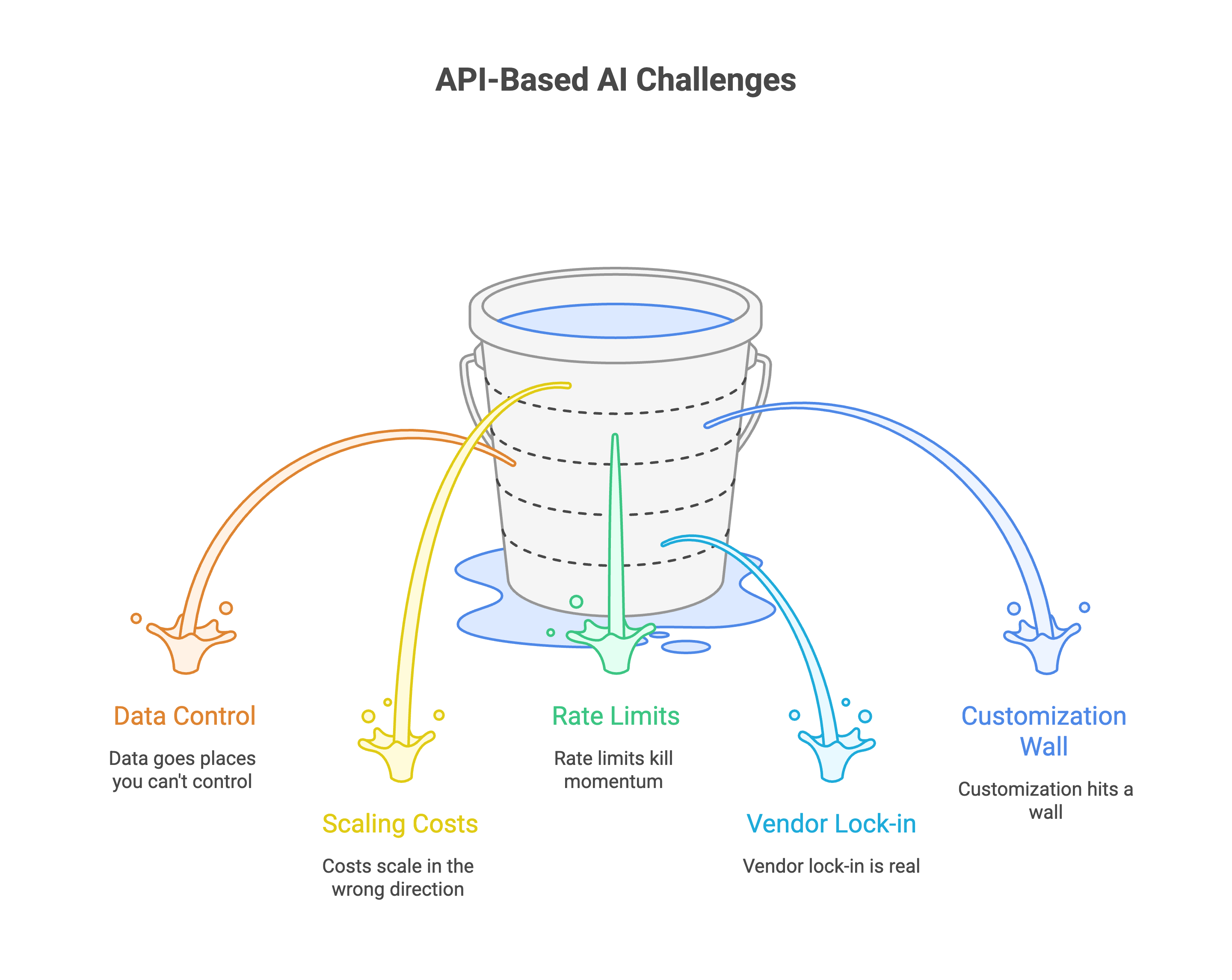
Your data goes places you can't control
Every prompt you send to ChatGPT, Claude, or Gemini lands on someone else's servers. What happens next is murky.
Most cloud AI vendors have policies that allow them to use your data to improve their models. Even if they say they don't train on your specific data, the fine print often includes exceptions or vague language about "service improvement."
OpenAI's data usage policies have changed multiple times, and what's considered private today might not be tomorrow.
For teams handling sensitive data, that's a non-starter. Understanding what a private AI platform actually offers helps clarify the alternative.
Costs scale in the wrong direction
API pricing looks reasonable at first. Then usage grows.
A company using ChatGPT API for customer service might pay $500-2000 monthly. After a year, that's $6000-24000, enough to buy quality hardware that you own forever.
With self-hosted AI, you pay upfront for infrastructure. After that, the cost per query drops close to zero. Some teams have cut LLM costs by 90% by rethinking their approach.
Rate limits kill momentum
Nothing derails a product launch like hitting API rate limits at the worst moment.
Third-party services throttle requests. They cap concurrent users. They charge premium rates to lift those limits. Your application's performance depends on someone else's infrastructure decisions.
Self-hosting removes the ceiling. Your capacity matches your hardware, not a vendor's pricing tier.
Vendor lock-in is real
Build your product around one API. Then watch the provider change pricing, deprecate features, or modify terms of service.
Relying on third-party APIs imposes ongoing operational costs that can quickly escalate as usage scales. These services lock users into vendor-specific APIs and updates, limiting flexibility to adapt models to evolving internal needs.
Self-hosted AI models let you switch between different open-source LLMs without rebuilding your entire stack.
Customization hits a wall
Public APIs offer generic models. They work for broad use cases but struggle with your specific terminology, workflows, and domain knowledge.
API vendors only offer generic models that work reasonably well for general use cases. While some offer limited fine-tuning options, you're still restricted by their capabilities and policies.
Self-hosting lets you fine-tune models on your own data. A legal team can train on case law. A healthcare company can adapt to medical terminology. The model becomes yours.
When Self-Hosting AI Makes Sense (And When It Doesn't)
Self-hosting isn't for everyone. The benefits are real, but so is the effort involved. Here's how to know if it's right for your situation.
Self-hosting makes sense when:
1. You handle sensitive or regulated data.
Healthcare, finance, legal, government. If compliance frameworks like GDPR or HIPAA apply to you, sending data to third-party APIs creates audit headaches. Self-hosting keeps everything inside your perimeter. You control where data lives, who accesses it, and how long it stays. Our guide on GDPR compliant AI chat covers the specifics.
2. Your usage is high and consistent.
APIs charge per token. At low volume, that's fine. At thousands of queries per day, the bills stack up. Self-hosting has higher upfront costs but near-zero marginal cost per request. If you're processing steady, predictable workloads, the math shifts in your favor within months.
3. You need to fine-tune for your domain.
Generic models give generic answers. If your use case requires understanding industry-specific terminology, internal processes, or proprietary knowledge, you'll need to train on your own data. Self-hosting makes that possible. APIs mostly don't.
4. Uptime and latency are critical.
Third-party APIs go down. They add network latency. They throttle during peak demand. If your application can't afford those risks, running models on your own infrastructure gives you control over reliability.
5. You have technical capacity (or are willing to build it).
Self-hosting requires infrastructure knowledge. Someone needs to manage GPUs, handle updates, monitor performance. If you have DevOps or MLOps capability, you're set. If not, factor in the learning curve or managed tooling costs.
Self-hosting doesn't make sense when:
1. Your usage is low or unpredictable.
If you're running a few hundred queries a week, APIs are simpler and cheaper. The infrastructure overhead isn't worth it for light workloads.
2. You need the latest frontier models immediately.
GPT-4, Claude 3.5, Gemini Ultra. The most powerful models aren't open-source. If cutting-edge capability matters more than privacy or cost, APIs are the only option. That said, open-source models have improved dramatically.
3. You're still experimenting.
Early-stage projects change fast. Locking into infrastructure before you've validated the use case wastes time and money. Use APIs to prototype. Move to self-hosting once you know what works.
4. Your team is stretched thin.
Self-hosting adds operational burden. If your engineering team is already maxed out, taking on AI infrastructure might slow everything else down. Be honest about capacity.
The honest middle ground
Most teams don't need to go all-in on either approach.
Start with APIs to validate your use case. Once volume grows and requirements stabilize, migrate the workloads that benefit most from self-hosting. Keep using APIs for experimental features or low-volume tasks.
Hybrid setups are common and practical.
What You Need to Self-Host AI Models?
Self-hosting AI isn't plug and play. You need the right hardware, software, and a realistic understanding of what runs on what.
The GPU question
VRAM is the defining constraint of local LLM deployment. Everything else supports VRAM optimization.
Here's the simple math: A 12GB GPU limits you to 7B models and heavily quantized 13B variants. A 16GB GPU opens the 13-30B model range comfortably. A 24GB GPU is the entry point for 70B models.
Running a model that's around 20GB in size efficiently would typically require a graphics card with at least 24GB of VRAM, such as an NVIDIA GeForce RTX 4090 or RTX 3090.
For most teams starting out, a single RTX 4090 (24GB) handles 7B-13B models well and can run quantized versions of larger models. Enterprise deployments with 70B+ models need multiple GPUs or cloud instances with A100s.
RAM and storage
For basic usage, you need at least 16GB RAM, 50GB storage, and preferably a GPU with 8GB+ VRAM.
More realistically: 32GB RAM is enough for small model inference. 64GB handles larger models and light fine-tuning comfortably. 128GB-256GB is ideal for training runs and multi-model pipelines.
Storage matters more than people expect. Model files run large. 512GB-1TB SSD is enough to store a few models. 1TB-2TB NVMe is ideal for datasets, embeddings, and multiple model versions.
CPU still matters
The GPU handles inference, but the CPU manages everything else: tokenization, data loading, orchestration.
Intel Core i5 or AMD Ryzen 5 handles smaller models smoothly. Intel Core i7/i9 or AMD Ryzen 7/9 offers faster clock speeds for quicker tokenization and stable performance under load.
Software stack
You need three layers:
1. Inference engine. This runs the model. Popular options include:
- Ollama: Simplest setup. Great for getting started. One command to download and run models.
- vLLM: High-throughput serving for production. Better for multi-user deployments.
- llama.cpp: Lightweight, runs on CPU. Good for testing or low-resource environments.
2. Container runtime. Docker simplifies deployment. You package the model, dependencies, and serving layer together. Makes scaling and updates manageable.
3. API layer. Most inference engines expose OpenAI-compatible APIs. Your applications call the same endpoints, just pointed at your local server instead of cloud services.
For a complete walkthrough, see our self-hosted LLM guide.
Realistic hardware tiers
Local AI deployment saves $300-500/month in API costs after a $1,200-2,500 hardware investment. The payback period depends on your usage volume.
Open-Source Models Worth Self-Hosting
You don't need to train a model. You pick one, download it, and run it. The open-source ecosystem has matured fast.
Here's what's actually worth considering.
Llama 3 (Meta)
The current standard for open-source LLMs. Available in 8B, 70B, and 405B parameter versions.
The latest Llama 3.3 70B model offers performance comparable to the 405B parameter model at a fraction of the computational cost.
Good for: General chat, reasoning, instruction following. Strong community support and wide tool compatibility.
License: Permissive for commercial use. Read the terms, but most business applications are covered.
Mistral (Mistral AI)
Delivered performance far exceeding their resource requirements. The 7B model punches way above its weight class.
Released under the permissive Apache 2.0 license, which makes it suitable for commercial use without restrictions.
Good for: Teams with limited hardware. Fast inference. Real-time applications where latency matters.
Setup: The most straightforward approach is to use Ollama and run ollama pull mistral for the 7B model.
DeepSeek R1
Released in January 2025 with an MIT license, it excels at mathematical problem-solving, code debugging, and logical reasoning tasks.
The model's unique ability to show its thinking process makes it invaluable for educational applications and professional scenarios requiring explainable AI decisions.
Good for: Complex reasoning, math-heavy tasks, scenarios where you need to understand how the model reached its answer.
Read more on why DeepSeek signals the future of open-source enterprise AI.
Qwen 2.5 (Alibaba)
Qwen2 (72B) or Llama 3.1 (with its 128k window) are excellent for long-context RAG.
Strong multilingual capabilities. Available in sizes from 0.5B to 72B, so you can match the model to your hardware.
Good for: Multilingual applications, long-context document processing, teams operating across regions.
Which model for which hardware?
24GB GPU (e.g., RTX 3090/4090): You can comfortably run 4-bit quantized versions of models up to ~40B parameters. DeepSeek-V2 (21B active), Qwen2.5 (32B), and Gemma 2 (27B) are excellent choices.
For coding: DeepSeek Coder V2 is the specialist. Qwen2.5 is also a strong choice.
For on-device/edge: Gemma 2 (9B) or smaller quantized models are the way to go.
1. Smaller models often win
Here's something that surprises most teams: a fine-tuned 7B model often outperforms a generic 70B model on your specific tasks.
Smaller models run faster, cost less, and fit on accessible hardware. If your use case is focused, small language models deserve serious consideration.
The best model is the one that fits your constraints and solves your problem.
Self-Hosted AI Tools That Simplify the Process
You don't need to build everything from scratch. These tools handle the heavy lifting.
For running models
1. Ollama
The easiest way to get started. One command downloads and runs models locally. No configuration headaches.
Install it, run ollama pull llama3, and you have a working LLM in minutes. Exposes an API compatible with most applications. Works on Mac, Linux, and Windows.
Best for: Getting started fast. Local development. Teams new to self-hosting.
2. vLLM
Production-grade inference engine. Higher throughput than Ollama. Handles multiple concurrent users efficiently.
More setup required, but worth it for serious deployments. Supports continuous batching and PagedAttention for better GPU utilization.
Best for: Production workloads. High-concurrency applications. Teams comfortable with Python.
3. llama.cpp
Runs models on CPU. No GPU required. Lightweight and portable.
Performance is slower, but it works on almost any hardware. Good for testing or running smaller models on modest machines.
Best for: CPU-only environments. Edge deployment. Low-resource setups.
4. LM Studio
Desktop app with a clean interface. Download models, chat with them, expose local APIs. No command line needed.
Good for non-technical users who want to experiment. Runs on Mac and Windows.
Best for: Exploration. Non-developers. Quick prototyping.
For fine-tuning and deployment
1. Prem Studio
End-to-end platform for teams who want self-hosted AI without managing infrastructure themselves.
Upload datasets, fine-tune across 30+ base models, run evaluations, and deploy to your own VPC or on-prem environment. Data stays in your infrastructure. The platform handles the complexity.
Best for: Enterprise teams. Fine-tuning on proprietary data. Teams without dedicated MLOps resources.
2. Hugging Face Transformers
The standard library for working with open-source models. Download models, run inference, fine-tune with your own data.
Requires Python knowledge. More hands-on than managed platforms, but gives you full control.
Best for: ML engineers. Custom training pipelines. Research and experimentation.
For building interfaces
Open WebUI Chat interface for your local models. Looks and feels like ChatGPT, but runs entirely on your infrastructure.
Connects to Ollama or any OpenAI-compatible API. Supports multiple users, conversation history, and document uploads.
Best for: Internal chatbots. Team-wide access to self-hosted models.
For automation and workflows
1. n8n
Visual workflow automation. Connect your self-hosted LLM to other tools: databases, APIs, email, Slack.
Build AI-powered automations without writing code. Trigger model calls based on events. Process outputs and route them wherever needed.
Self-hostable. Open source. Pairs naturally with Ollama for complete local AI workflows.
Best for: Workflow automation. Integrating AI into existing systems. Non-developers building AI tools.
2. LangChain
Framework for building LLM applications. Handles prompts, chains, memory, and tool use.
Works with any model, local or cloud. Useful when you're building something more complex than a simple chatbot.
Best for: Developers building custom AI applications. RAG pipelines. Agent-based systems.
Pick based on your use case. Most teams start with Ollama, add Open WebUI for a chat interface, and bring in n8n or LangChain when they need automation or custom applications. For fine-tuning and enterprise deployment, Prem Studio handles the full pipeline.
Integrating Self-Hosted AI Into Your Workflow
Running a model locally is step one. Making it useful means connecting it to the systems your team already uses.
1. The API swap
Most self-hosted tools expose OpenAI-compatible APIs. This makes integration straightforward.
If your application already calls OpenAI, you change two things: the base URL and the model name. Everything else stays the same. Your existing code, your existing prompts, your existing error handling.
# Before (OpenAI)
base_url = "https://api.openai.com/v1"
# After (local Ollama)
base_url = "http://localhost:11434/v1"
That's it. Your app now talks to your local model instead of a cloud API.
2. Real integration patterns
Internal knowledge base. Connect your self-hosted model to company documents via RAG. Employees ask questions, the model retrieves relevant internal content and generates answers. No sensitive docs leave your network.
Tools: Ollama + Open WebUI + a vector database like ChromaDB or Milvus.
Automated document processing. Invoices, contracts, support tickets come in. The model extracts key information, categorizes content, routes to the right team. Runs continuously without per-document API costs.
Tools: n8n triggers on new files, calls your local model, pushes results to your database or ticketing system.
Code review assistant. Developers push code. The model scans for bugs, suggests improvements, checks against internal style guides. Runs in your CI pipeline. Your proprietary code never touches external servers.
Tools: Git hooks + local model API call + results posted to PR comments.
Customer support draft. Support ticket arrives. Model generates a draft response based on your knowledge base and past tickets. Agent reviews, edits, sends. Response time drops. Quality stays consistent.
Tools: Helpdesk webhook → n8n → local model → draft back to helpdesk.
3. Connecting to existing systems
Most integrations follow the same pattern:
- Trigger: Something happens (new email, file upload, form submission, scheduled time)
- Call: Send relevant data to your model's API endpoint
- Process: Model returns a response
- Act: Push the result somewhere useful (database, Slack, email, another system)
n8n and similar tools make this visual. No code required for most workflows. For custom applications, any language with HTTP support works.
What changes, what doesn't
Switching to self-hosted AI doesn't mean rebuilding your stack. Your databases stay the same. Your frontend stays the same. Your business logic stays the same.
The model becomes another service in your architecture. It has an endpoint. You call it. It responds. The fact that it runs on your infrastructure instead of someone else's is invisible to the rest of your system.
The real work is figuring out which workflows benefit most from AI and designing prompts that actually help. For teams already using RAG pipelines, self-hosted models slot right in. The retrieval layer doesn't care where the model lives.
Security, Compliance, and Data Control
Self-hosting solves the biggest compliance headache: your data never leaves your environment. But that's the starting point.
What self-hosting gives you automatically
No third-party data transfer. Prompts, responses, and training data stay on your servers. This eliminates the primary GDPR concern around sending personal data to external processors.
No ambiguous terms of service. You're not agreeing to policies that might change. Your data isn't being used to train someone else's models. What happens in your infrastructure stays in your infrastructure.
Full audit trail ownership. You control the logs. You decide what gets recorded, how long it's stored, who can access it.
What you still need to build
- Access controls: Not everyone needs access to everything. Role-based permissions limit who can query the model, view outputs, or modify configurations.
- Your legal team might access contract analysis. Engineering accesses code generation. Neither sees the other's data. Standard enterprise identity management applies here too. SSO, MFA, the usual stack.
- Logging and monitoring: Log every interaction. Who sent what prompt. What the model returned. When it happened.
- This isn't optional for regulated industries. Auditors want proof. Beyond compliance, logs help you catch misuse and debug problems.
- Data handling policies: The model processes whatever you send it. If someone pastes customer PII into a prompt, the model sees it. That data now exists in logs and potentially cached outputs. Set clear policies. Train users on what's appropriate to submit. Consider input filtering for sensitive patterns like credit card numbers or health information.
GDPR specifics
GDPR cares about where data goes and who processes it. Self-hosting answers both questions cleanly: data stays in your infrastructure, you're the processor.
Document your setup. Record what data flows through the model, where it's stored, how long it's retained. Standard data processing records apply.
For teams building customer-facing AI, our GDPR compliant AI chat guide covers the implementation details.
HIPAA specifics
Healthcare data requires extra care. Self-hosting meets the core requirement of keeping PHI off external servers.
You still need proper access controls, encryption at rest and in transit, audit logging, and BAAs with any cloud providers involved in your infrastructure (even if the model itself is self-hosted).
The honest limitation
Self-hosting makes compliance easier. It doesn't make it automatic.
You trade one set of problems (trusting third parties) for another (managing security yourself). If your team lacks security expertise, that's a real gap.
The infrastructure is only as secure as your configuration. Misconfigured APIs, weak access controls, or missing encryption undo the benefits of self-hosting.
For teams without dedicated security resources, managed platforms that deploy to your infrastructure offer a middle path. You get data residency without building the security layer from scratch.
Self-Hosted AI vs API Services: Cost Breakdown
The math depends on usage. Here's how the numbers actually play out.
API costs at scale
Looks cheap at low volume. But enterprise usage grows fast. A 50-person team using AI daily can easily hit 100M+ tokens monthly.
Self-hosted costs
Hardware is a one-time cost. After that, you're paying electricity and maintenance.
Breakeven analysis
If you're spending over $500/month on API calls, self-hosting likely pays for itself within 6 months.
Hidden costs: API side
Hidden costs: Self-hosted side
When each option wins
The hybrid approach
Most teams don't go all-in either way.
Common pattern: self-host for high-volume, routine tasks (summarization, classification, internal chat). Use APIs for complex reasoning or when you need frontier model capabilities.
Route 80% of queries to your local Mistral 7B. Send the hard 20% to GPT-4. You get cost savings on volume while keeping access to cutting-edge performance when it matters.
For detailed cost optimization strategies, see how to save 90% on LLM API costs.
Getting Started With Self-Hosted AI
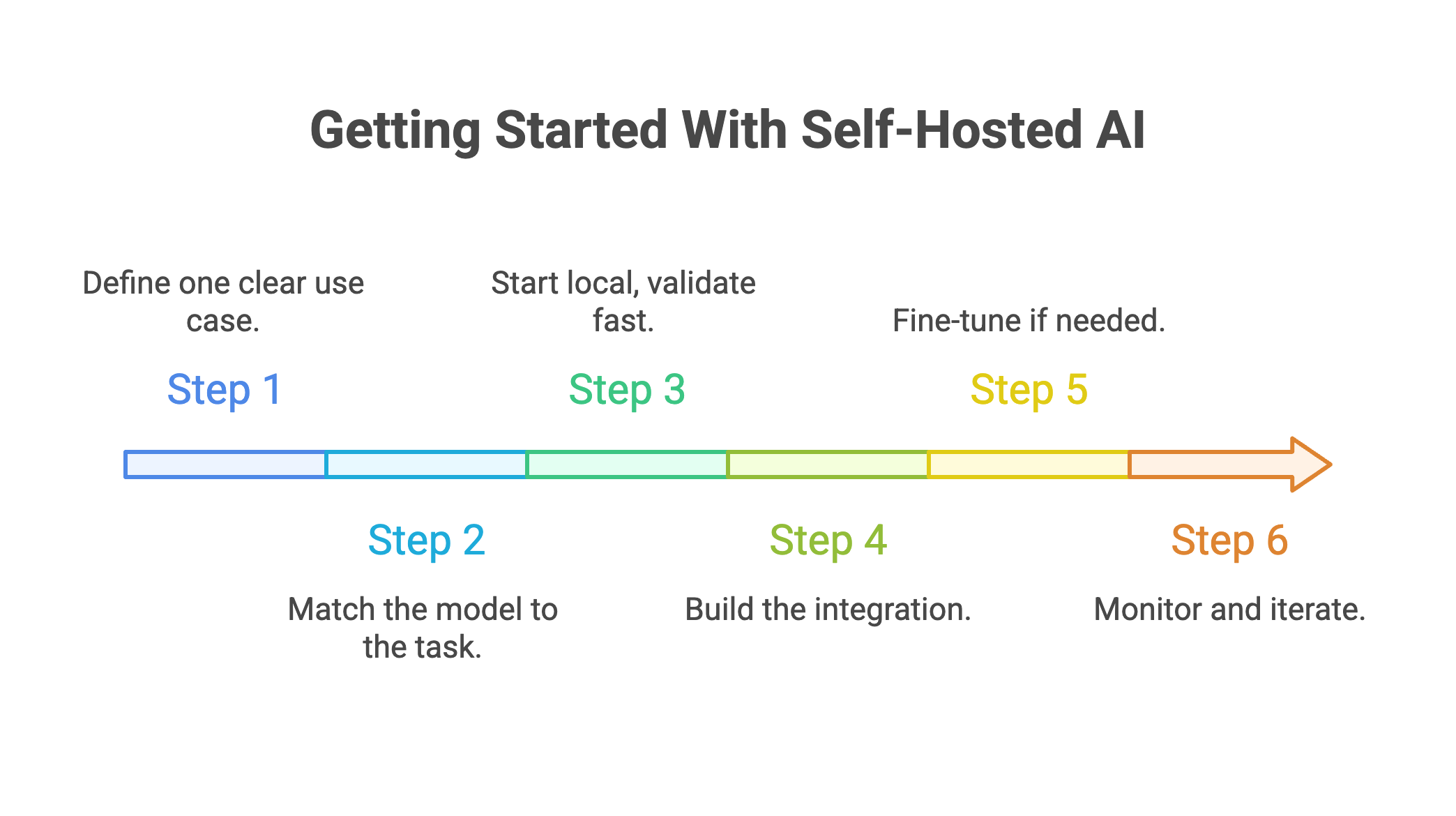
Step 1: Define one clear use case.
Don't boil the ocean. Pick a single workflow where AI adds obvious value. Document summarization. Code review. Customer ticket classification. Internal knowledge search.
Choose something with measurable outcomes. "Make AI work" isn't a goal. "Reduce document review time by 40%" is.
Step 2: Match the model to the task.
General chat? Llama 3 8B or Mistral 7B handles it well. Code generation? DeepSeek Coder. Multilingual support? Qwen 2.5. Reasoning-heavy tasks? DeepSeek R1.
Don't grab the biggest model available. A fine-tuned small model often beats a generic large one on specific tasks.
Step 3: Start local, validate fast.
Install Ollama. Pull your chosen model. Test it against real examples from your workflow. Does the output quality meet your bar? If not, try a different model or consider fine-tuning.
This takes a few hours, not weeks. You'll know quickly whether self-hosting fits your use case.
Step 4: Build the integration.
Connect the model to your existing stack. Most tools expose OpenAI-compatible APIs. Swap the endpoint, keep everything else.
Start with one integration. Internal Slack bot. Document processing pipeline. Code review assistant. Prove value before expanding.
Step 5: Fine-tune if needed.
Generic models get you 70% of the way. Your data gets you the rest.
If you're handling proprietary information or need domain-specific accuracy, fine-tuning closes the gap. Prem Studio lets you upload datasets, fine-tune across 30+ base models, and deploy to your own infrastructure. Your data never leaves your environment.
Step 6: Monitor and iterate.
Track what matters. Response quality. Latency. User adoption. Error rates.
Models improve. New releases drop monthly. Build a process for evaluating updates and redeploying when better options emerge.
FAQs
What hardware do I need to self-host AI models?
Depends on model size. A 12GB VRAM GPU (RTX 3060) runs 7B models comfortably. For 13B-30B models, you need 24GB VRAM (RTX 4090). Running 70B models requires multiple GPUs or cloud A100 instances. RAM matters too: 32GB minimum, 64GB recommended.
How much does self-hosting cost compared to APIs?
Starter hardware runs $1,200-2,500 one-time, plus $30-50/month electricity. At $300-500/month API spend, self-hosting typically breaks even within 6 months. Above $1,000/month, payback drops to under 3 months. The math favors self-hosting at scale.
Can I self-host GPT-4 or Claude?
No. Frontier models from OpenAI and Anthropic aren't open-source. But open models have caught up significantly. Llama 3.3 70B, DeepSeek R1, and Qwen 2.5 match GPT-4 performance on many benchmarks. For specialized tasks, fine-tuned open models often outperform generic frontier models.
Is self-hosted AI secure enough for regulated industries?
Yes, when configured properly. Self-hosting eliminates third-party data transfer, which solves the primary GDPR and HIPAA concern. You still need access controls, encryption, audit logging, and network security. The infrastructure enables compliance. Your policies and configuration complete it.
How long until I have a working setup?
Basic local testing with Ollama takes under an hour. A production deployment with security, monitoring, and one integration typically takes 2-4 weeks. Adding fine-tuning extends that by another 2-4 weeks. Managed platforms like Prem Studio compress these timelines significantly.
Conclusion
Self-hosted AI isn't about rejecting cloud services. It's about choosing where your data lives and what you pay for access.
The trade-offs are real. You take on infrastructure responsibility. You need technical capacity or partners who provide it. Updates and maintenance become your problem.
But so are the benefits. Data stays in your environment. Costs become predictable. Models adapt to your specific needs. Compliance gets simpler when you control the stack.
The tools are ready. Open-source models perform at near-frontier levels. Deployment frameworks have matured. The gap between "possible" and "practical" has closed. If you're spending serious money on API calls, handling sensitive data, or hitting the limits of generic models, self-hosting deserves a hard look.
Ready to start? Prem Studio gives you the infrastructure for fine-tuning and deployment without building MLOps from scratch. Your data stays in your environment. Your models stay under your control.