
Self-Hosted LLM Guide: Setup, Tools & Cost Comparison (2026)
Learn how to self-host LLMs with Ollama, vLLM, and Docker. Includes hardware requirements, model recommendations, setup walkthrough, and cost breakeven analysis.
Enterprise spending on LLMs has exploded. Model API costs alone doubled to $8.4 billion in 2025, and 72% of companies plan to increase their AI budgets further this year.
But there's a problem. According to Kong's 2025 Enterprise AI report, 44% of organizations cite data privacy and security as the top barrier to LLM adoption. Every prompt sent to OpenAI, Anthropic, or Google touches external servers. For companies handling sensitive data, that's a dealbreaker.
Self-hosting solves this. When you run an LLM on your own infrastructure, your data never leaves your environment. No third-party retention policies. No training on your inputs. No compliance gray areas.
The tradeoff is complexity. Self-hosting LLMs requires choosing the right model, sizing your hardware, configuring deployment tools, and maintaining the stack over time. It's not plug-and-play like calling an API.
This guide walks you through the process. You'll learn what self-hosting actually involves, what hardware you need, which models and tools to consider, and how to decide if it makes sense for your use case.
What Is a Self-Hosted LLM?
A self-hosted LLM is a large language model that runs on infrastructure you control, whether that's a local server, an on-premise data center, or a private cloud environment. Instead of sending requests to OpenAI's API or Anthropic's servers, you run inference locally. The model weights live on your hardware, and your prompts never leave your network.
This is different from using a managed API, where the model runs on the provider's infrastructure and you pay per token. It's also different from fully managed platforms that handle deployment for you but still process data externally.
Self-hosting gives you maximum control and customization at the cost of operational complexity.
Why Self-Host an LLM?
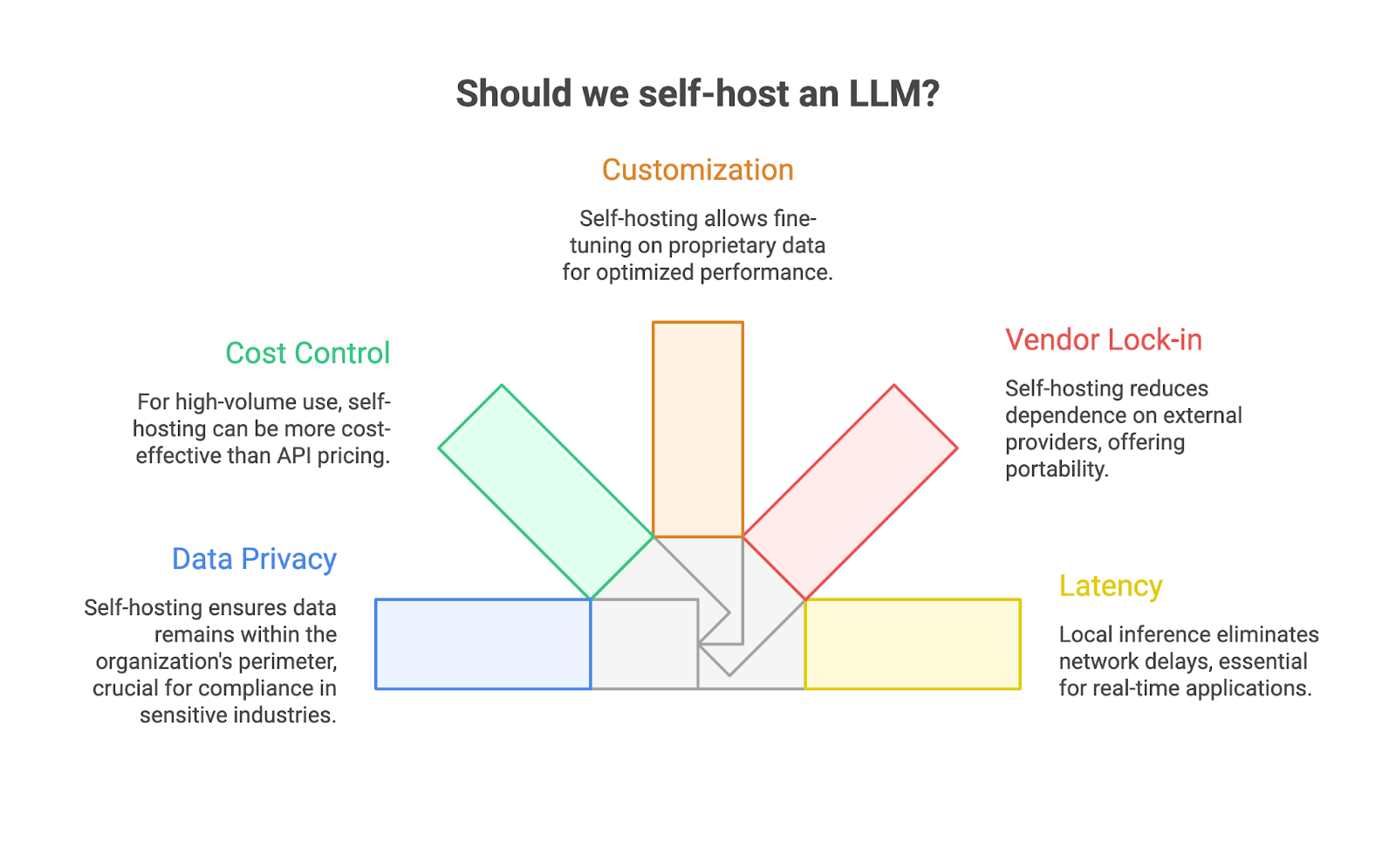
Organizations self-host for five main reasons.
1. Data privacy and sovereignty.
When you use a cloud-based API, your prompts travel to external servers. Even with enterprise agreements, you're trusting the provider's retention policies and security practices. Self-hosting keeps everything inside your perimeter. For industries like healthcare, finance, and legal, this isn't optional, it's a compliance requirement.
2. Cost control at scale.
API pricing works well for low-volume use, but costs compound quickly. If you're processing millions of tokens daily, self-hosting becomes more cost-effective. You pay for hardware once, not per request. Organizations with predictable, high-volume workloads often see significant cost savings after the initial investment.
3. Customization and fine-tuning.
Managed APIs give you the model as-is. Self-hosting lets you fine-tune on proprietary data, adjust model behavior, and optimize for your specific use case. You can train a smaller model to outperform a general-purpose giant on your particular domain.
4. Reduced vendor lock-in.
When your workflow depends on OpenAI's API, you're exposed to pricing changes, rate limits, and service disruptions. Self-hosting with open-source models like Llama or Mistral gives you portability. You control the stack.
5. Latency and availability.
Local inference eliminates round-trip network delays and doesn't depend on external uptime. For real-time applications or air-gapped environments, self-hosting may be the only viable option.
Hardware Requirements
GPU memory (VRAM) is the defining constraint. Your model must fit in VRAM for reasonable inference speed, if it doesn't, the system falls back to CPU processing, which runs 10–100x slower.
The rule of thumb: you need roughly 0.5GB of VRAM per billion parameters when using 4-bit quantization. Full precision (FP16) doubles that requirement.
Here's what different hardware configurations can handle:
Beyond the GPU:
- System RAM: 16GB minimum, 32GB recommended. RAM handles model loading and overflow when VRAM runs short.
- Storage: NVMe SSD essential. A quantized Llama 3 70B model is 35GB+. Spinning disks make load times painful.
- CPU: Modern processors with AVX-512 can run inference without a GPU, but expect single-digit tokens per second. Fine for testing, impractical for production.
Quantization changes everything. A 70B model that needs 140GB at full precision shrinks to ~35GB with 4-bit quantization, minimal quality loss, massive VRAM savings. Tools like llama.cpp and Ollama apply quantization automatically.
For most teams, a single RTX 4090 (24GB) running quantized models hits the sweet spot between capability and cost. Enterprise deployments handling 70B+ models typically require multi-GPU setups or cloud instances with A100/H100 hardware.
Choosing the Right Model
Not all open-source models are equal. The right choice depends on your use case, hardware, and performance requirements.
Match the model to the task:
- General chat and reasoning: Llama 3.3 70B and Qwen 2.5 72B lead the pack. Both handle long contexts well and produce clean, controllable output.
- Coding: DeepSeek Coder V2 and Qwen2.5-Coder specialize here. Strong HumanEval scores and they catch bugs without excessive prompting.
- Multilingual: Qwen models support 29+ languages out of the box, useful for global teams.
- Resource-constrained deployment: Gemma 2 (9B) and Mistral Small 3 punch above their weight on modest hardware.
Match the model to your hardware:
Licensing matters. Most popular models use permissive licenses (Apache 2.0, MIT) that allow commercial use without fees. Llama, Qwen, DeepSeek, and Gemma all permit commercial deployment, just review each model's acceptable use policy before production.
All these models are available through Hugging Face and work with tools like Ollama and vLLM. Start with a smaller model that fits your hardware comfortably, benchmark it against your actual workload, then scale up only if you need more capability.
Some Tools for Self-Hosting
Choosing the right inference framework determines whether your self-hosted LLM runs smoothly or becomes an operational headache. Each tool optimizes for different priorities, simplicity, throughput, flexibility, or managed infrastructure.
Here's what actually matters.
1. Ollama: The Starting Point
Ollama is the "Docker for LLMs", one command pulls and runs models locally. It bundles llama.cpp under the hood, handles quantization automatically, and exposes an OpenAI-compatible API without configuration.
bash
# Install and run in under a minute
curl -fsSL https://ollama.com/install.sh | sh
ollama run llama3.2:8b
Ollama excels at development workflows, privacy-focused personal use, and air-gapped environments. It supports macOS, Linux, and Windows with automatic hardware detection.
The tradeoff: Ollama caps at ~4 parallel requests by default. Red Hat benchmarks show it peaks around 41 tokens per second under load, fine for single users, but it won't scale to production traffic without significant tuning.
Use Ollama when: You're prototyping, building a personal assistant, or need something running in five minutes.
2. vLLM: Production-Grade Performance
vLLM is engineered for throughput. Its PagedAttention algorithm reduces memory fragmentation by 40%+, enabling larger batch sizes and dramatically higher concurrency. Benchmarks show vLLM hitting 793 TPS compared to Ollama's 41 TPS, a 19x difference at scale.
The performance gap widens under concurrent load. At 128 simultaneous users, vLLM maintains sub-100ms P99 latency while Ollama's latency spikes to 673ms. If you're serving customer-facing applications or internal tools with multiple users, this difference matters.
vLLM requires more setup, NVIDIA GPUs with CUDA, proper driver configuration, and understanding of tensor parallelism for multi-GPU deployments. But that complexity buys you enterprise-grade serving capabilities.
Use vLLM when: You're running production workloads, serving multiple concurrent users, or need strict latency SLAs.
3. LocalAI: The Universal API Hub
LocalAI takes a different approach, it's a drop-in OpenAI API replacement that handles text, images, audio, and embeddings through a single endpoint. Think of it as middleware that can route requests to multiple backends.
docker run -p 8080:8080 --gpus all localai/localai:latest-gpu-nvidia-cuda-12The real power is orchestration. You can route high-throughput text requests to a vLLM instance while keeping image generation local, all through one API. LocalAI also supports distributed inference across multiple nodes for teams scaling beyond single-server deployments.
Use LocalAI when: You need multimodal capabilities, want a unified API for multiple models, or require OpenAI API compatibility for existing applications.
4. Prem AI: Managed Self-Hosting for Enterprise
Here's the reality: most teams don't have dedicated MLOps engineers to manage GPU infrastructure, optimize inference pipelines, and handle model updates. The DIY approach works for experimentation but becomes a full-time job at production scale.
Prem AI bridges this gap. It's a fully managed self-hosting platform that runs on your infrastructure, your cloud, your servers, your data center, while Prem handles the operational complexity.
What makes it different:
- Zero data retention. Your prompts and outputs never touch external servers. The entire inference pipeline runs within your environment.
- Swiss jurisdiction. For teams with strict compliance requirements (GDPR, HIPAA, financial regulations), Prem's legal structure adds an extra layer of data protection.
- Built-in fine-tuning. Need to customize models on proprietary data? Prem's fine-tuning pipeline is integrated directly, no separate tooling required.
- Optimized inference. You get production-grade serving without manually configuring vLLM, managing CUDA drivers, or debugging memory issues.
Prem API is OpenAI-compatible, so existing applications work without code changes. Teams typically deploy through the self-hosting documentation or book a demo for custom enterprise setups.
Use Prem AI when: You want self-hosting benefits (privacy, cost control, customization) without building and maintaining the infrastructure yourself. Ideal for regulated industries, enterprise deployments, and teams processing sensitive data at scale.
5. LM Studio: GUI-First Experience
LM Studio offers a polished desktop interface for downloading, configuring, and running models. No command line required. It also includes a headless server mode for integration with other tools.
On machines without dedicated GPUs, LM Studio often outperforms Ollama thanks to Vulkan offloading capabilities. It's particularly effective on integrated graphics and Apple Silicon.
Use LM Studio when: You prefer GUIs, want to experiment with different models quickly, or need optimized performance on consumer hardware.
6. llama.cpp: Maximum Portability
llama.cpp is the underlying engine that powers many of these tools. Using it directly gives you zero dependencies and runs on anything, laptops, ARM devices, Raspberry Pis. It's rock-solid for edge computing and resource-constrained environments.
The tradeoff is manual setup: you handle model conversion, quantization, and API wrappers yourself.
Use llama.cpp when: You're deploying to edge devices, need CPU-only inference, or want maximum control over the inference stack.
Which Tool Should You Choose?
Your choice depends on where you are in the deployment journey:
- Experimenting? Start with Ollama or LM Studio. Get a model running in minutes.
- Building production systems? Migrate to vLLM for throughput or LocalAI for multimodal needs.
- Enterprise with compliance requirements? Skip the DIY phase entirely, Prem AI gives you self-hosting benefits with managed infrastructure.
The common pattern: teams prototype with Ollama, realize production requires more engineering than expected, then either invest in dedicated MLOps or move to a managed solution like Prem that handles the infrastructure layer.
Basic Setup Walkthrough
Let's get a self-hosted LLM running. This walkthrough uses Ollama with Open WebUI, the fastest path from zero to a working ChatGPT-style interface on your own hardware.
Prerequisites
- Docker Desktop installed (download here)
- 8GB+ RAM for smaller models (16GB+ recommended)
- GPU optional but significantly improves speed
Step 1: Start Ollama
Run this single command to launch Ollama in a Docker container:
docker run -d \
  -v ollama:/root/.ollama \
  -p 11434:11434 \
  --name ollama \
  ollama/ollama
The volume mapping (-v ollama:/root/.ollama) persists downloaded models between container restarts. Without it, you'd re-download models every time.
For GPU acceleration (NVIDIA):
docker run -d \
  -v ollama:/root/.ollama \
  -p 11434:11434 \
  --gpus all \
  --name ollama \
  ollama/ollama
,
Verify it's running:
curl http://localhost:11434
# Should return: Ollama is running
Step 2: Pull a Model
Download a model inside the container:
docker exec -it ollama ollama pull llama3.2:3bThis 3B parameter model is ~2GB and runs well on most hardware. For more capable responses (if you have 16GB+ RAM), try:
docker exec -it ollama ollama pull llama3.1:8bTest it directly:
docker exec -it ollama ollama run llama3.2:3b "What is self-hosting?"Step 3: Add a Web Interface
Open WebUI provides a familiar chat interface. Run it alongside Ollama:
docker run -d \
  -p 3000:8080 \
  --add-host=host.docker.internal:host-gateway \
  -v open-webui:/app/backend/data \
  --name open-webui \
  --restart always \
  ghcr.io/open-webui/open-webui:main
Open http://localhost:3000 in your browser. Create an account (stored locally), select your model, and start chatting.
Docker Compose (Recommended)
For easier management, use this docker-compose.yml:
services:
  ollama:
    image: ollama/ollama:latest
    container_name: ollama
    ports:
      - "11434:11434"
    volumes:
      - ollama_data:/root/.ollama
    deploy:
      resources:
        reservations:
          devices:
            - driver: nvidia
              count: 1
              capabilities: [gpu]
    restart: unless-stopped
  open-webui:
    image: ghcr.io/open-webui/open-webui:main
    container_name: open-webui
    ports:
      - "3000:8080"
    environment:
      - OLLAMA_BASE_URL=http://ollama:11434
    volumes:
      - open-webui_data:/app/backend/data
    depends_on:
      - ollama
    restart: unless-stopped
volumes:
  ollama_data:
  open-webui_data:
Start everything with:
docker compose up -dStep 4: Test the API
Ollama exposes an OpenAI-compatible API. Test it with curl:
curl http://localhost:11434/api/generate -d '{
  "model": "llama3.2:3b",
  "prompt": "Explain Docker in one sentence",
  "stream": false
}
Or use the OpenAI-compatible endpoint for drop-in replacement in existing applications:
curl http://localhost:11434/v1/chat/completions \
  -H "Content-Type: application/json" \
  -d '{
    "model": "llama3.2:3b",
    "messages": [{"role": "user", "content": "Hello!"}]
  }
What You've Built:
- A local LLM running entirely on your hardware
- A web interface at localhost:3000
- An OpenAI-compatible API at localhost:11434
- Zero data leaving your network
Your prompts, outputs, and conversation history stay on your machine. No API keys, no usage tracking, no recurring costs.
Next Steps
- Try larger models: ollama pull qwen2.5:14b or ollama pull deepseek-coder:6.7b for coding tasks
- Connect to applications: Point any OpenAI-compatible tool at http://localhost:11434
- Add RAG: Use PrivateGPT or AnythingLLM to chat with your documents
For production deployments with multiple users, compliance requirements, or enterprise-grade infrastructure, Prem AI's self-hosting platform handles scaling, optimization, and security, while keeping everything on your infrastructure.
When Self-Hosting Makes Sense?
Self-hosting isn't universally better than APIs. It's a tradeoff, upfront complexity and hardware costs versus long-term savings and control. Here's how to decide.
The crossover point where self-hosting becomes cheaper depends on your token volume. Industry analysis puts the threshold at approximately 2 million tokens per day for most configurations.
Example calculation:
A 7B model running on a single H100 spot instance (~$1.65/hour) at 70% utilization costs roughly $10,000/year. At 400 requests/second with 300 tokens each, that's about $0.013 per 1,000 tokens, compared to GPT-4o mini at $0.15/$0.60 per million (input/output).
The math shifts further in self-hosting's favor when you factor in:
- Multiple applications sharing the same infrastructure
- Fine-tuned models (API fine-tuning costs add up quickly)
- Unpredictable usage spikes that would blow API budgets
When Self-Hosting Wins?
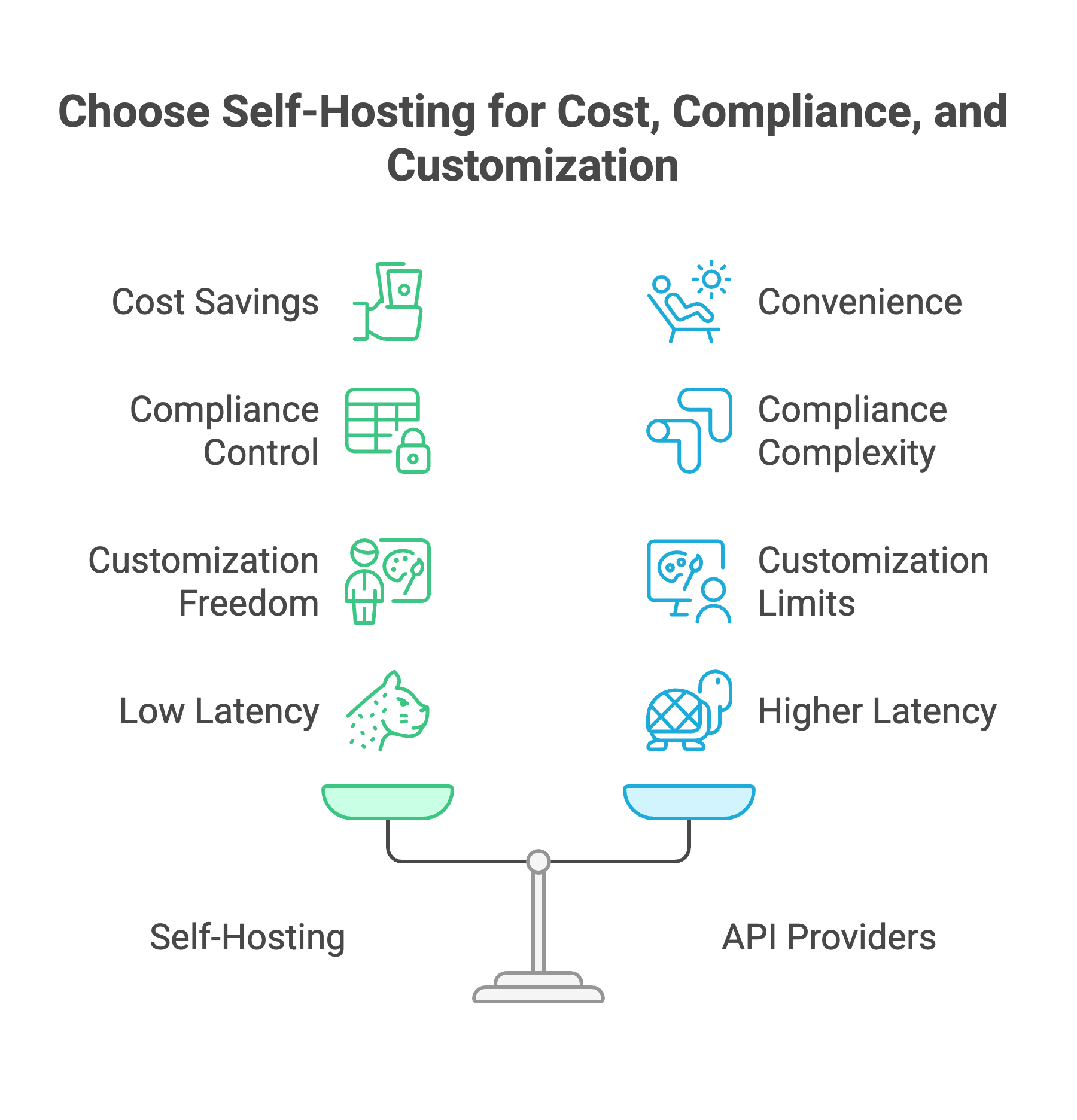
1. High-volume, predictable workloads.
If you're processing millions of tokens daily across customer support, document analysis, or content generation, self-hosting pays back within 6–12 months. One fintech company reduced monthly spend from $47,000 on GPT-4o Mini to $8,000 with a hybrid self-hosted approach, an 83% cost reduction.
2. Strict compliance requirements.
HIPAA, PCI-DSS, GDPR, and SOC 2 audits get complicated when data flows through third-party APIs. Self-hosting keeps PHI, payment data, and PII within your controlled environment. A telehealth client cut costs from $48k to $32k monthly by moving chat triage to a self-hosted LLM, while simplifying their compliance posture.
3. Air-gapped or offline environments.
Defense contractors, government agencies, and organizations handling classified data often can't send prompts to external servers at all. Self-hosting is the only option.
4. Customization beyond prompt engineering.
When you need to fine-tune on proprietary data, modify model behavior at the architecture level, or run specialized models not available via APIs, self-hosting gives you complete control. API providers limit what you can customize.
5. Latency-critical applications. Local inference eliminates network round-trips. For real-time applications, live coding assistants, trading systems, interactive games, the 50–200ms saved per request compounds into noticeably better UX.
When APIs Win?
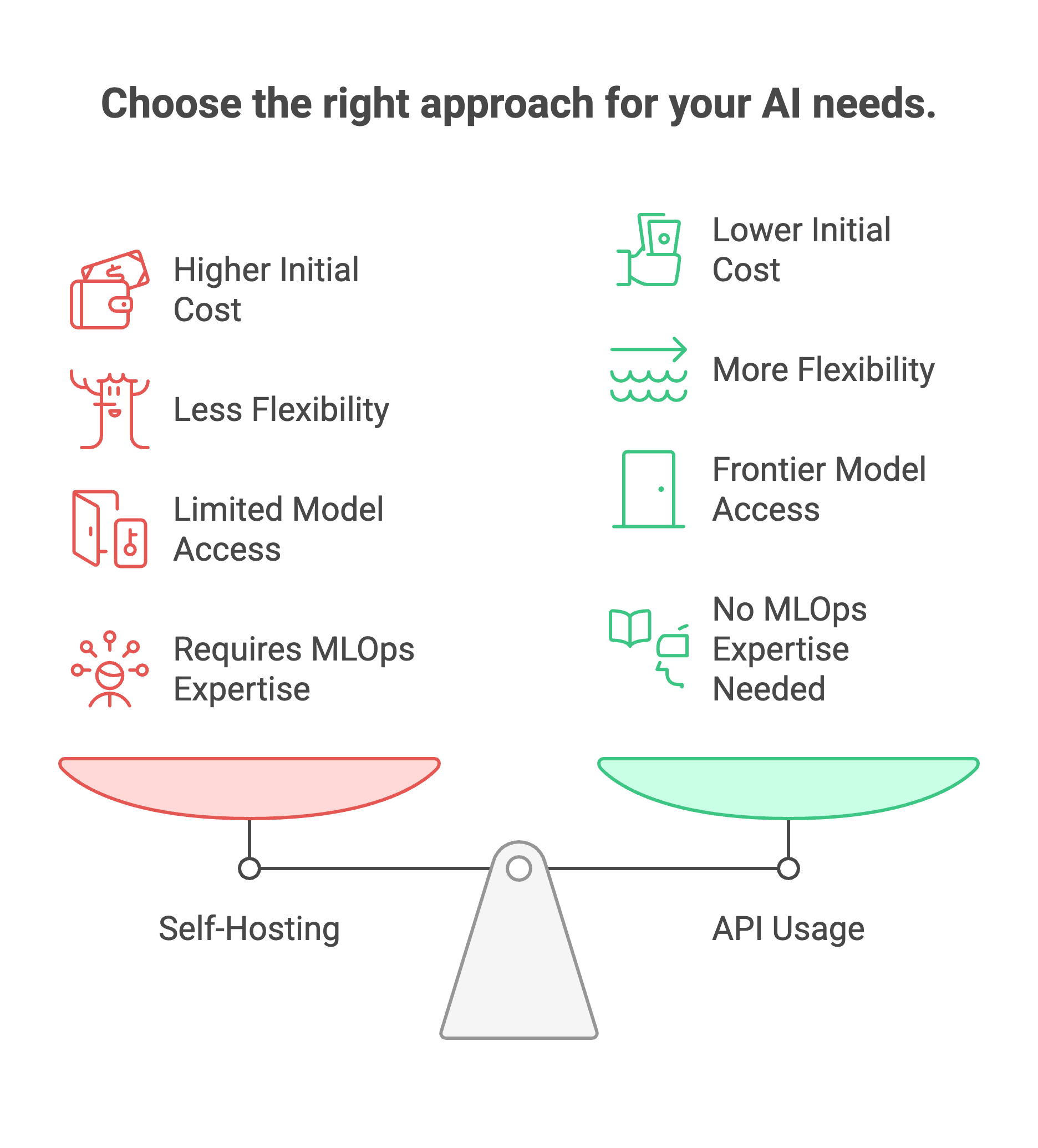
1. Low or unpredictable volume.
If you're processing under 1 million tokens daily, API costs are likely lower than maintaining infrastructure. The operational overhead isn't worth it.
2. Rapid prototyping.
When you're still figuring out what to build, API flexibility lets you switch models without hardware changes. Lock in infrastructure only after you've validated the use case.
3. Access to frontier models.
GPT-4, Claude Opus, and Gemini Ultra aren't available for self-hosting. If your application genuinely requires frontier-level reasoning, APIs remain the only path.
4. No MLOps capacity.
Self-hosting requires someone to manage GPU drivers, monitor inference performance, handle model updates, and troubleshoot CUDA errors at 2am. If that expertise doesn't exist on your team, the hidden costs add up fast.
The Hybrid Approach [Cost Effective]
Most mature organizations land on a hybrid strategy:
- Route simple queries (classification, extraction, FAQ responses) to a small self-hosted model (7B–13B)
- Reserve API calls for complex reasoning tasks that genuinely need larger models
- Use self-hosted for sensitive data and APIs for non-sensitive workloads
This approach captures cost savings on high-volume commodity tasks while preserving access to frontier capabilities when needed. Teams report 40–70% cost reductions versus all-API approaches without sacrificing output quality.
Ask these five questions to simplify the decision making process:
- Volume: Are you processing 2M+ tokens daily? → Self-hosting becomes cost-competitive
- Compliance: Does your data require on-premises processing? → Self-hosting may be mandatory
- Customization: Do you need fine-tuning or model modifications? → Self-hosting gives full control
- Team: Do you have MLOps capacity to maintain infrastructure? → Required for DIY self-hosting
- Latency: Is sub-100ms response time critical? → Self-hosting eliminates network delays
If you answered yes to questions 1–3 but no to question 4, managed self-hosting platforms like Prem AI bridge the gap, you get the benefits of self-hosting (data control, cost efficiency, customization) without building the infrastructure team.
Book a demo to model the economics for your specific workload.
FAQ
1. What is self-hosting LLM?
Self-hosting an LLM means running a large language model on your own infrastructure, your servers, your cloud account, or your local machine, instead of calling a third-party API like OpenAI or Anthropic. The model weights, inference engine, and all processing happen within your controlled environment. Your prompts and outputs never leave your network, giving you complete data sovereignty and eliminating per-token API costs.
2. Is it worth self-hosting LLM?
It depends on three factors: volume, compliance, and customization needs. Self-hosting becomes cost-effective when you process over 2 million tokens daily, below that threshold, API costs are typically lower than infrastructure overhead. It's worth it if you handle sensitive data requiring on-premises processing (healthcare, finance, legal) or need fine-tuning capabilities that APIs limit. For low-volume prototyping or access to frontier models like GPT-4 or Claude Opus, APIs remain the better choice.
3. What is the most popular self-hosted LLM?
Llama 3.3 70B and Qwen 2.5 72B currently lead for general-purpose use. Llama dominates in ecosystem support, nearly every tool (Ollama, vLLM, LM Studio) optimizes for it first. Qwen excels in multilingual tasks with 29+ language support. For coding specifically, DeepSeek Coder V2 and Qwen2.5-Coder are top choices. Smaller teams often run Mistral 7B or Llama 3.2 8B for the best balance of capability and hardware requirements.
4. Is SLM better than LLM?
Small Language Models (SLMs) like Phi-4, Gemma 2 9B, or Qwen3-0.6B aren't "better", they're optimized for different constraints. SLMs run on modest hardware (8GB VRAM or even CPU-only), respond faster, and cost less to operate. They handle focused tasks like classification, extraction, and simple Q&A well. LLMs (70B+) provide deeper reasoning, better instruction-following, and more nuanced outputs, but require serious GPU power. Many production systems use both: SLMs for high-volume simple queries, LLMs for complex tasks.
5. Is self-hosted LLM cheaper?
At scale, yes, significantly. A self-hosted 7B model on an H100 costs roughly $0.013 per 1,000 tokens versus $0.15–$0.60 for GPT-4o mini. One fintech company cut monthly AI spend from $47,000 to $8,000 (83% reduction) by moving to hybrid self-hosting. However, below ~2 million tokens daily, API costs are lower because you're not paying for idle infrastructure. Self-hosting also has hidden costs: MLOps time, GPU maintenance, and troubleshooting. Factor in total cost of ownership, not just per-token rates.
6. Is 16GB RAM enough for an LLM?
For system RAM, 16GB is the minimum for running 7B models via tools like Ollama. It works, but you'll hit limits quickly, larger context windows and bigger models need more headroom. 32GB is the practical recommendation for comfortable operation with 7B-13B models. For GPU VRAM (which matters more), 16GB lets you run 13B models at 4-bit quantization or 7B models at higher precision. The RTX 4060 Ti 16GB hits the sweet spot for hobbyists and small teams.
7. Is LLM better on RAM or GPU?
GPU wins decisively for speed. LLM inference is memory-bandwidth bound, VRAM runs 10–100x faster than system RAM for the repeated weight fetches transformers require. A model loaded entirely in GPU VRAM generates 30–50 tokens/second; the same model offloaded to system RAM drops to 1–5 tokens/second. CPU-only inference works for testing but is impractical for production. Prioritize GPU VRAM capacity first, then ensure enough system RAM (32GB+) to handle model loading and context management.
8. Is 70% RAM usage too high?
For system RAM during LLM inference, 70% usage is fine, even expected. Models load into memory, and you want them fully resident to avoid disk swapping. Problems start above 85–90%, where the OS may start paging to disk, destroying performance. For GPU VRAM, 70% utilization is actually low, you're leaving capacity on the table. Aim for 80–90% VRAM usage to maximize the model size or context window you can run. Monitor for OOM (out-of-memory) errors rather than targeting a specific percentage.
9. Is 64GB RAM overkill for machine learning?
Not for serious LLM work. 64GB system RAM lets you comfortably run 70B+ models with CPU offloading, handle large context windows, and run multiple models simultaneously. It's the recommended minimum for teams working with larger models or doing any fine-tuning. For hobbyists running 7B–13B models, 32GB suffices. For production inference servers or training workloads, 128GB+ is common. "Overkill" depends on your use case, but RAM is cheap compared to GPU costs, and having headroom prevents frustrating bottlenecks.